Home Prev Next CM550 Cable Modem User’s Guide 29
Safety Getting Started Installation USB Drivers Usage Troubleshooting Glossary
Installing USB Drivers on Windows Vista
Follow these steps to install USB drivers on Windows Vista.
Installing Touchstone USB Drivers on Vista in 32-bit Mode
When running Vista in 32-bit mode, simply connect your PC to the Touchstone
Cable Modem. The Vista Hardware Installation Wizard finds the correct 32-bit USB
driver and installs it for you.
Installing Touchstone USB Drivers on Vista in 64-bit Mode
When running Vista in 64-bit mode, you must install an updated Vista USB 1.1 driv-
er. Follow these steps to obtain and install the driver.
1 Download the zipped Vista USB driver from the ARRIS website at the follow-
ing link:
http://www.
arrisi.com/support/usb/index.asp
2 Unzip the files to a directory that can be referenced later (Step 8) during the
installation of the USB driver.
3 Connect the USB cable between the Cable Modem and personal computer
running Vista.
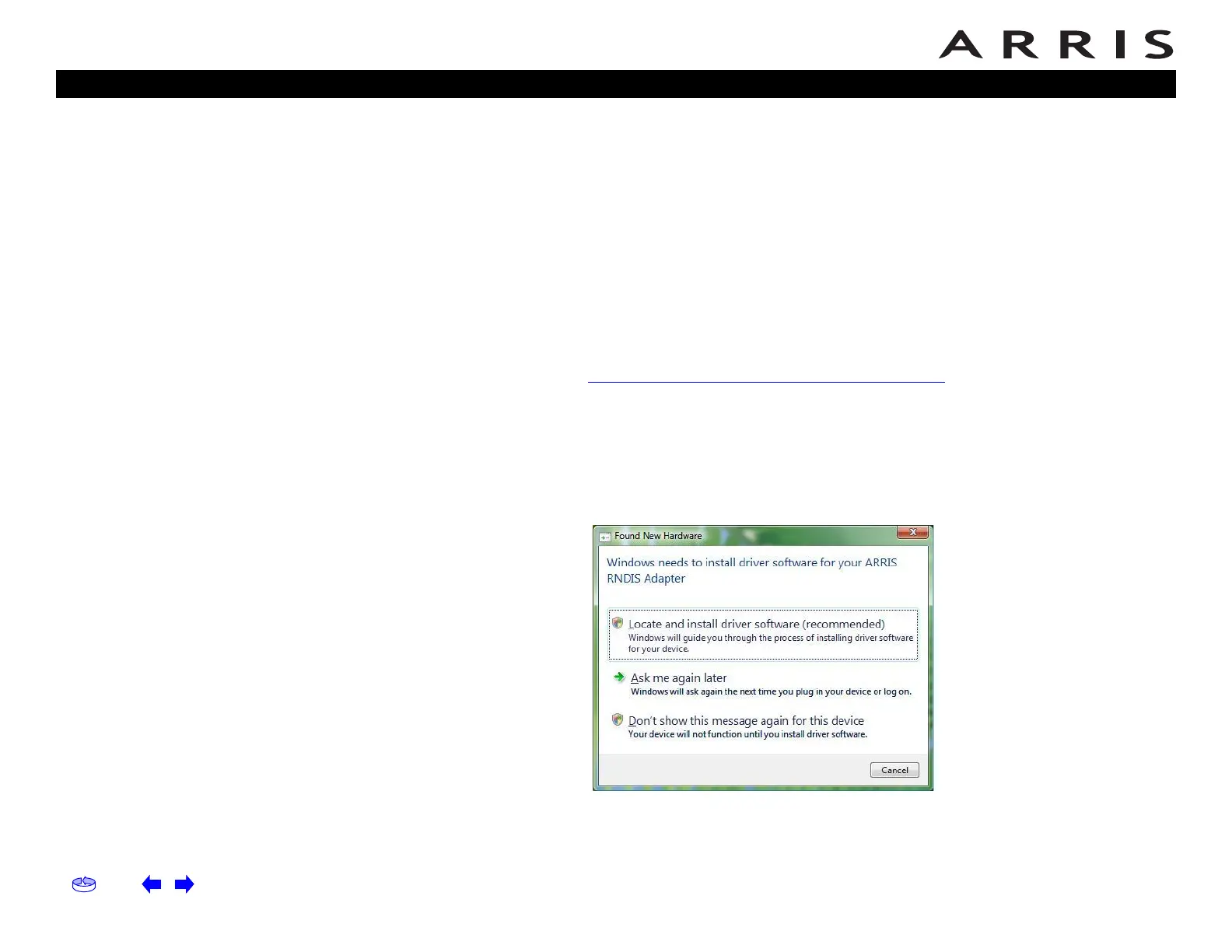
4 When the Found New Hardware screen is presented, select the “Locate and
install driver software (recommended)” option.
5 When you see a window with the heading “Windows needs your permission
to continue,” click Continue to proceed.














 To Next Page