EasyManua.ls Logo

Arris touchstone TM1602 - Page 31

Arris touchstone TM1602
42 pages
Print Icon
To Next Page IconTo Next Page
To Previous Page IconTo Previous Page
Loading...
Touchstone TM1602G Telephony Modem Users Guide
Safety
Getting
Started
Battery
Installation
Installation
Ethernet
Conguration Usage Troubleshooting Glossary
31
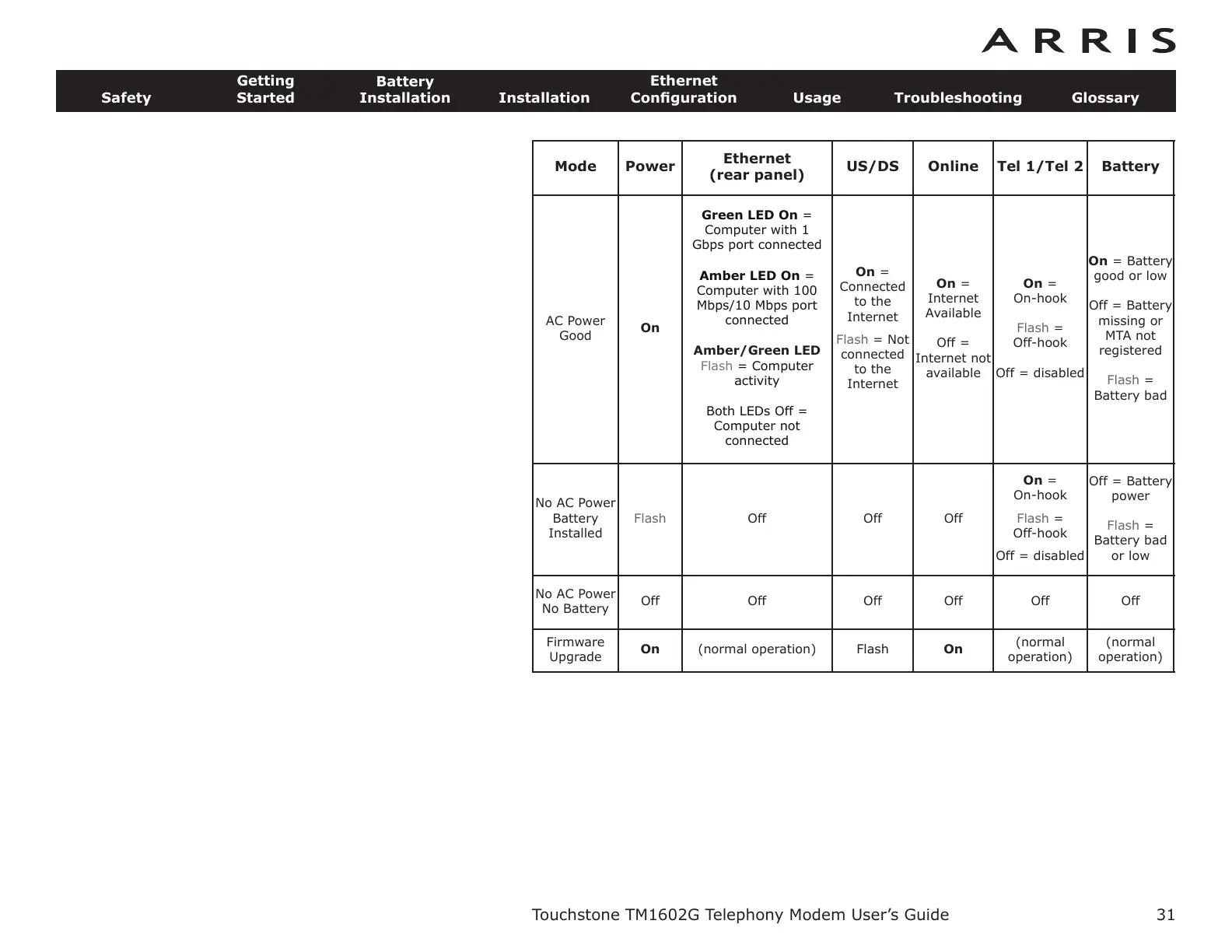
Mode Power
Ethernet
(rear panel)
US/DS Online Tel 1/Tel 2 Battery
AC Power
Good
On
Green LED On =
Computer with 1
Gbps port connected
Amber LED On =
Computer with 100
Mbps/10 Mbps port
connected
Amber/Green LED
Flash = Computer
activity
Both LEDs Off =
Computer not
connected
On =
Connected
to the
Internet
Flash = Not
connected
to the
Internet
On =
Internet
Available
Off =
Internet not
available
On =
On-hook
Flash =
Off-hook
Off = disabled
On = Battery
good or low
Off = Battery
missing or
MTA not
registered
Flash =
Battery bad
No AC Power
Battery
Installed
Flash Off Off Off
On =
On-hook
Flash =
Off-hook
Off = disabled
Off = Battery
power
Flash =
Battery bad
or low
No AC Power
No Battery
Off Off Off Off Off Off
Firmware
Upgrade
On (normal operation) Flash On
(normal
operation)
(normal
operation)

Related product manuals