Chapter 7: Using the Telephony Modem
Release 8 STANDARD 1.3 August 2016 Touchstone TM822G Telephony Modem User Guide
© 2011-2016 ARRIS Enterprises LLC. All Rights Reserved. 36
DS US Online Description
On On Flash Downstream and Upstream found;
retrieving setup information from
service provider
On On On Ready for service
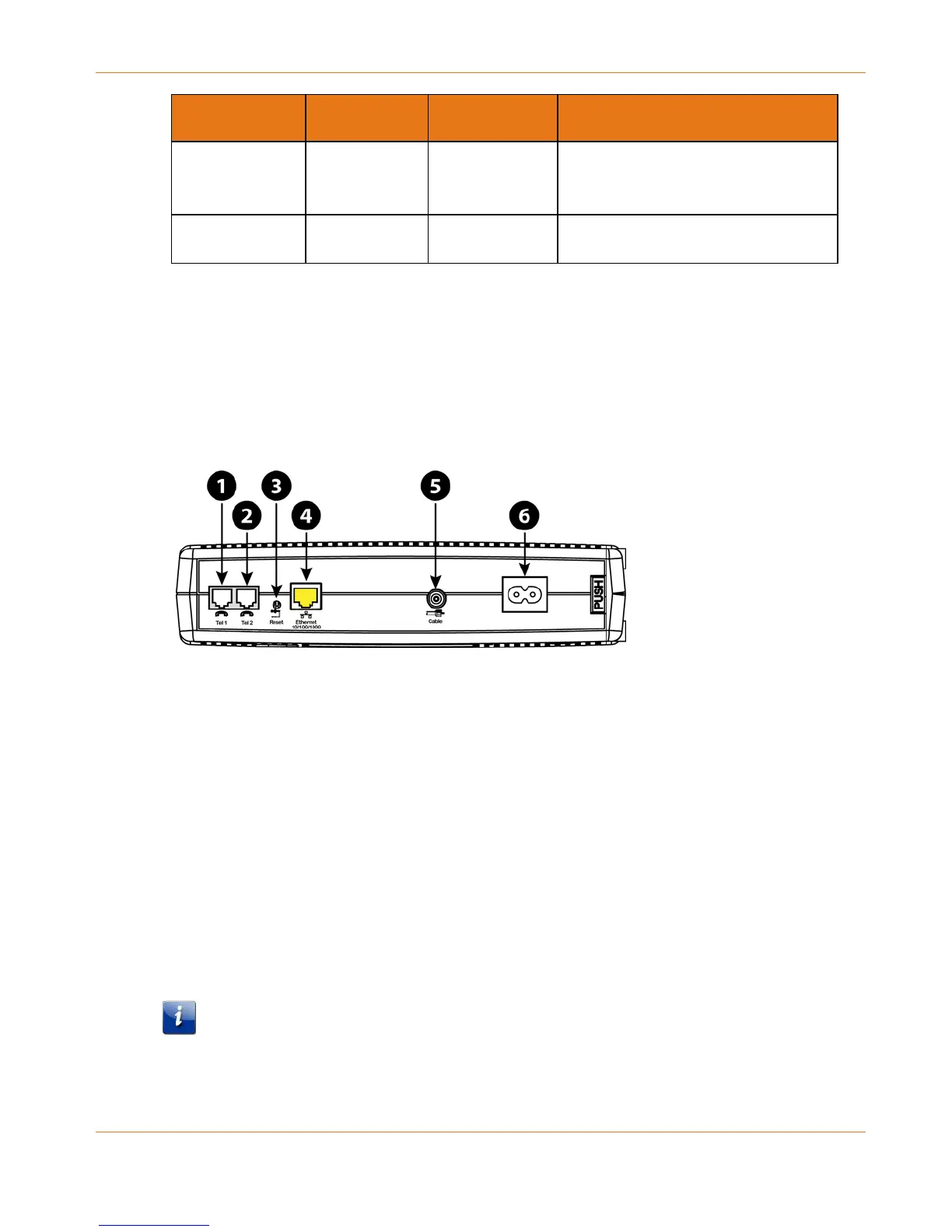
Using the Reset Button
Use the Reset button, on the back of the Telephony Modem, to reset the modem and perform
initialization as if you power cycled the unit. You may need to reset the Telephony Modem if
you are having problems connecting to the Internet. Using this button will be rare.
Use a pointed non-metallic object to press this button. The Reset button is recessed to
prevent accidental resets.
1. Tel 1
2. Tel 2
3. Reset button
4. Ethernet
5. Cable
6. Power
Booting from Battery
The TM822G supports a “Boot from Battery” feature that allows the Telephony Modem to
provide continued telephone service during power outages.
To start the TM822G from its battery, follow these steps:
1. If a battery is already installed in the Telephony Modem, remove it.
2. Re-insert the battery into the Telephony Modem. See Battery Installation and Removal
(page 16) for details.
3. Press the Reset button; the Power light should turn on immediately.
Note: If the Telephony Modem does not turn on, the battery may not be charged.















 To Next Page