INSTALLATION & USER MANUAL ENERGY EFFICIENT WOODSTOVE | PHOENIX
13 | Page
6.4.3. Use of the electronic control panel
ARTE® PHOENIX woodstoves incorporate two ventilators with total power output of 420m
3
/h, which are used for heating the air and
redistribute it in the room, which drastically increases the heating capability of the woodstove.
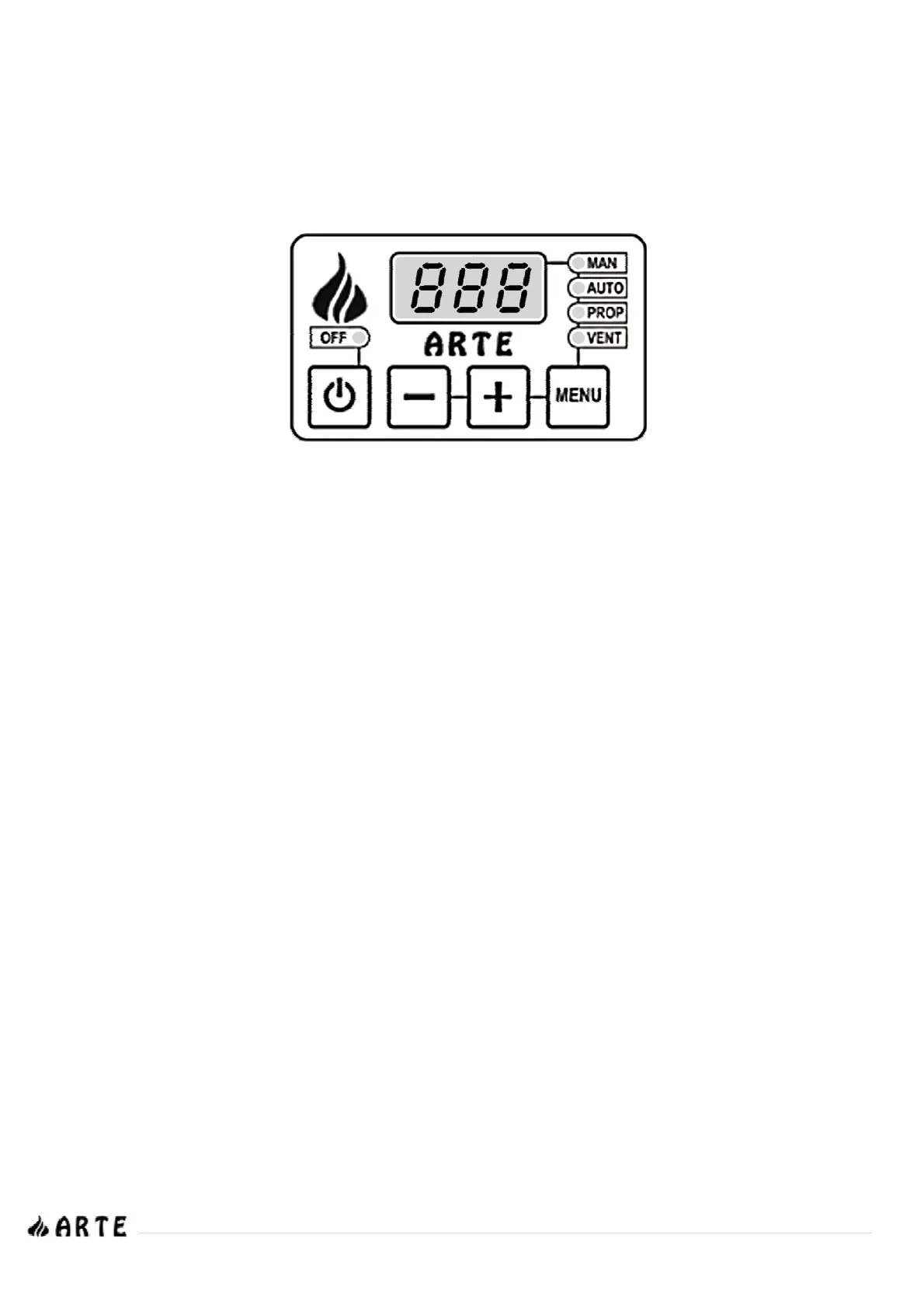
The motors are controlled by an electronic board which settings you can change using the control panel that is located beneath the control
panel door.
To turn the panel ON or OFF, press key A. The state ON/OFF is indicated through LED light L1.
> Operation MODES
1. MANUAL mode (indication MAN – LED light L2)
The ventilator operates at the selected speed regardless of the temperature of the sensor.
2. AUTOMATIC mode (indication MAN – LED light L3)
The ventilator operates at the selected speed when the sensor temperature is higher than that in which the thermostat is set (45
o
C).
3. PROGRESSIVE mode (indication PROP – LED light L4)
The ventilator automatically increases its speed according to the temperature of the sensor (starting from 45
o
C). In case you neglect to
turn on the thermostat before lighting the woodstove (it remains in OFF) and the sensor temperature exceeds 100
o
C, the ventilators are
automatically activated (ON) and start to operate in MANUAL mode, for 10 seconds and then it automatically switches to PROGRESSIVE
mode until the temperature drops to 90
o
C, in which case it switches back to MANUAL mode. This process is repeated continuously until you
choose another mode.
4. ALARM mode
If the temperature of the sensor exceeds 130
o
C, then a sound alarm is activated. You can turn that off for 5 minutes by pressing any key.
After five minutes, and if the problem is not yet restored, the alarm is activated again
> Main MENU
1. Mode selection
Press the MENU key (D) to view the selected mode, which is indicated on the screen and the corresponding LED light. By pressing the same
key again, you can choose one of the three operating modes appearing consecutively on the screen and are indicated by the
corresponding LED light. The setting is automatically stored in memory after 4 seconds. LED light L5 indicates the state of the ventilators.
2. Operation speed selection
By pressing keys B or C you can view or change the current ventilation speed.
P0 = OFF (only for MANUAL mode)
P1 = Lowest speed setting
P10 = Highest speed setting
This function is not available in PROGRESSIVE mode.
In AUTOMATIC mode you can choose speed settings P1 ~ P10
> FAILURE or ALARM signals
The control panel can indicate possible sensor failures. In these cases it may display the following on the LCD screen:
LO: indicates low temperature (temperature lower than 0°C): The sensor is open or disconnected
HI: indicates high temperature (temperature higher than 180°C): The sensor has a short circuit
L1
L2
L3
L4
L5
A
B
C
D


 To Next Page