As you become more knowledgable about the MicroFreak you will be able to create and
route more and more complex control signals. Your ability to create complex control signals
is what makes you unique as an analog performer/composer. MicroFreak will offer you
plenty of opportunities to create a personal style.
Note for advanced users: On an analog synthesizer or modular system all modulation
is done using Control Voltages. In mostly digital synthesizers such as the MicroFreak all
modulation is done using digital signals that mimic the behavior of analog Control Voltages.
In this manual we therefore use the term Control Signal when discussing modulation. If
your background is in the analog world you're welcome to substitute "Voltage" for "Signal"
whenever you read it.
5.2. The Matrix and its encoder
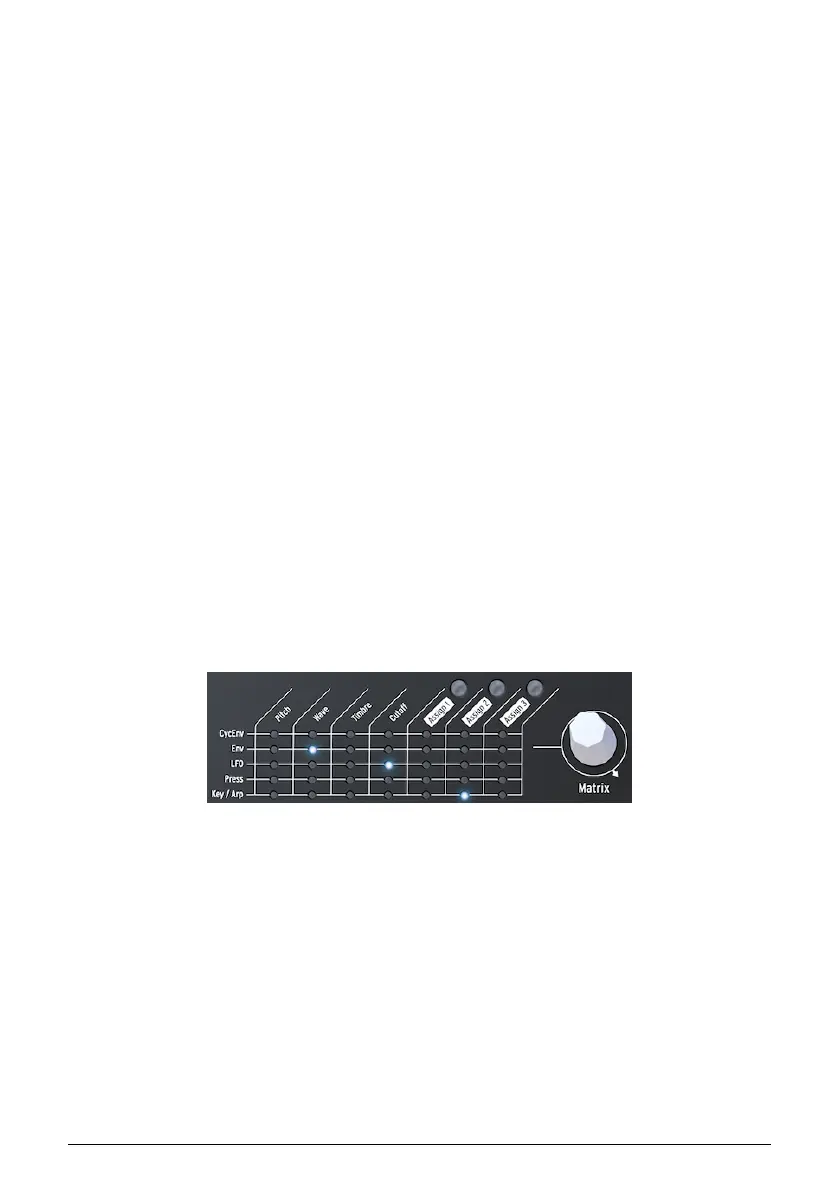
The Matrix is the place where you link all these signals together.
Classic synthesizers are great, but many have a major drawback: a fixed signal flow. As
a rule, sounds are generated by an Oscillator, then continue to a Filter where it can be
shaped further, and at the end of the chain there is a VCA, a voltage controlled amplifier that
amplifies the sound. The MicroFreak is no exception here, but there is one major difference:
Matrix enables you to break the standard connections and create new ones that override
these connections.
The thing that makes a synthesizer flexible is the ability to route the modulation signals
(Triggers, Gates, LFO Waves, and Envelopes) to the modules that shape the sound (the
Digital Oscillator and the Filter).
The Matrix is the main switchboard where you make and break these connections. It is the
key to unlocking the timbral secrets of the MicroFreak. Mastering the Matrix will help you to
create sounds that fit your musical taste.
The Matrix consists of two parts: the switchboard and the encoder. You use the encoder to
select and create connections and to set the amount of modulation that will flow through
the connection link.
To select a point on the Matrix where you connect a source to a destination, turn the encoder
until you are at the right position and press the encoder. You can scroll forward or backward;
at the end of the Matrix it cycles back to the beginning.
At any moment the Matrix gives you feedback about the connections you have made:
• LED OFF = no routing is made OR the amount is set at 0
• LED ON = routing is made between the two objects
• LED blinking = you have selected a routing and are editing its modulation
strength
The Matrix and its Encoder
29 Arturia - User Manual MicroFreak - Making Connections















 To Next Page