Connector Pinouts
Chapter A
12 Aruba 200 Mobility Controller 0500215-01
Installation Guide January 2006
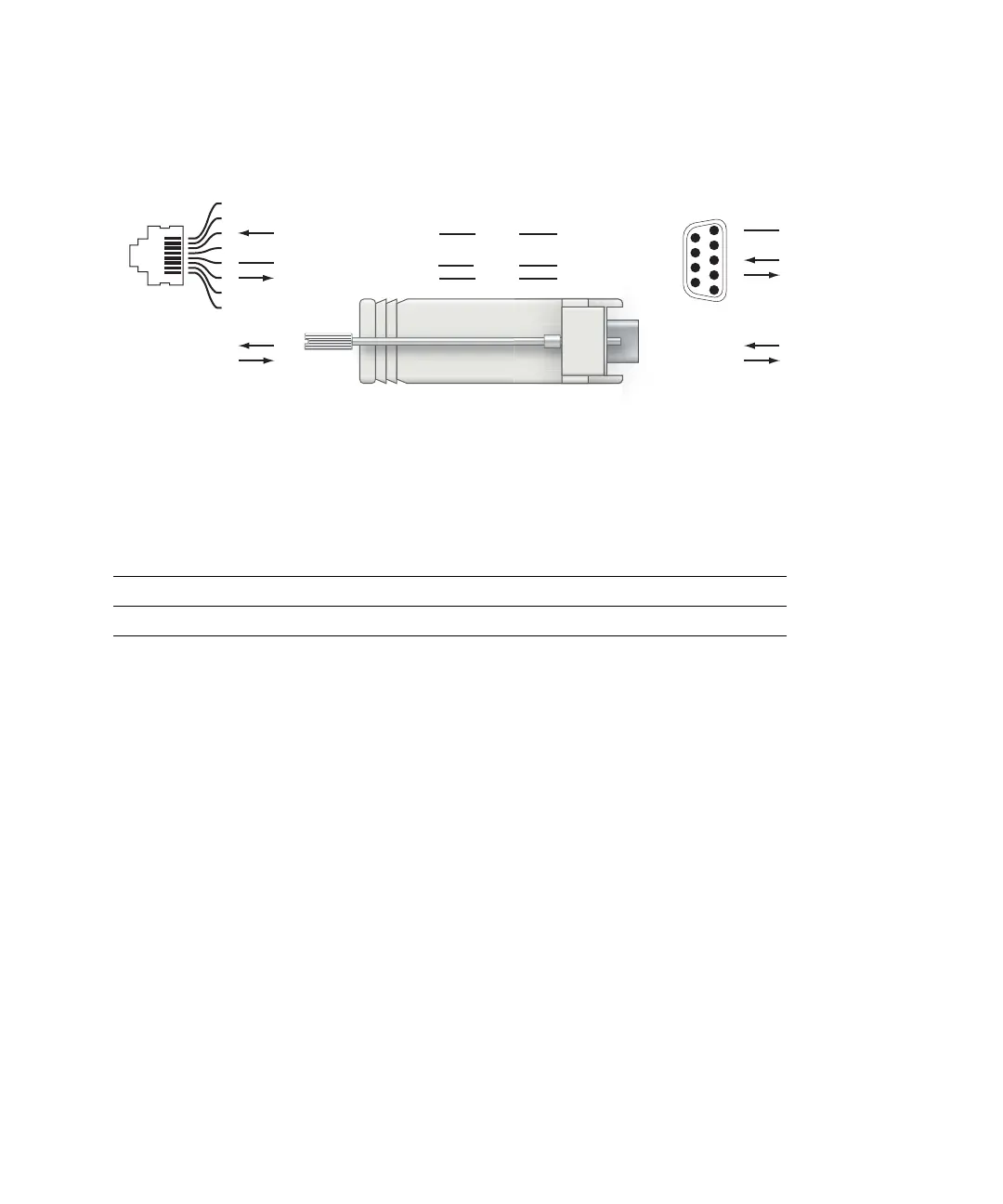
To connect the required RS-232 serial cable to a terminal with a DB-9 male port,
use the included adapter. Pin-outs are shown in Figure A-2:
FIGURE A-2 Serial Port Adapter
Communications Settings
TABLE A-1 Console Terminal Settings
Baud Rate Data Bits Parity Stop Bits Flow Control
9600 8 None 1 None
3
4
5
2
5
63
RJ-45 DB-9
Internal
Connections
TxD
GND
RxD
1
2
3
4
5
6
7
8
TxD
GND
RxD
RJ-45 Female
Pin-Out
Direction
Input
Output
DB-9 Female
Pin-Out
TxD
RxD
Ground
5
4
3
2
1
9
8
7
6
Direction
Input
Output



 To Next Page