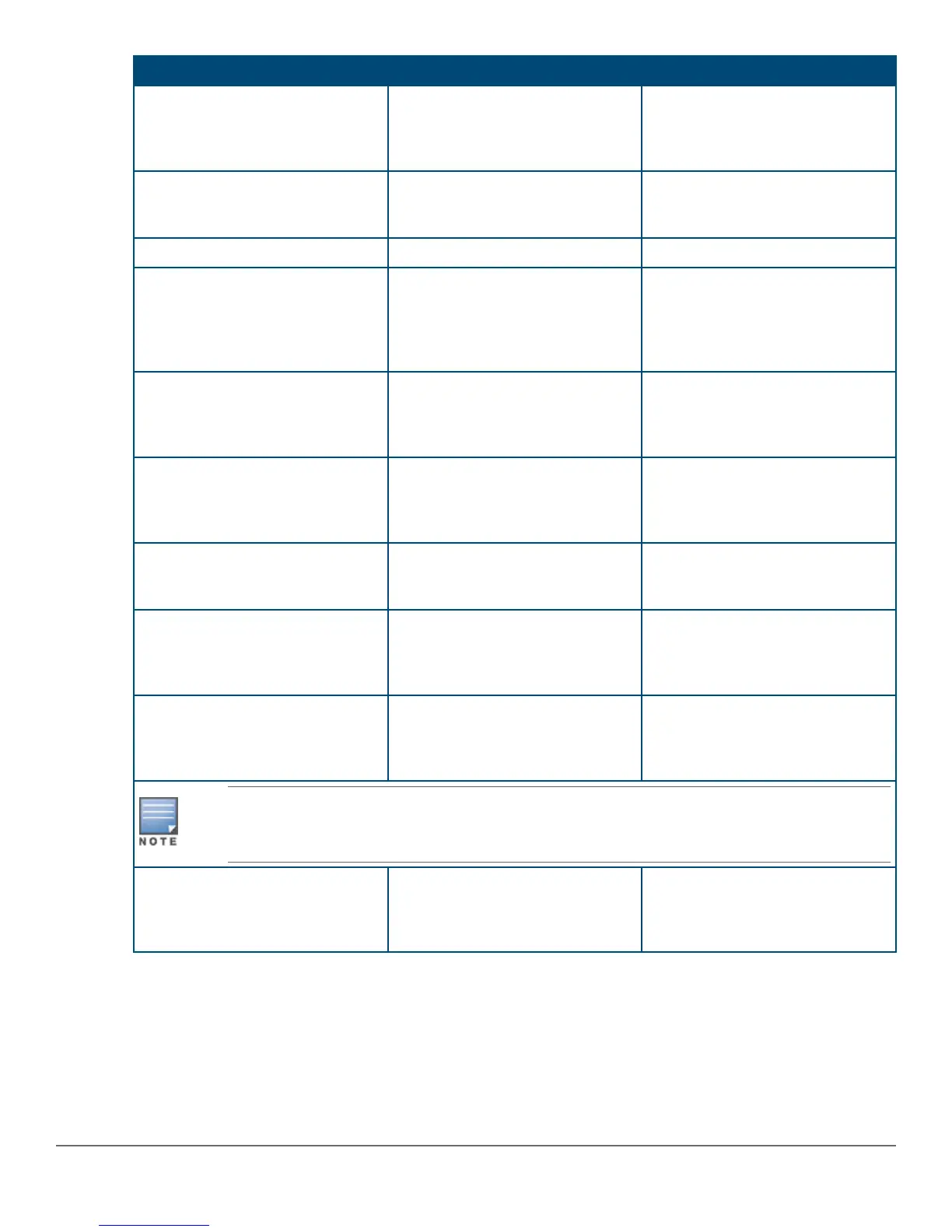
Parameter Default
Logon Default CLI The default setting selects the
command line interface for console
access. The alternative is the
menu interface.
Time Zone 0 (none) Optional; 1440 to -1440. The
number of minutes your location is
to the West (-) or East (+) of GMT.
Community Name public Default setting recommended.
Spanning Tree Enabled No Default setting recommended
unless STP is already running on
your network or the switch will be
used in complex network
topologies.
Default Gateway blank Optional; Enter the IP address of
the next-hop gateway node if
network traffic needs to be able to
reach off-subnet destinations.
Time Sync Method None Optional; The protocol the switch
uses to acquire a time signal. The
options are NTP, SNTP, TimeP,
and TimeP/SNTP.
TimeP Mode Disabled Optional; The method the switch
uses to acquire the TimeP server
address.
IP Config (DHCP/ Bootp) DHCP/Bootp Set to Manual unless a DHCP/
Bootp server is used on your
network to configure IP
addressing.
IP Address xxx.xxx.xxx.xxx Recommended; If you set IP
Config to Manual, then enter an IP
address compatible with your
network.
The IP address and subnet mask assigned for the switch must be compatible with the IP
addressing used in your network. For more information on IP addressing, see the Management
and Configuration Guide .
Subnet Mask xxx.xxx.xxx.xxx Recommended; If you entered an
IP address, then enter a subnet
mask compatible with your
network.
Where to go from here
The above procedure configures your switch with a Manager password, IP address, and subnet mask. As a
result, with the proper network connections, you can now manage the switch from a PC equipped with Telnet,
and/or a web browser interface.
46 Aruba 2930F Switch Series Installation and Getting Started
Guide



 To Next Page