Need help?
Do you have a question about the Arylic S50 Pro+ and is the answer not in the manual?
Download the 4STREAM application for iOS and Android devices to control the unit.
Connect the device to your network using the 4STREAM mobile application.
Establish a wired network connection to the device using an Ethernet cable.
Pair your mobile device with the unit via Bluetooth for audio streaming.
Configure device name, speaker info, alarm clocks, and sleep timer via the app.
Access and play music files stored on your mobile device or USB drives.
Stream music from your Network Attached Storage (NAS) supporting DLNA.
Connect external audio sources via AUX cable and select line-in mode.
Stream audio wirelessly via Bluetooth from your mobile device.
Connect external audio sources via optical cable and select optical mode.
Access and use integrated online music streaming services like Spotify, Tidal, and Deezer.
Use Spotify Connect for seamless music playback from the Spotify app.
Stream audio wirelessly from Apple devices using AirPlay protocol.
Utilize Qplay protocol for music playback, compatible with QQ Music.
Group multiple units to play music in sync across different rooms or zones.
Configure stereo sound by assigning left and right channels to different units.
Save and quickly access favorite playlists using preset buttons on the remote or app.
Switch between different audio input sources like WiFi, Bluetooth, Line-in, and USB.
Reset the device to its original factory default settings to resolve issues.
Update the device firmware through the application to improve performance and add features.
Stream music from iTunes libraries on Mac and Windows PCs.
Use Foobar2000 with UPnP protocol to play music from a Windows PC.
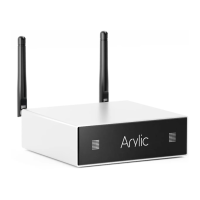
The Arylic S50 Pro+ is a high-end audio streaming preamplifier designed to integrate wireless audio streaming capabilities into existing stereo systems. It offers a comprehensive set of features for playing and enjoying music from various sources, making it a versatile hub for a modern home audio setup.
The S50 Pro+ acts as a bridge, allowing users to stream high-resolution audio from smart devices, USB drives, Network Attached Storage (NAS), and popular streaming services like Spotify, Tidal, and Qobuz. It supports multiple streaming protocols including 4STREAM App, AirPlay, Bluetooth aptX HD, DLNA, and UPnP, ensuring broad compatibility with different devices and applications. The device is engineered with Hi-Fi hardware components, such as the ESS9023 DAC and Cirrus Logic ADC, to deliver high-quality sound.
Beyond basic streaming, the S50 Pro+ supports multiroom and multizone audio systems. By adding multiple units to a home audio setup, users can create a synchronized whole-house audio experience, playing the same music across different rooms or different music in various zones. It also offers digital and analog inputs and outputs, including Coaxial and Optical digital outputs, RCA analog output, and a dedicated subwoofer output for connecting to external active subwoofers. The device features a 12V trigger output for integrating with other audio equipment.
The S50 Pro+ is designed for ease of use, offering multiple control methods. The primary control interface is the 4STREAM application, available for both iOS and Android devices. This app allows users to:
The device also comes with a full-function remote controller, allowing users to operate the S50 Pro+ without a smartphone. The remote provides buttons for power on/off, mute, volume control, source mode selection (USB, AUX IN, Optical, Bluetooth, WiFi), playback control (pause/play, previous/next), and EQ adjustments (bass, treble, flat, deep bass). It includes six preset buttons that can be configured via the app to quickly access favorite playlists.
An OLED display panel on the front of the unit provides status information, enhancing user interaction. For PC users, the S50 Pro+ supports streaming music from iTunes on Mac and Windows PCs, as well as from Windows PCs via Foobar2000 using UPnP protocol. A web player interface is also available by entering the device's IP address in a web browser, offering an alternative control method for volume, playback, and input source selection.
The S50 Pro+ incorporates features to ensure its longevity and performance:
The S50 Pro+ is designed to be a robust and adaptable audio component, offering a rich set of features for both casual listeners and audiophiles looking to upgrade their home audio experience with advanced streaming capabilities.
 General
| Amplifier Type | Class D |
|---|---|
| Output Impedance | 4-8Ω |
| Input Impedance | 47kΩ |
| Bluetooth Version | 5.0 |
| Frequency Response | 20Hz-20kHz |
| Bluetooth Profiles | A2DP, AVRCP |
| Supported Codecs | SBC, AAC |
| Wi-Fi | IEEE 802.11 b/g/n 2.4G |
| Ethernet | 10/100M RJ45 |
| Supported Formats | MP3, AAC, FLAC, ALAC, WAV |
| Decoding | 24-bit/192kHz |
| Connectivity | RCA Input, Optical Input, Coaxial Input, USB Host, RJ45, RCA Output, Subwoofer Output |
| Streaming protocols | Spotify Connect, Airplay, DLNA, UPnP |
| Operating Temperature | 0°C to 40°C |
| Storage Temperature | -20~70°C |


 To Next Page