7
8.2 Connection
8.2.1 Connection via app
1. Power the device.
2. Connect your mobile devices to your network.
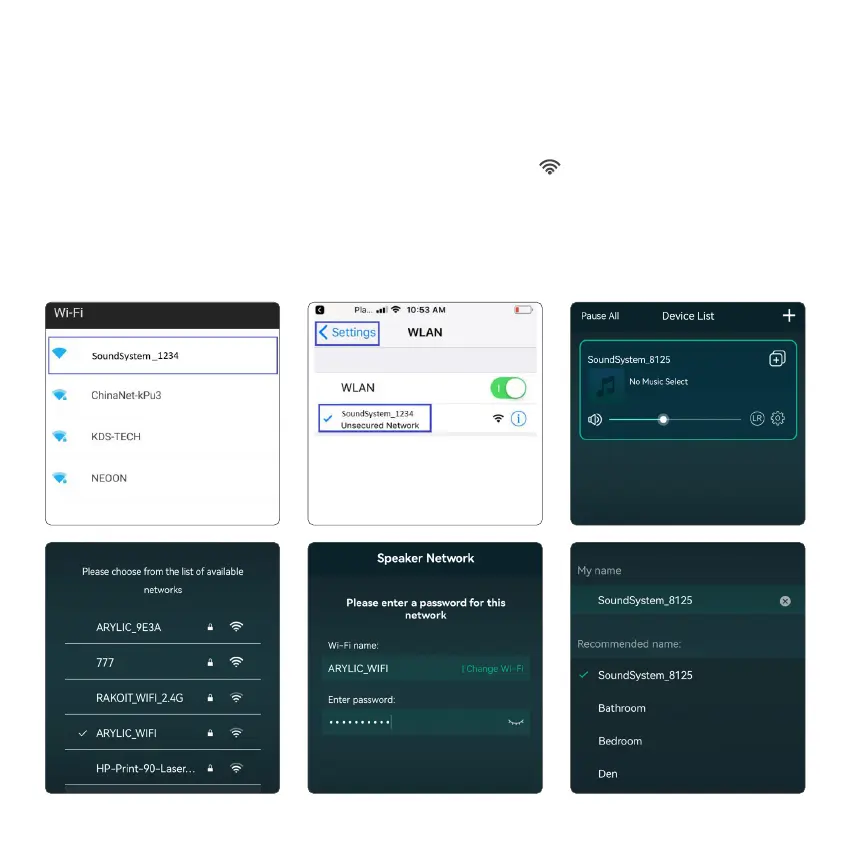
3. Go for mobile device WLAN settings> Connect
mobile device to hotspot SoundSystem_xxxx you will see a WiFi logo
.
(short press the reset button if
the hotspot is not found).
4. Open the 4STREAM application, follow the guides, or if you see the device in the device list, click on the
+ icon on top right corner.
5. Choose the 2.4G network (Only 2.4G network will appear), Enter router password>wait for the device to
be congured.
*For multiple units connecting to same router, router password will be saved.



 To Next Page