The Arylic BP50 is a versatile Bluetooth wireless stereo pre-amplifier with a wide range of input and output options, designed to enhance your audio experience. It serves as both a Bluetooth receiver and transmitter, allowing for flexible integration into various audio setups.
Function Description:
The BP50 acts as a central hub for your audio system, capable of receiving audio wirelessly via Bluetooth from devices like mobile phones, tablets, or TVs. It can then output this audio to your amplifier, active speakers, or even transmit it wirelessly to Bluetooth earphones or earbuds. This dual functionality allows you to enjoy music from your Bluetooth-enabled devices through your home stereo or to listen privately with Bluetooth headphones from any connected audio source.
Beyond Bluetooth, the BP50 offers a comprehensive array of analog and digital inputs. It features a dedicated phono input for turntables, allowing you to connect your vinyl player directly. Line-in inputs accommodate other analog devices, while optical and TV ARC (Audio Return Channel) inputs cater to digital sources like soundbars, amplifiers, or TVs. For local music playback, it includes a USB Type-A port for connecting USB disk drives. Additionally, a USB Type-C port enables connection to a PC, allowing the BP50 to function as an external USB DAC (Digital-to-Analog Converter).
All incoming audio signals, whether from Bluetooth, phono, line-in, optical, TV ARC, USB disk drive, or USB DAC, can be routed to connected amplifiers or active speakers, or simultaneously streamed wirelessly to Bluetooth earphones or earbuds. This makes the BP50 an ideal solution for creating a multi-room audio experience or for personal listening without disturbing others.
Control of the BP50 is intuitive, with options including a physical volume knob and input mode button on the device itself, an included IR remote controller, and a free mobile application (Go Control) available for both Android and iOS systems. The mobile app provides full control over the device, including playback controls, input source selection, Bluetooth pairing and transmission management, and a user-friendly EQ system for sound customization.
Important Technical Specifications:
- Bluetooth Standard: 5.2
- Bluetooth Transmit: 2x Bluetooth TX, connects up to 2 Bluetooth speakers or earbuds.
- Bluetooth Receive: 2x Bluetooth RX, connects up to 2 Bluetooth transmitter devices.
- Bluetooth Codec: aptX HD, aptX LL, aptX AD, AAC, SBC.
- Audio Inputs:
- Line in: Analog RCA, Max 2Vrms input.
- Phono in: Analog RCA, Supports MM/MC cartridges.
- Optical in: Up to 192KHz/24bit PCM only.
- TV ARC: PCM only, CEC function supported.
- USB Host: USB disk drive playback, supports resume playback. Storage format: Fat16, Fat32, exFat, up to 128GB. Supported codecs: mp3, mp4, wma, mov, m4a, aac, flac (96KHz/24bit), ape.
- USB Type-C: USB DAC for PC connection, Sample rate: 48KHz.
- Audio Outputs:
- Subwoofer out: Max 3Vrms output, Cutting frequency: 250Hz.
- Line out: Max 2Vrms output.
- Optical out: 48KHz/16bit output.
- Coaxial out: 48KHz/16bit output.
- Power Input: 12V/1A.
- Size: 185 x 155 x 50 mm.
- Weight: 750g.
- In the Box: Main Unit x1, Antenna (3dBi) x2, Remote Control x1, User's Manual x1, Power Adapter x1.
Usage Features:
- Bluetooth Receiver Mode: The BT LED flashes when waiting for connection. Once connected, the LED stays on. The device remembers paired devices and auto-connects. Supports connecting up to 2 devices simultaneously (only one can play at a time). To connect a second device, press the Reset button or BT button on the remote. Disconnect by pressing the Reset button twice.
- Bluetooth Transmitter Mode: Enabled from any source input mode (Line in, Phono in, Optical in, TV ARC, USB disk drive, USB DAC) by pressing the Reset button or BT TX button on the remote. The BT LED flashes while searching for Bluetooth receiver devices (speakers, headphones). Can connect a second BT receiver device by pressing the Reset button or BT TX button again. Both connected BT receiver devices will have sound output. Disconnect by pressing the Reset button twice.
- Line In Mode: Connects analog devices with line out. Activated via the Mode button, remote, or Go Control APP. Line LED turns on. Audio can also be streamed via Bluetooth.
- Phono In Mode: Connects turntables to the Phono in RCA connectors. Optional GND connection for turntables with a GND socket. Activated via the Mode button, remote, or Go Control APP. Phono LED turns on. Turntable audio can also be streamed via Bluetooth. Caution: Phono input has high amplification; do not connect other line-out devices to avoid loud sound and potential damage.
- Optical In Mode: Connects devices with digital optical output. Activated via the Mode button, remote, or Go Control APP. OPT LED turns on. Optical audio can also be streamed via Bluetooth.
- TV ARC Mode: Connects to a TV's HDMI ARC port using an HDMI cable. Activated via the Mode button, remote, or Go Control APP. ARC LED turns on. Supports HDMI CEC. TV audio can also be streamed via Bluetooth to headphones for private listening.
- USB Disk Drive Playback Mode: Plug in a USB disk drive with music files; the BP50 automatically switches to USB Mode and begins playback. USB LED turns on. Supports resume playback. USB disk drive audio can also be streamed via Bluetooth.
- USB DAC Mode: Connects to a PC via a USB Type-C data link cable (not just a charging cable). The PC will recognize the device as "Up2Stream USB Audio." PC audio can also be streamed via Bluetooth.
- Remote Controller: Provides comprehensive control including ON/OFF, Mute, Volume +/-, Play/Pause, Previous/Next (for Bluetooth and USB), input mode selection (Phono in, Line in, Optical Mode, ARC Mode, USB Mode, DAC Mode, BT Receive Mode), Enable BT Transmitter Pairing, and Treble/Bass control, as well as preset EQ options (Flat, Classic, Pop, Jazz, Rock, Vocal).
- Mobile Application (Go Control): User-friendly app for Android and iOS. Automatically detects and connects to BP50. Offers playback controls (stop, pause, mute, previous, next), remote audio source switching, display of connected phone/Bluetooth codec in RX mode, display of connected earphone info in TX mode, dark mode, device name change, LED on/off control, and firmware version check.
- ACPWrokBench (Sold Separately): A Windows application for advanced audio effect tuning, including Music Noise Suppressor, Virtual Bass, Stereo Widener, Exciter, and 10-band EQ. Provides real-time feedback and allows saving/exporting settings.
Maintenance Features:
- Firmware Update: During firmware updates, all LEDs will turn on. Do not turn off power until all LEDs turn off and return to BT mode.
- Protection Mode: If all LEDs start flashing, the device is in protection mode (e.g., over-heat or short-circuited output). Turn off the device and check for the reason.
- Factory Reset: Press and hold the Reset button on the back of the device to perform a factory reset.
- USB Disk Drive Compatibility: Ensure USB disk drive file format is Fat16/Fat32/exFat. Supports up to 128GB USB disk drives.

 Need help?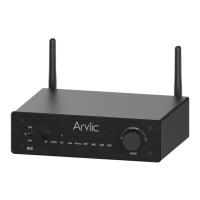










 To Next Page
 General