Need help?
Do you have a question about the Arylic S10 and is the answer not in the manual?
For remote control reception.
Green-line input mode for audio sources.
White-power on/WiFi mode indicator.
Blue-Bluetooth mode indicator.
Red-USB mode indicator.
Power control and WiFi reset function.
Wired Ethernet connection to router.
Connect USB pen drive (max 1024 tracks).
Input for external audio sources.
Output for analog audio to other devices.
Power input via Micro USB.
Controls the LED status light on the device.
Powers the device on or off.
Mutes or unmutes the audio output.
Selects the USB input mode.
Selects the AUX input mode.
Increases the audio volume level.
Controls music playback: pause or resume.
Decreases the audio volume level.
Navigates to previous or next track (WiFi mode only).
Selects optical input mode.
Selects the WiFi input mode.
Selects the Bluetooth input mode.
Adjusts treble and bass levels.
Resets EQ settings to flat via long press.
Enhances bass frequencies.
Activates pre-configured playlists.
Download the 4STREAM application for iOS and Android devices.
Detailed guide for connecting the device to networks, including WiFi, LAN, and Bluetooth setup.
Overview of functionalities available within the 4STREAM app, like device settings and music playback.
How to use the line-in audio input with the device.
How to select and use Bluetooth mode for audio streaming.
Overview of supported online streaming services like Spotify and AirPlay.
Guide for using Spotify with the device, requires premium account.
Instructions for using AirPlay for audio streaming.
How to use QQ music with Qplay protocol.
How to group devices for multiroom and multizone playback.
Setting left/right channels for stereo pairing.
How to use and set preset playlists on the remote.
Methods to change between input sources (WiFi, Bluetooth, Line, USB).
Steps to reset the device to factory defaults.
How to update the device firmware for new features and fixes.
Playing music from iTunes on Mac and Windows computers.
Using Foobar2000 for PC music playback with UPnP protocol.
Connecting and playing audio via USB from a PC.
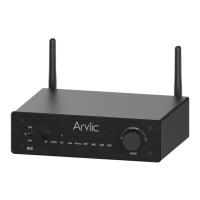
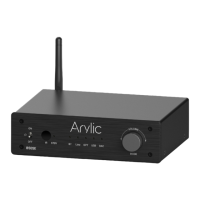
The Arylic S10 is a wireless streaming preamplifier designed to integrate seamlessly with your existing stereo system, offering a modern and versatile way to enjoy your music. This device allows you to stream high-resolution audio from various sources, including your smart devices, USB drives, Network Attached Storage (NAS), and popular streaming services. With its network and Bluetooth 5.0 connectivity, the S10 provides a flexible and high-quality audio experience.
The primary function of the Arylic S10 is to act as a bridge between your digital music sources and your traditional stereo system. It receives audio wirelessly via Wi-Fi or Bluetooth, or through wired connections, and outputs it as an analog signal to your amplifier or powered speakers. The S10 supports a wide range of audio formats, including lossless options like FLAC, APE, and WAV, and can decode music at sample rates up to 24-bit/192kHz, ensuring a high-fidelity listening experience.
One of its key features is its multiroom and multizone capability. By adding multiple Arylic units to your home audio system, you can create a synchronized whole-house audio setup. This allows you to play the same music across different rooms in perfect sync or stream different music to various zones, offering a highly customizable audio environment. All music sources, whether from online services, local storage, or wired inputs, can be restreamed in sync to other compatible Arylic models.
The S10 also supports various streaming protocols and third-party apps, including AirPlay, Spotify Connect, Qplay, DLNA, and UPnP. This broad compatibility ensures that you can easily stream music from your preferred platforms and devices. For instance, you can stream directly from Spotify using Spotify Connect, or from Apple devices via AirPlay.
Beyond wireless streaming, the S10 offers wired connectivity options. It includes a micro USB input that allows you to connect it to a PC and stream music digitally, bypassing your computer's sound card for potentially higher audio quality. It also features an AUX IN for connecting external audio sources like TVs or CD players, and a USB Host port for playing music directly from a USB pen drive.
The Arylic S10 is designed for ease of use, primarily controlled through the dedicated 4STREAM app, available for both iOS and Android devices.
The S10 comes with a full-function remote controller, allowing you to manage playback without needing your mobile phone.
The Arylic S10 supports over-the-air (OTA) firmware updates. The 4STREAM app will notify you when a new firmware version is available. It is recommended to update the firmware regularly, as updates can fix bugs, improve security, and introduce new features and services, ensuring your device remains up-to-date and performs optimally.
If you encounter issues or wish to clear all settings, the S10 can be restored to its factory defaults. This can be done through the 4STREAM app by navigating to the device settings, selecting "Speaker info," and then choosing "restore factory setting." Alternatively, a hard reset can be performed by long-pressing the "SLEEP (RESET)" button for more than 5 seconds while in Wi-Fi mode. If the device is in Bluetooth mode, a long press on the "SLEEP (RESET)" button will terminate the current connection.
The manual includes a FAQ section to address common questions, such as compatibility with AirPlay and third-party DLNA apps, multiroom grouping limits, wireless range, high-resolution audio support, language support, online music services, local music playback, and Windows device compatibility.
For advanced audio customization, Arylic offers a separate DSP Audio Effects Tool (Windows only). By connecting the S10 to a PC via USB, users can access this program to tune various audio effects, including Music Noise Suppressor, Virtual Bass, Stereo Widener, Exciter, and a 10-band EQ. Once adjusted, these effects can be saved to the device, ensuring the tuned sound profile persists.
In summary, the Arylic S10 is a comprehensive wireless streaming preamplifier that brings modern connectivity and high-resolution audio to any stereo system, offering extensive control and flexibility for an enhanced listening experience across your home.
 General
| Bluetooth Codec | SBC, AAC |
|---|---|
| Bluetooth Range | Up to 10 meters |
| Connectivity | Wi-Fi, Bluetooth, USB |
| Streaming Protocols | AirPlay, DLNA, Spotify Connect |
| Power Input | 5V/1A |
| Frequency Response | 20Hz - 20kHz |
| Input Impedance | 10kΩ |
| Signal-to-Noise Ratio | 91dB |


 To Next Page