6
8.1 App Download
Download the 4STREAM application from App Store for iOS based devices and Google Play Store for
Android based devices.
The application supports English, Spanish, French, German, Italian, Portugese, Korean, Simplied
Chinese, Traditional Chinese and Japanese.
Once power up, the device is in standby mode (red LED is on), use the power button on remote controller
or press the reset button to turn it on.
8. How to use
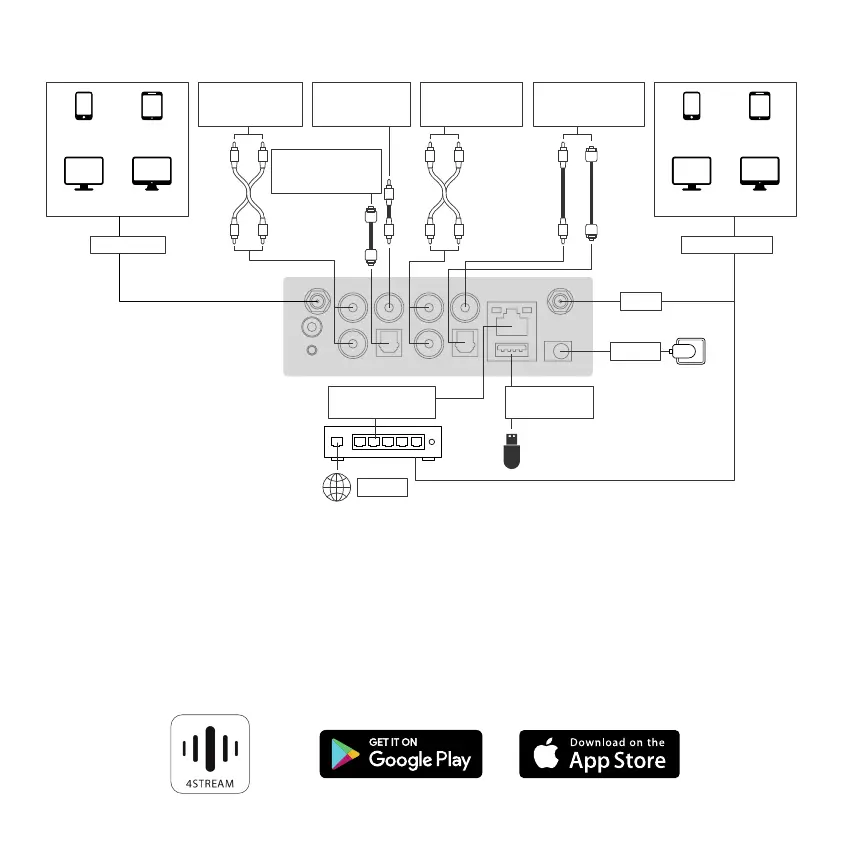
7. Connection Diagram
Smart Phone Smart Tablet
Windows PC iMAC
Smart Phone Smart Tablet
Windows PC iMAC
Router
Analog device
Audio RCA output
Analog device
Audio RCA input
Digital device audio
Coax/Optical input
Active Subwoofer
RCA
Digital device audio
Optical output
DC input
Internet
Wi-Fi
Ethernet RJ 45
connect to network
Connect to USB
pen drive
BT Connnect Wi-Fi Connnect



 To Next Page