PAGE 11
RECORDING YOUR PERFORMANCE
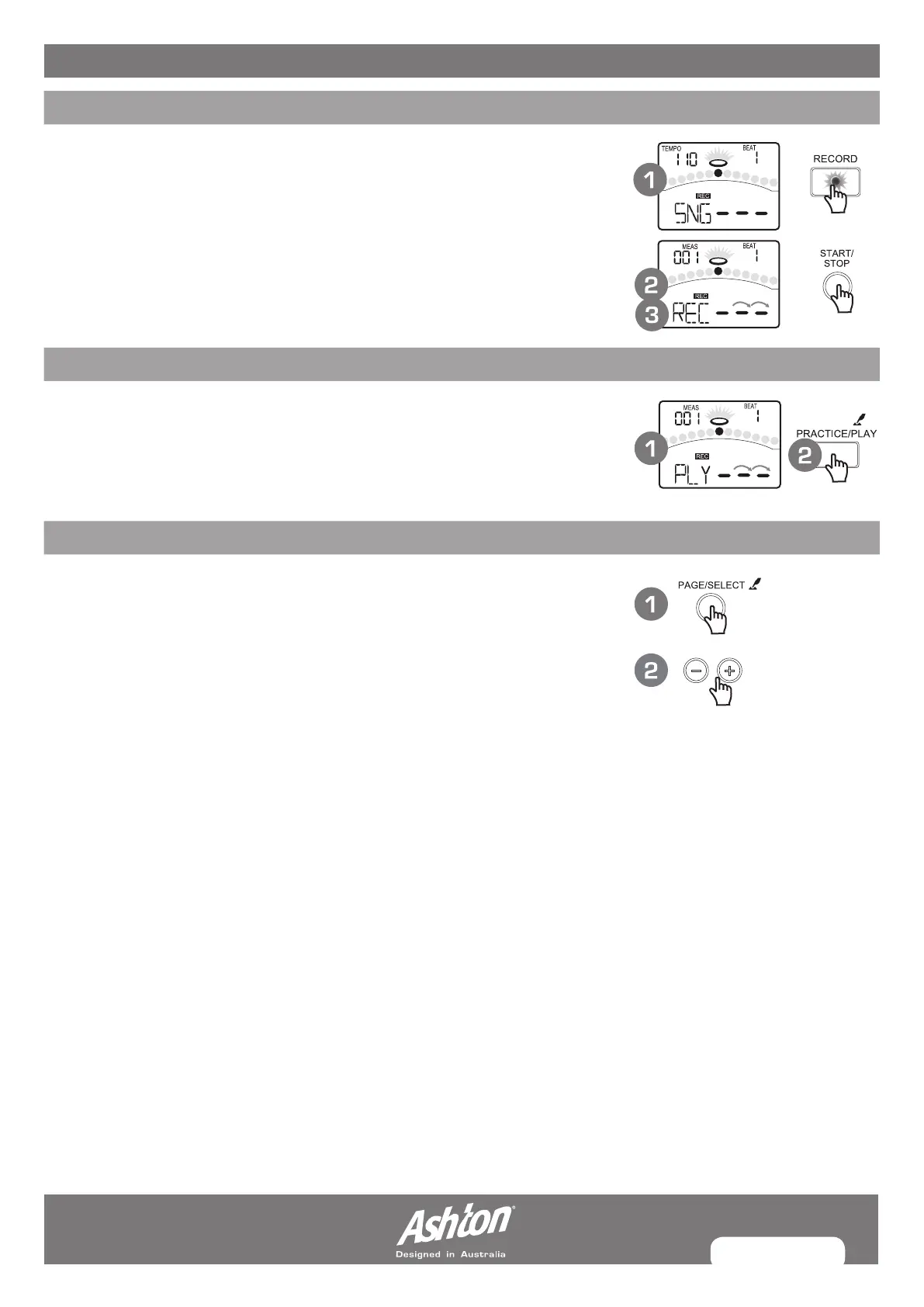
QUICK RECORD
1. Press the [RECORD] button. The [RECORD] led will flash. The Metronome will
be turned on automatically. The display will show:
2. Press the [START/STOP] button or strike the pad. Recording will start. The
[RECORD] led will turn on.
3. Press the [START/STOP] button again, or press the [RECORD] button. Stop
recording, the [RECORD] led will turn off. Your performance has been recorded.
ADJUSTING VOLUMES
In SONG menu, you can adjust the volume of drum or accompaniment track.
1. Press the [SONG] or [PAGE] button. Select the ACC Volume or Drum
Volume page.
2. Press the [--] or [+] button. Adjust the corresponding volume.
MUTING THE DRUM IN SONGS
If you want to mute the drum track of the song, please press the [DRUM OFF]
button. The [DRUM OFF] led will turn on.
USING THE PADS TO PLAY SONGS
This function is available only with electric drum. When you struck the pads that
have been set Pad Song function, they will start the performance of the songs.
For Example:
KICK: You can play the bass-line (Tap group, refer to Song List) note by note with
you kick drum.
CRASH: The chords (Hit group, refer to Song List) progress when you strike the pad.
RECORDING PLAYBACK
In SONG menu, you can adjust the volume of drum or accompaniment track.
1. Press the [SONG] or [PAGE] button. Select the ACC Volume or Drum
Volume page.
2. Press the [–] or [+] button. Adjust the corresponding volume.
SETTINGS
You can make the settings for recording on Record Standby.
1. Press the [PAGE] button. Select the Record Setting pages.
2. Press the [–] or [+] button. Adjust the parameters about recording.
For details on record setting, refer to Advanced Use.


 To Next Page