PAGE 8
FUNCTIONS
USING THE METRONOME
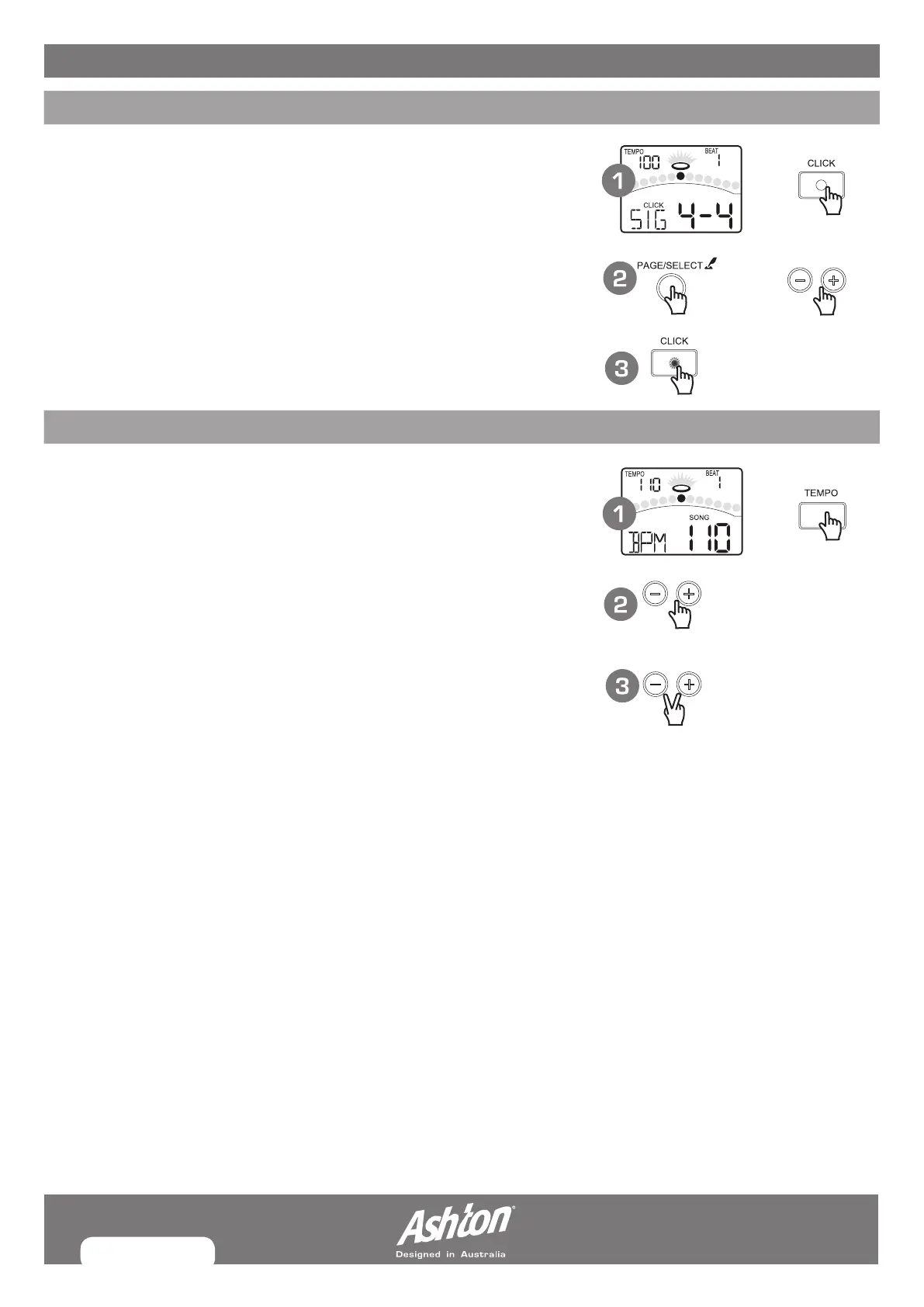
You can switch the click sound on and off by pressing [CLICK] button. When the
click plays at the current Time Signature and Tempo (displayed in the top left
corner of the LCD), the beat indicators will swing accordingly. You can set the
time signature and interval, adjust the click volume and select the click sound in
the CLICK menu.
1. Press the [CLICK] button. Start the metronome with click sound.
2. Press the [PAGE] button to select the click menu pages and press the
[–] or [+] button to adjust the parameters.
3. Press the [CLICK] button again. Stop the metronome and exit the click menu.
ADJUSTING THE TEMPO
You can adjust the tempo of the Metronome, the current song, and the current
learning pattern. The current tempo always displays in the top left corner of the LCD.
1. Press the [TEMPO] button.
2. Press the [–] or [+] button. Adjust the current tempo.
3. Press both [–] and [+] buttons at the same time, reset the current tempo to
its default value.
Note:
If there’s no operation, it will return to the previous menu page automatically
after 3 seconds.


 To Next Page