PAGE 6
BASIC FUNCTIONS
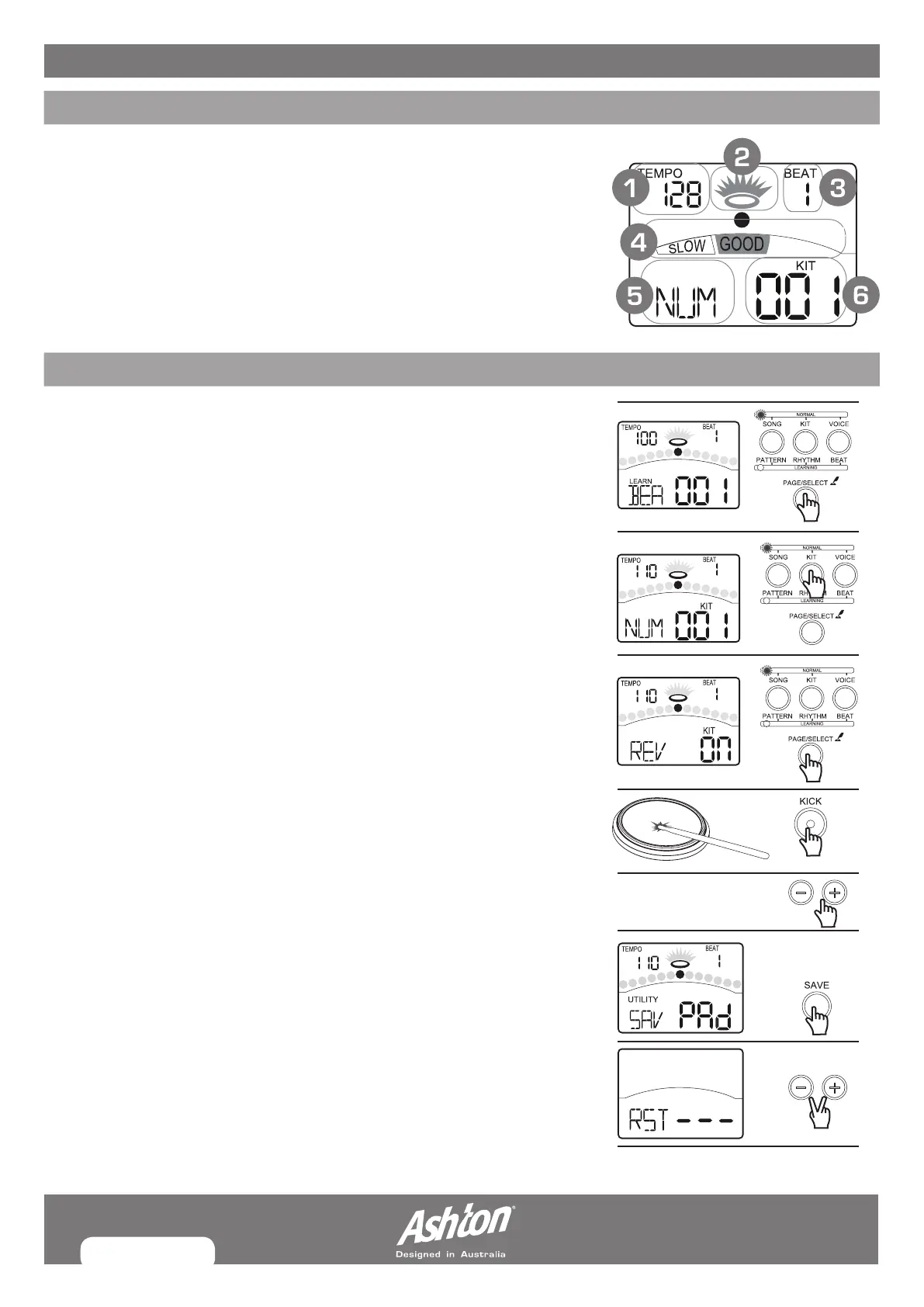
DISPLAY
1. Tempo/Measure
2. Hitting Indicator
3. Beat Count
4. Indicators for Learning
5. Indicators for Menus
6. Current Mode and Parameter Display
BASIC OPERATIONS
After you have turned on the digital drum, here’s how to perform basic
operations such as selecting modes and menu pages.
SELECTING MODES
Press and hold the [PAGE/SELECT] button for 1 second to switch modes
between NORMAL and LEARNING.
SELECTING MENUS
Press the Menu buttons to select menus.Such as [KIT], [SONG], [VOICE],
[UTILITY], etc. in Normal mode; [BEAT], [RHYTHM], [PATTERN] in Learning
mode.
SELECTING PAGES
Press the [PAGE] button or press the Menu buttons to switch the menu pages.
SELECTING PADS
Hit the pad or press the Pad button such as [KICK], [SNARE], [RIM], etc.
EDITING VALUE
Use the [–] and [+] buttons.
SAVING
Use the [SAVE] button to save kit settings and trigger settings.
FACTORY RESETTING
Hold down [–] and [+] buttons simultaneously, and turn on the power.


 To Next Page