EasyManua.ls Logo

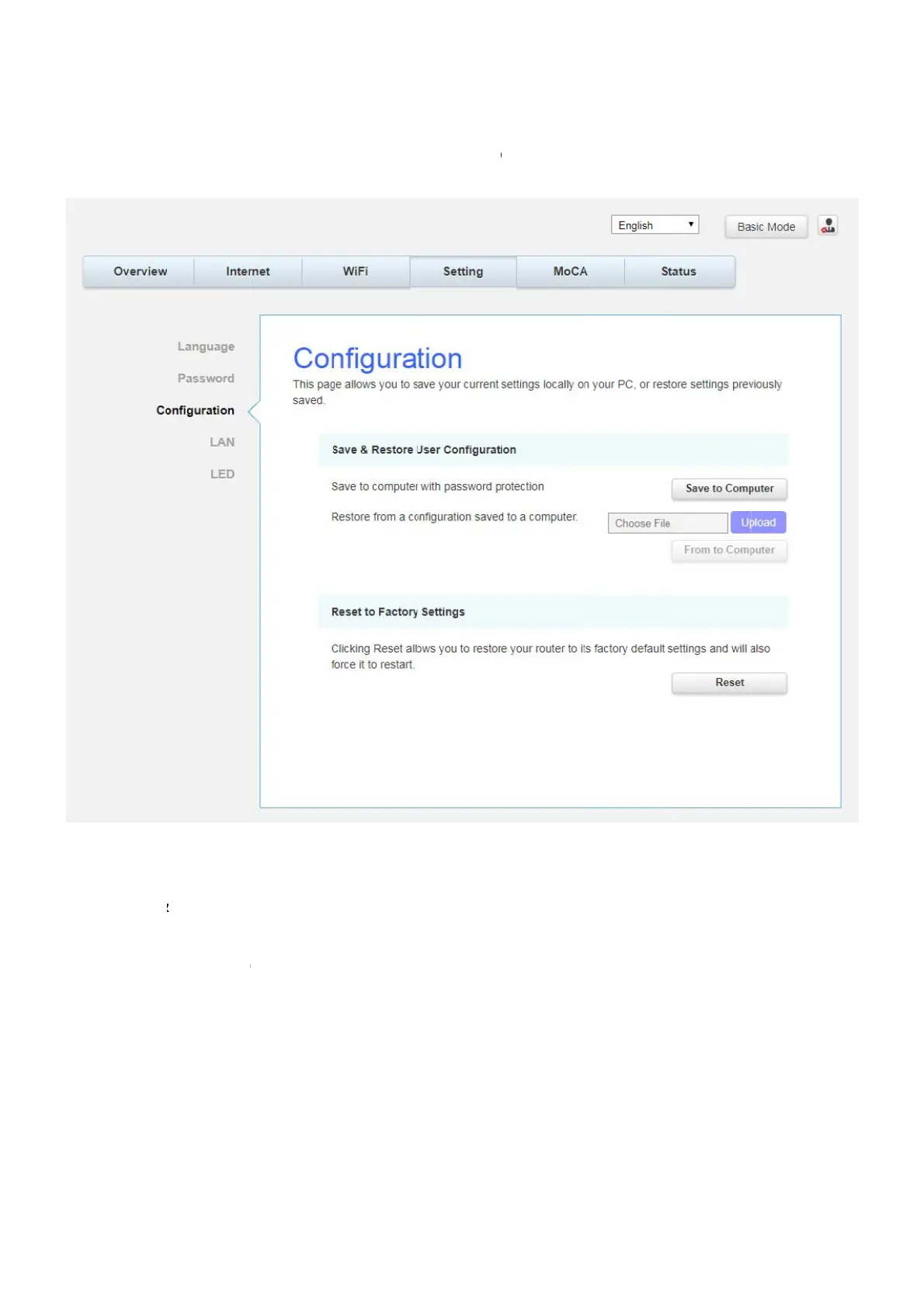
Askey TCG310 - Configuration

Askey TCG310
71 pages
Print Icon
To Next Page IconTo Next Page
To Previous Page IconTo Previous Page
Loading...
C
o
Th
pr
z
z
o
nfi
g
urat
i
h
is pa
g
e al
eviously s
a
Save
&
to Co
m
T
o rest
o
the file
(
Comp
u
Reset
t
default
s
i
on
lows you t
a
ved.
&
Restore
m
puter an
d
o
re a previ
o
(
usually b
a
u
ter to res
t
t
o Factor
y
s
ettin
g
s a
n
o save yo
u
User Co
n
d
follow th
o
us confi
g
a
ckupsetti
n
t
ore the s
e
y
Settin
gs
n
d will als
o
u
r current
s
Fig.2-19
S
n
fi
g
uratio
n
e prompts
uration, cl
ng
s.con
f
.)
e
ttin
g
s. On
s
: Click R
e
o
force it t
o
s
ettin
g
s lo
c
S
etting\Co
n
n
:
T
o bac
k
.
ick Uploa
d
Once the
f
ce the set
t
e
se
t
allow
s
o
restart.
c
ally on y
o
n
fi
g
uratio
n
k
up the c
u
d
and use
f
ile has be
e
t
in
g
s are r
e
s
you to re
o
ur PC, or
r
n
u
rrent con
f
the navi
ga
e
n located
,
e
stored, t
h
store your
r
estore se
t
f
i
g
uration,
a
tion wind
o
,
click Fro
m
h
e device
w
router to
Page36
/
t
tin
g
s
click Sav
e
o
w to loca
t
m
to
w
ill reboot
.
factory
/
71
e
t
e
.

Table of Contents

Related product manuals