15
1234 5
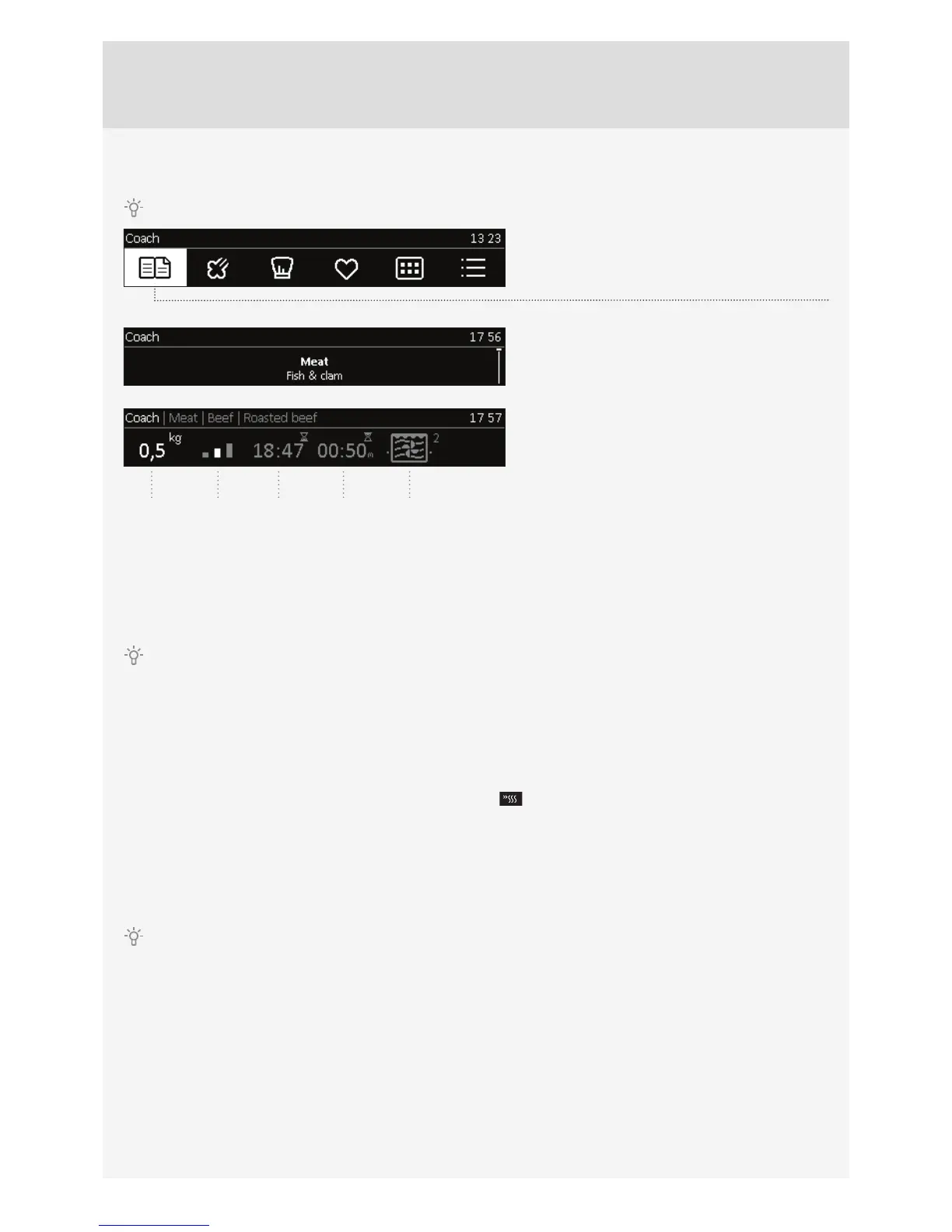
A) COOKING BY SELECTING THE TYPE OF FOOD (Auto mode)
Confi rm each setting by pressing the KNOB.
Rotate the KNOB and select the Auto mode.
Confi rm the setting by pressing on the KNOB.
Select the type of food and the dish. Confi rm the
selection.
Preset values will appear. Rotate the KNOB and
confi rm by pressing the KNOB to change these
settings.
1 Amount
2 Doneness
3 Delayed start
4 Cooking duration
5 Cooking system and recommended level
When in the Auto mode, choose the duration or system symbol to open the Professional mode (see section on
COOKING BY SELECTING THE OPERATING MODE).
Touch the START/STOP key to start oven operation.
All selected settings are indicated on the display.
PREHEAT
Some dishes in the Auto mode also include the preheat function
..
When you select the food, the following note will appear: »Selected program includes preheating.« Preheating
started. Do not insert the food yet. The symbol °C will fl ash on the display.
When the selected temperature is reached, the preheating process stops and an acoustic signal is emitted.
The following note will appear on the display: »Preheating complete«. Please insert the food. Open the door or confi rm
by pressing the KNOB. The program then resumes the cooking process with selected settings.
When the preheat function is set, delayed start function cannot be used.



 To Next Page