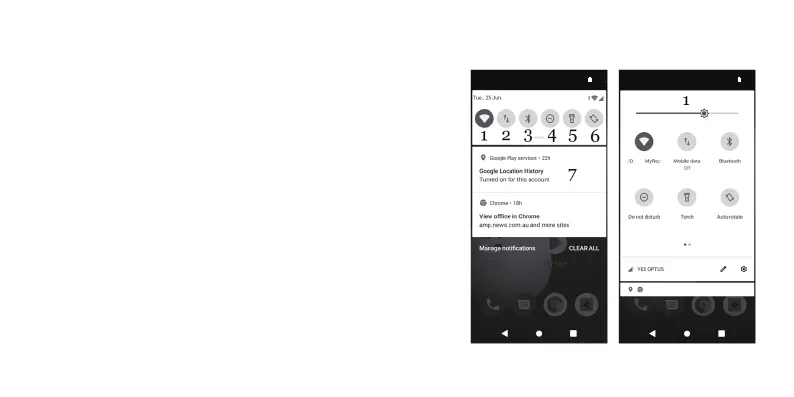
Can be accessed by swiping one finger in a downwards motion from the top of the screen when the phone is
unlocked and on the Home Screen.
•Once opened, you can quickly enable and disable these options by tapping on them once.
•To go into the respective icon’s advanced options, tap and hold one finger on the icon until your phone
transitions to the advanced options screen.
1.Wireless Networks
2.Mobile Network Data
3.Bluetooth
4.Do Not Disturb
5.Flashlight/Torch
6.Screen Orientation Lock
7.Notifications
For notifications (7), you can remove them by holding one finger on them and swiping to the right.
You can swipe one finger down again after this to bring down an advanced Panel, which has access to more
settings.
The advanced panel allows you to see what the icons are and allow you to adjust brightness (1) and further
additional settings.
To access additional settings, swipe one finger from the right side of the screen to the left.
Screenshot – You can quickly take a photo of what is currently on your device screen by holding the power
and volume down buttons together for three seconds.
Alternatively, you can hold the power button for three seconds to bring up the option of taking up a screenshot
on the right side of the screen.
Navigation Buttons and Task Manager – Depending on the context of the screen, you will have
three buttons to use at the bottom of the screen.
13
12:00
PM
100%
12:00
PM
100%



 To Next Page