2524
Installing Hand Brakes
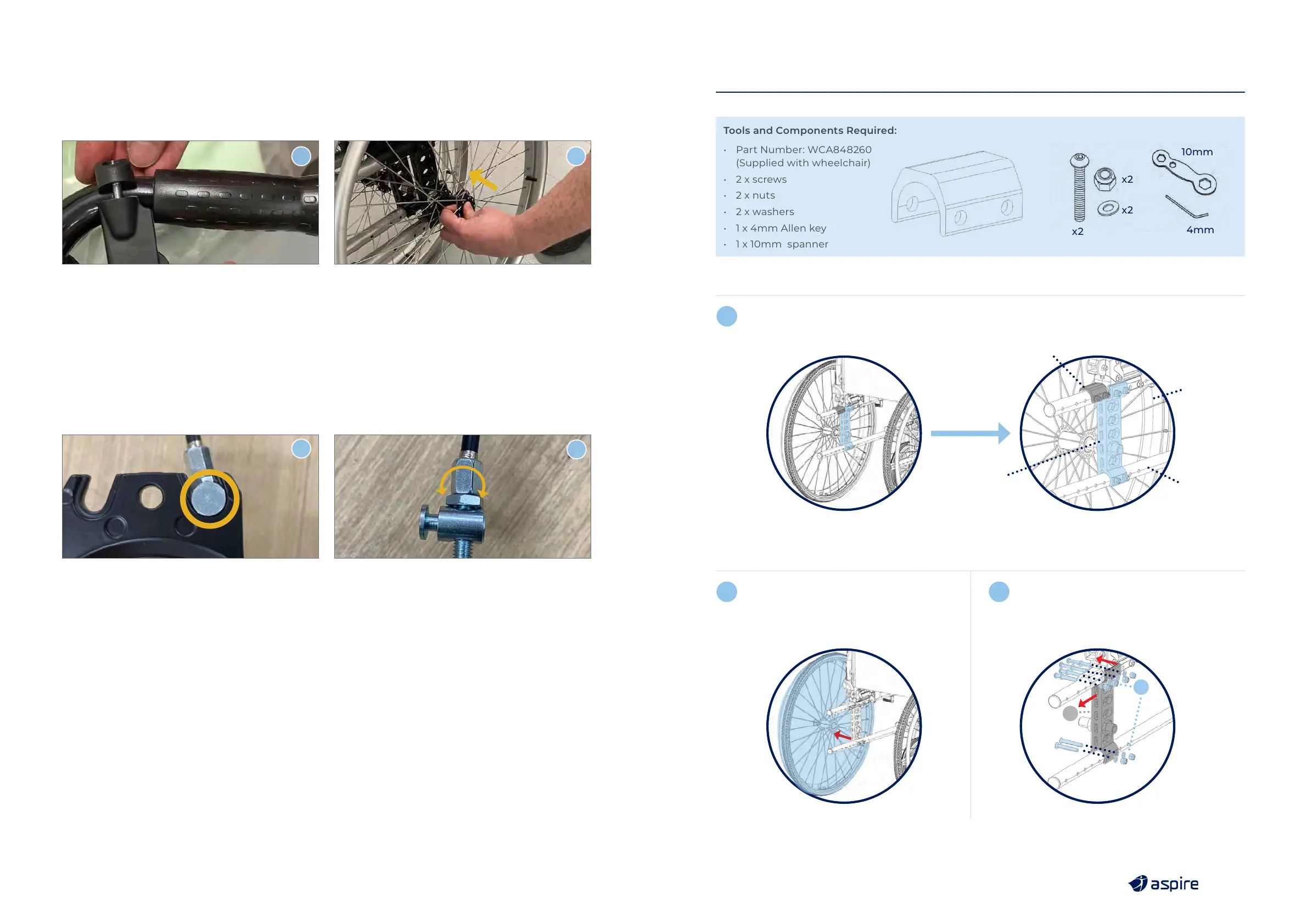
1. Mount hand brake to wheelchair handle & fasten in place with a 4mm Allen key.
2. Fasten wheel to wheelchair by locking in place with the quick release axle provided in the box.
3. Repeat steps 1 to 8 for the other side.
1
2
Adjusting Brake Strength
If brakes require tightening or loosening, follow below steps.
1. Remove wheel and quick release axle from wheelchair, slide out brake cable.
2. Adjust brake strength: Tighten (Clockwise) & Loosen (Anti-Clockwise).
3. Reposition brake cable & wheel and lock into place with quick release axle.
1
2
13. AMPUTEE SETTING ADJUSTMENT
Tools and Components Required:
• Part Number: WCA848260
(Supplied with wheelchair)
• 2 x screws
• 2 x nuts
• 2 x washers
• 1 x 4mm Allen key
• 1 x 10mm spanner
x2
x2
x2
10mm
4mm
Original Position
Rear Wheel
1.
Rear Axle
Mounting Plate
Frame
Detail
WCA848260
b
a
2. Detach wheel off the frame. 3. a. Loosen fastener.
b. Move the rear axle mounting plate backward.
1
2
3



 To Next Page