18
English
1
3.1.2 Removing the Top Cover
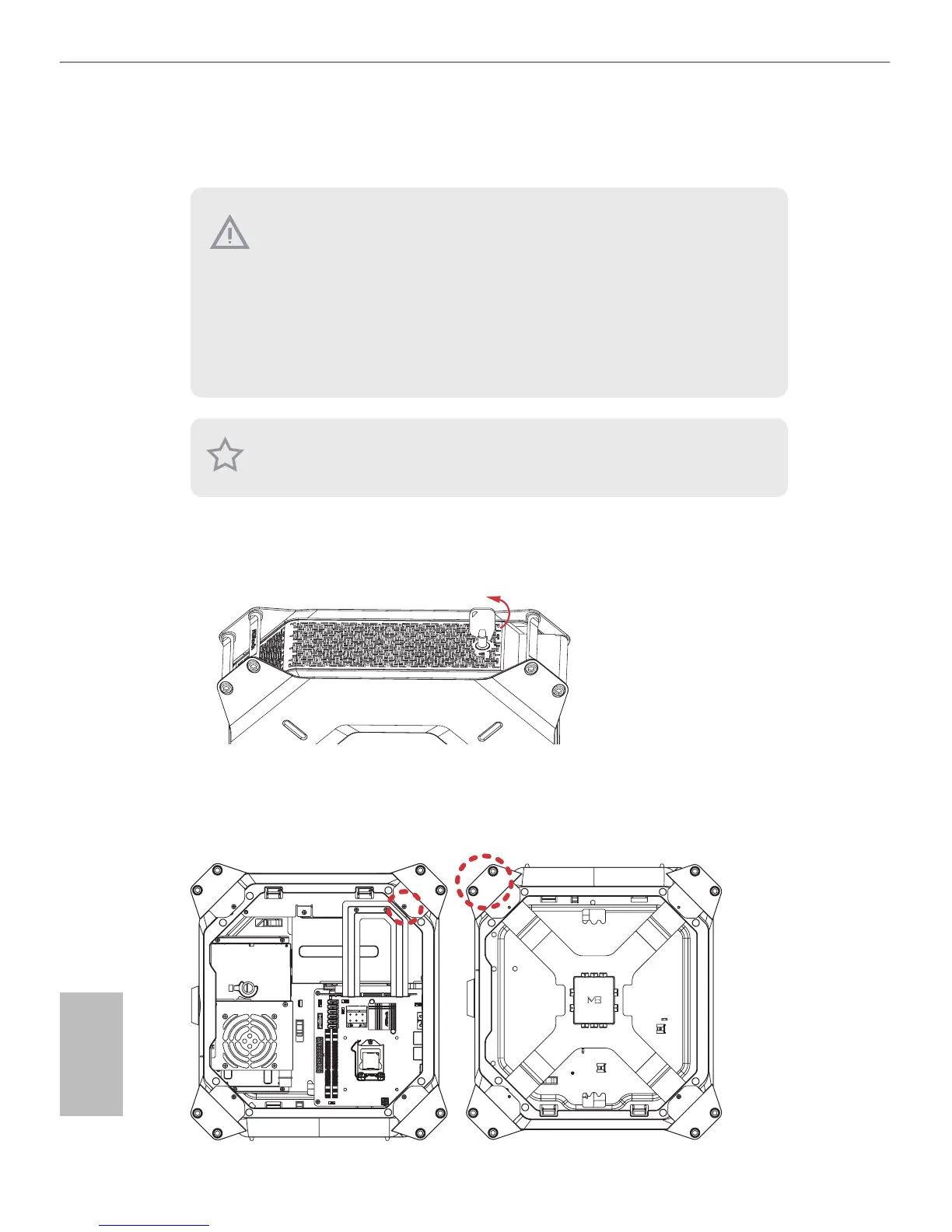
1. Place the system in an upright position.
2. Unlock the system keylock on the top cover.
3. Follow the instructions in Section 3.1 to remove the right side panel.
4. Remove the one screw and two hexagon nuts that secure the top right bracket ear to the
top cover.
1. To remove the top cover, you have to follow the procedures below:
1) Power o the system and unplug the power cord.
2) Unlock the keylock on the top cover using the system key.
3) Follow the instructions in Section 3.1 to remove the right side panel.
4) Slide the top cover toward the front of the system until it releases from the latch.
2. Aer the top cover is replaced, make sure to lock the keylock on the top cover and then
power on the system.
3. e system must be operated with the chassis top cover installed to ensure proper cooling.
Remove the top cover to add graphics card or install hard drives.




 To Next Page