M8
79
English
Step 4
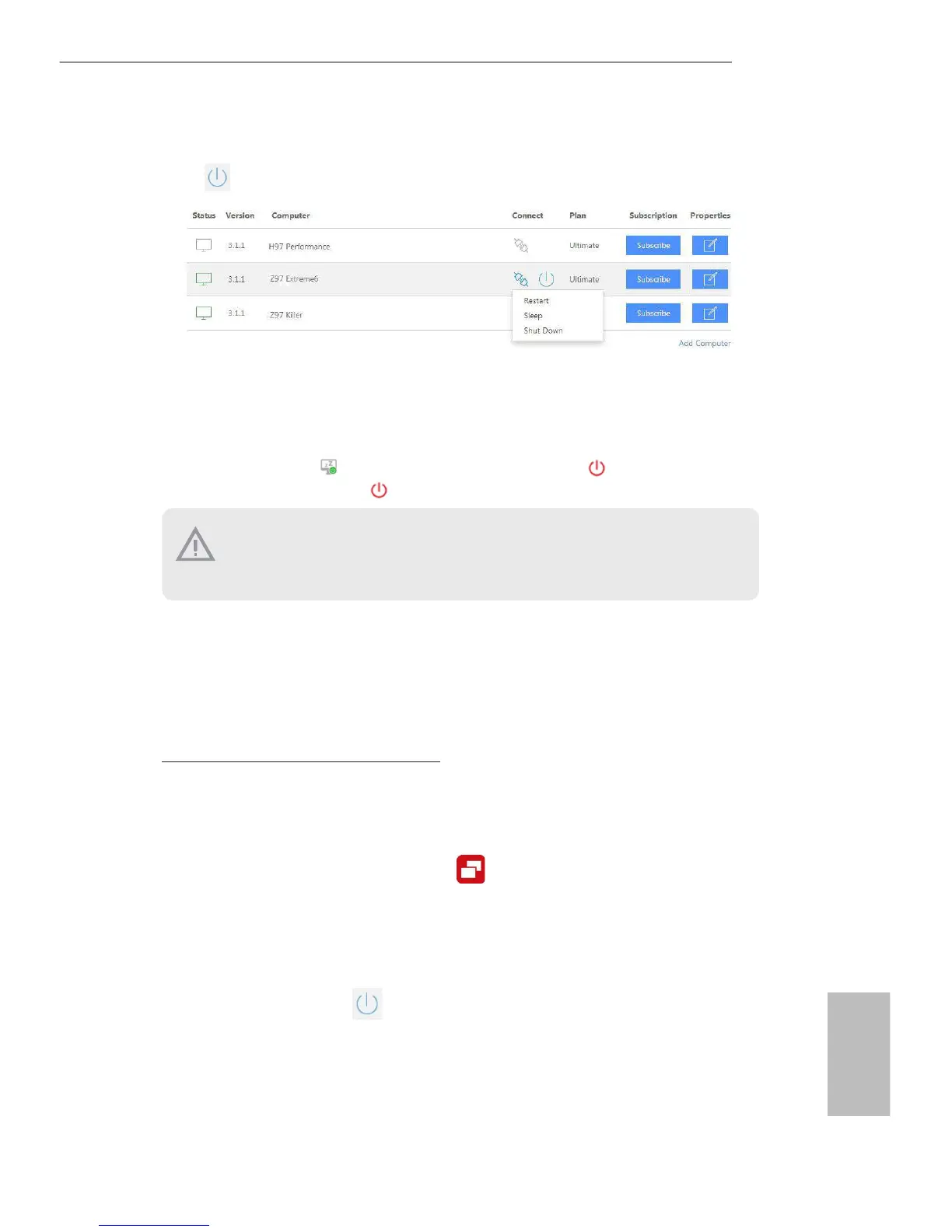
Click
and power options appear. Click to select Restart, Sleep or Shut Down.
Select Restart from the options to restart your host computer remotely.
When you select Sleep, if the host device is WOW(Wake-On-Wan) compatible, you can
put your host computer to sleep (S3/S4). e host status in the Status column shows oine
and ready to be awaked
and the power option shows wakable .
To wake up the computer, click .
If you select Shut Down, you can turn o your computer remotely. However, the Intel®
Remote Wake Technology does not support remote wake-up from shutdwon (S5).
Please physically turn on your host computer.
For iOS or Android Mobile Devices users:
Download and install “Orbweb.ME Professional” app from the App Store (iOS) or Play
Store (Android).
Step 1
Tap the “Orbweb.ME Professional” app icon
to launch it.
Step 2
Log in with your
Orbweb.ME account and password.
Step 3
Tap the Power Options icon
and power options appear.
Please be noted that if the host device is not WOW compatible, the host status icon
will turn oine and the power option icon will disappear. You have to physically
wake up computer in order to bring power option icon back to online.





 To Next Page