PROGRAMMING (T MODEL ONLY)
Setting Current Time/Day
Select POOL MODE Standby/Off
(a) Press the CLOCK button
(b) Press DAY to change the current day
(c) Press HOUR to move the Display cursor to the hour digits and then use the Up and Down arrows to the right of the
display to change the current hour
(d) Press MIN to move the Display cursor to the min digits and then use the up and down arrows to the right of the
display to change the current minutes
(e) Press the CLOCK button to exit the clock setting mode.
Setting Timers
Your Chlorinator has 4 timers enabling you to set four different periods in which your chlorinator/pump will operate.
Different periods can be set for the weekend compared to weekdays. Timers are set by entering a start time, and a period
for how long you want to operate (i.e. Mon – Fri T1 On 14:00 and Mon – Fri T1 Period 6:15 will run the chlorinator/pump
during weekdays from 14:00 for 6.25 hours). To set timers, do the following:
(f) Select POOL MODE Standby/Off
(g) Press the TIMER button to step to the timer you want to set
(h) Press DAY button to step from Mon-Fri to Sat-Sun and Visa versa
(i) Press HOUR button to set the hour for the timer selected and use the Up/Down arrows to change the time. NOTE:
Hour digits go from Not Used and then 0 to 23. If you don’t want to use this timer, select Not Used.
(j) Press MIN button to select the minutes for the timer selected and use the Up/Down arrows to change the time.
Press the TIMER button to select the Period or another time and set as required.
(k) When finished, press the TIMER button a number of times to scroll through the other times until you return to
normal display. This saves your new settings.
(l) Select POOL MODE Auto.
Programming Recommendations
AstralPool recommend that you use two timers, one for the morning and one for the evening and typically for periods of 2-5
hours for each. Your chlorinator is most effective if running in the early morning or evening when it is cooler (strong sunlight
consumes more chlorine). As a default, the control is set to come on at 08:00 and 16:00 both for periods of 4 hours.
NOTE: Due to different time clock settings for weekday and weekends, the timer periods cannot be set to run past
midnight (24:00 hours). If you cannot adjust the start time for a timer period, it is likely the period of run time is set to go
beyond 24:00 hours. To correct this, reduce the period run time first, then return to the start time and adjust.
An example of this is if you have your timer period set to run for 4 hours, the chlorinator will not allow the start time to be
set any later than 19:59. If you require the chlorinator to start at 20:00 hours, the running period must be less than 4 hours
to prevent cross over to the next day.
CHLORINE OUTPUT
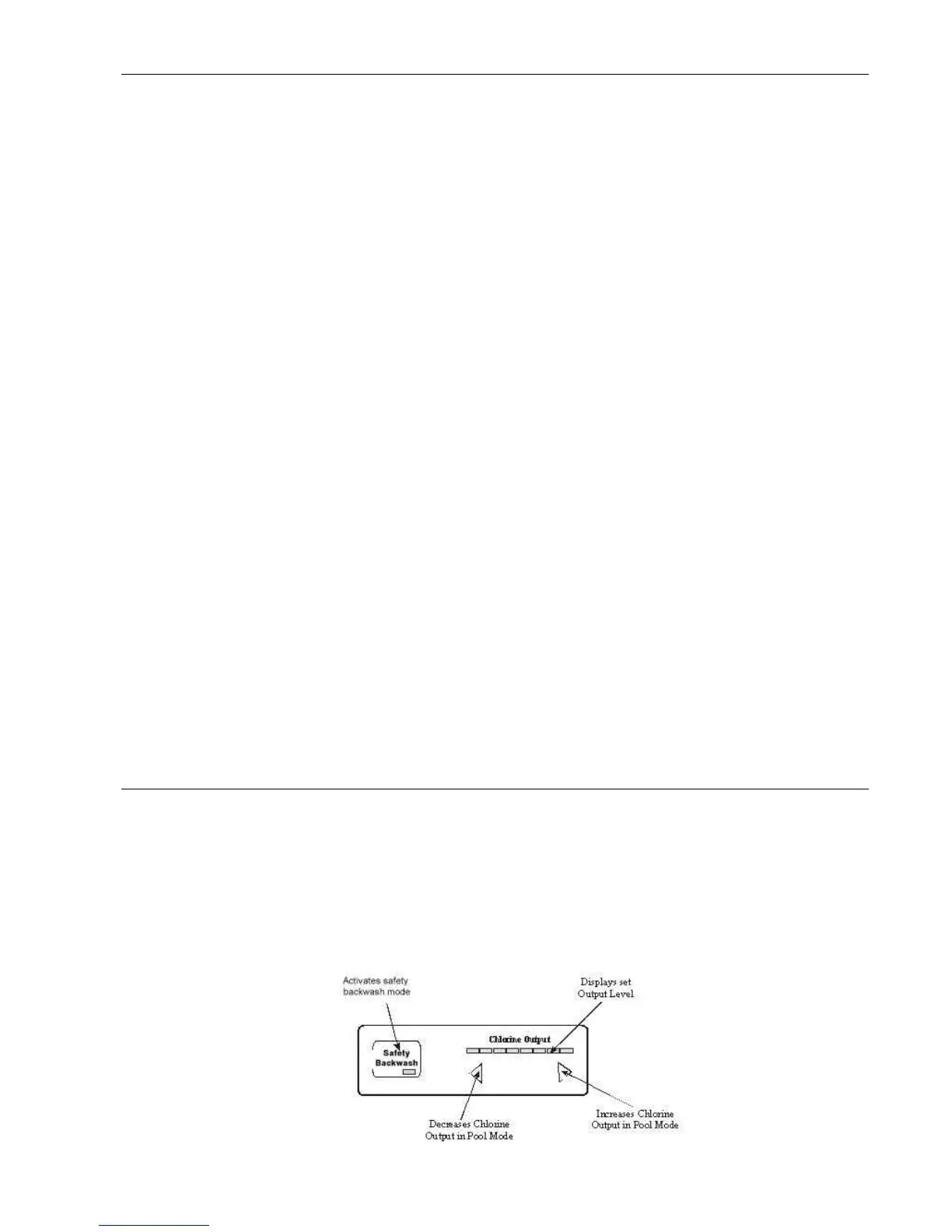
The Chlorine Output Control area of the user panel has three main functions:
(a) Increase/Decrease arrows for setting the chlorine output level of the chlorinator. The chlorinator output can be set
from levels 1 through to 8. This level only applies to Pool Mode. When the Chlorinator is in Spa mode, the chlorine
output will be at level 1.
(b) Chlorine Output display shows the level set.
(c) The LCD display will also show an output level from 1 to 8 which indicates the performance of the chlorinator
compared to the Chlorine Output LED’s. Should the LCD output level (1 to 8) be less than the LED output, check salt
level in pool. Should salt level be at 4000 ppm and output more than 2 settings less than LED display, your cell may
need replacing.


 To Next Page