SAFETY BACKWASH
When backwashing your sand filter, the pool water does not pass through the cell. During the backwash and rinse process,
most chlorinators will build up potentially explosive hydrogen gas in the Chlorinator Cell.
The Safety Backwash function allows the pump to turn on without applying power to the Chlorinator Cell. This prevents the
build up of hydrogen gas during the back wash and rinse process. In addition, the Safety Backwash function has set run
times after which the pump will automatically turn off. This will prevent extended backwashing and potential excessive
water loss from the pool.
To Back Wash and Rinse your filter follow these steps:
1. Press the pool mode button to the “off/standby” mode
2. Turn the Multiport Valve to “Backwash” position
3. Press the Safety backwash button on the user panel – the pump will now start without applying power to the
chlorinator cell
a. Press once for one minute pump operation
b. Press twice for two minute pump operation
c. Press three times for three minute pump operation
d. Press four times to turn pump off
4. After pump turns off turn the filter multiport valve to Rinse
5. Press the Safety backwash button on the user panel once for a one minute rinse
6. When pump turns off, move the multiport valve back to filter position
7. Press the pool mode button to “Auto” function so that chlorinator will operate on time clock settings.
RUN DRY SAFETY FEATURE
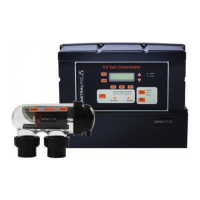
Your VX Chlorinator incorporates a run dry safety cut out. When the Chlorinator turns the filter pump on, it will check for
water flow. If no water flow is detected within 3 minutes, the chlorinator will turn the pump off. This is designed to protect
the pump seal and parts from overheating if no water flow is present.
On initial start up, you will need to prime the pump. In some cases, the pump will take more than three minutes to prime
and for water flow to be detected by the chlorinator. If this should occur, simply start the pump again by pressing the Pool
Mode button to “on”.
If during normal operation, the chlorinator switches the pump off after three minutes, then check the position of all valves,
empty skimmer basket and pump basket and clean the filter.
PLEASE SEE PAGE 11 FOR THE RECOMMENDED METHOD OF CELL CLEANING.
GENERAL OPERATION/POOL CHEMISTRY
SETTING THE RIGHT CHLORINE OUTPUT AND FILTRATION TIME
Your VX Chlorinator must be run every day to ensure that your pool is correctly sanitised. As the sun dissipates chlorine,
running times are higher in the summer compared to the winter. AstralPool recommend that you initially run you
chlorinator at maximum output.
Summer
You should set your Chlorinator to operate for 8 to 10 hours per day. Ideally, run it for 4-5 hours in the morning (say 8-
12pm) and 4-5 hours in the evening (say 6.00-11pm).
In extremely hot weather it may be necessary to extend the running time if you find that the free chlorine level is too low.
Winter
You should set your Chlorinator to operate for 6 to 8 hours per day. Again, running it in the morning and evening is
preferable.
Checking Chlorine Level
Ideally, check your Chlorine level after the morning operating period. The free chlorine residual level should be somewhere
between 1 and 3 parts per million. Increase or decrease the output of the Chlorinator to get the right residual chlorine level.
It may also be necessary to adjust the operating period if you are running at minimum or maximum output.


 To Next Page