Chapter 1: Knowing the Parts
1-10
Rear Side
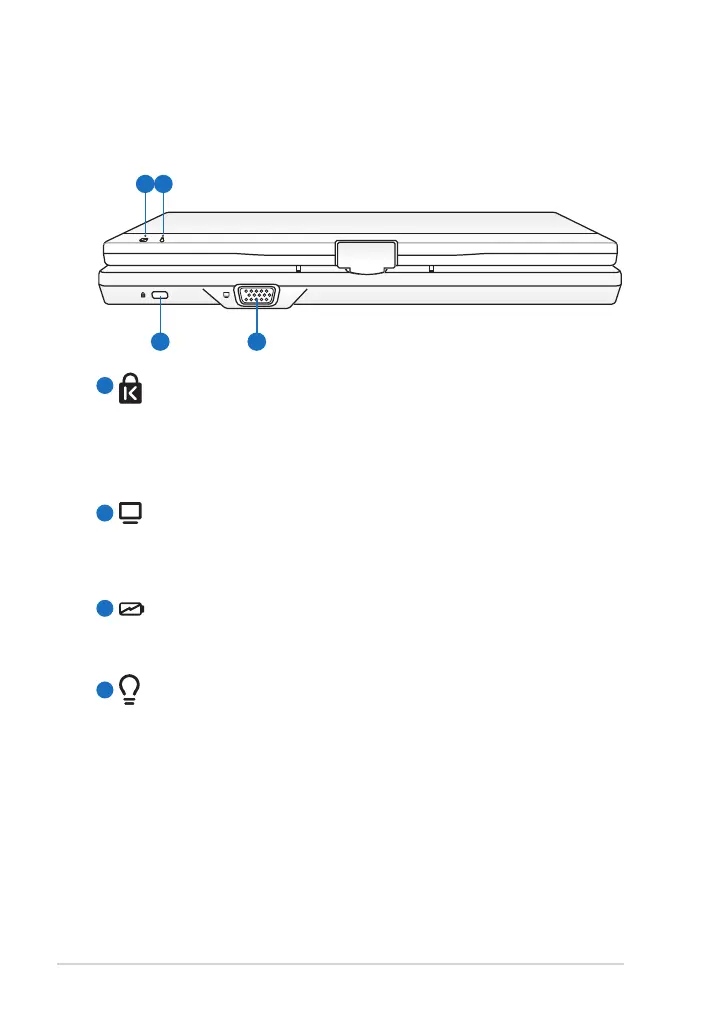
Refer to the illustration below to identify the components on this side of
the Eee PC.
Kensington® Lock Port
The Kensington® lock port allows the Eee PC to be secured
using Kensington® compatible security products. These security
products usually include a metal cable and lock that prevent the
Eee PC to be removed from a fixed object.
Display (Monitor) Output
The 15-pin D-sub monitor port supports a standard VGA-
compatible device such as a monitor or projector to allow
viewing on a larger external display.
Battery Charge Indicator
The battery charge indicator (LED) shows the status of the
battery’s power. Refer to the LED status table on pages 1-3 to 1-4.
Power Indicator
The power indicator lights when the Eee PC is turned ON and
blinks slowly when the Eee PC is in the Save-to-RAM (Suspend)
mode. This indicator is OFF when the Eee PC is turned OFF.
1
2
3
4



 To Next Page