Chapter 3: Using the Eee PC
3-4
Bluetooth Connection
This device contains FCC ID: TLZ-BT253 and IC ID:6100A-AWBT253.
Bluetooth technology eliminates the need for cables for connecting
Bluetooth-enabled devices. Examples of Bluetooth-enabled devices may
be Notebook PCs, Desktop PCs, mobile phones, and PDAs.
To connect to a Bluetooth-enabled device:
1. Press <Fn> + <F2> repeatedly
until Bluetooth ON or WLAN &
Bluetooth ON is shown.
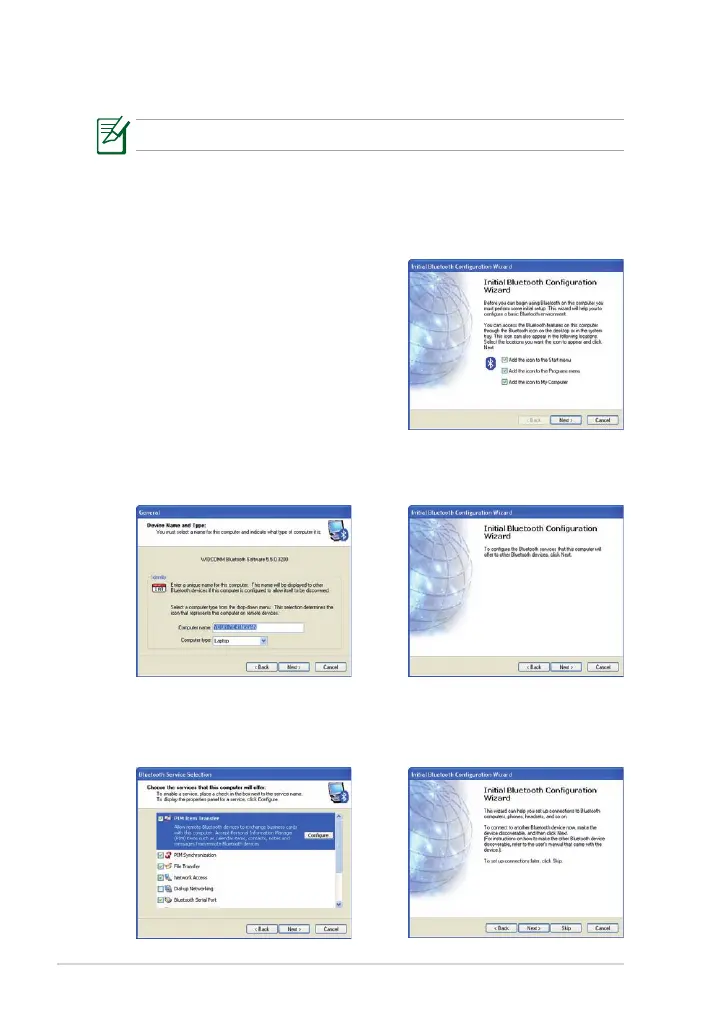
2. Click My Bluetooth Places on the
desktop and follow the onscreen
instructions to finish initialization.
Click Next to continue.
4. To decide the Bluetooth
services this device offers, click
Next to continue.
3. Name your Eee PC and select
the device type. Click Next to
continue.
5. Select the service you would
like to offer from the list and
click Next to continue.
6. Click Next to start setting up
the Bluetooth connection.



 To Next Page