Chapter 3: Using the Eee PC
3-14
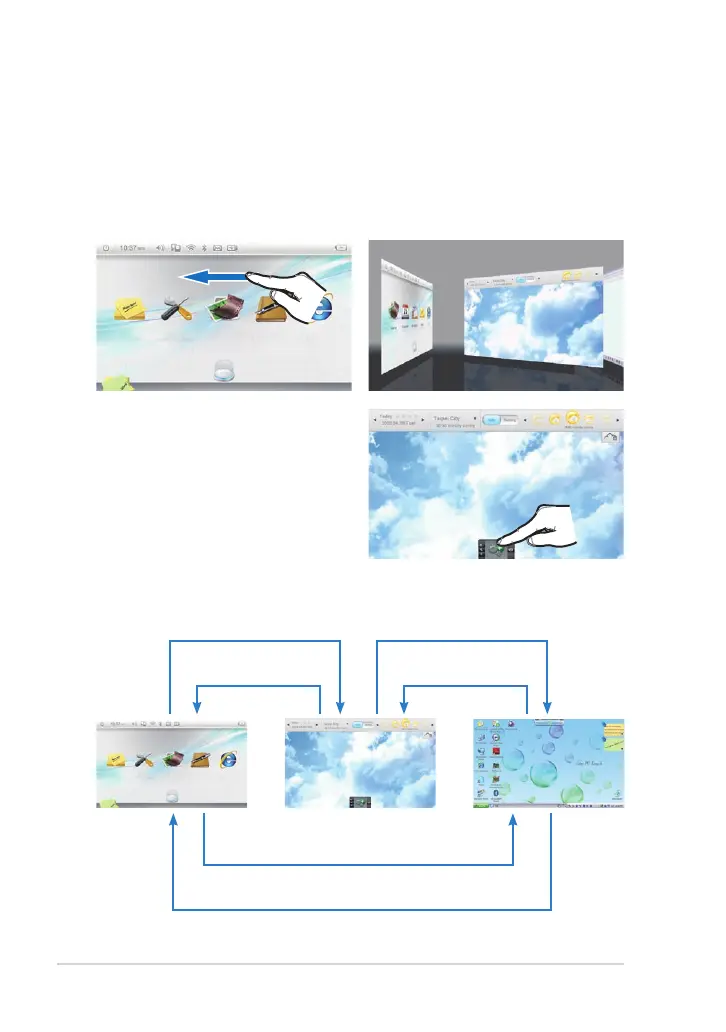
Switching to Widgets Mode
To switch to Widgets mode:
3. Once connected to the
Internet, the weather widget
automatically shows local
weather status. Tab the “+”
icon below to show and use
more widgets.
1. Slide leftward on any empty
area of the Touch Gate main
screen.
2. The desktop switches to
Widget mode.
4. You can freely switch your desktop from Windows mode, Widget
mode and Touch Gate mode.
Slide rightward to Windows mode
Tap the Touch Gate Mode icon from the Eee Docking
Touch tool bar or Press the Home key to Touch Gate mode
Slide leftward to Widget mode
Slide rightward to
Touch Gate mode
Slide leftward to Windows mode
Tap Widget in the Eee Docking
Touch tool bar to Widget mode



 To Next Page