EasyManua.ls Logo

Asus H97M-PLUS - Product Introduction Continued; Motherboard Layout Diagram

Asus H97M-PLUS
80 pages
Print Icon
To Next Page IconTo Next Page
To Previous Page IconTo Previous Page
Loading...
H97M-PLUS
Place this side
towards the rear
of the chassis
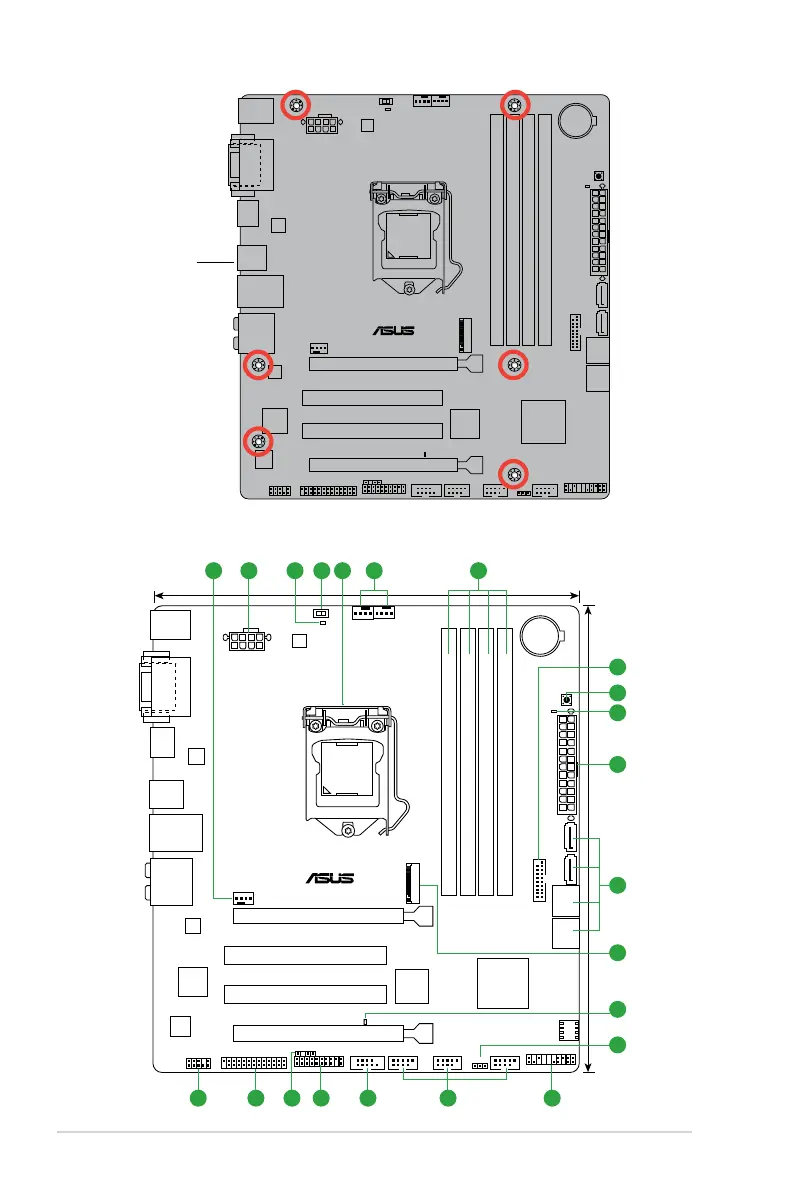
1.2.3 Motherboard layout
H97M-PLUS
PCIEX16_1
PCI1
PCI2
PCIEX16_2
M.2(SOCKET3)
Intel
I218V
ASM
1442K
USB910 USB1112 USB1314
AAFP
EATXPWR
CPU_FAN
BATTERY
Super
I/O
ASM
1083
ALC
887
KBMS
DVI_VGA
SB_PWR
CLRTC
SPDIF_OUT
22.4cm(8.8in)
DDR3 DIMM_A1 (64bit, 240-pin module)
DDR3 DIMM_A2 (64bit, 240-pin module)
DDR3 DIMM_B1 (64bit, 240-pin module)
DDR3 DIMM_B2 (64bit, 240-pin module)
SATA6G_1SATA6G_2
SATA6G_34SATA6G_56
LAN_USB3_34
HDMI
USB3_56
CHA_FAN1
CHA_FAN2
24.4cm(9.6in)
LGA1150
DIGI
+VRM
COM
EATX12V
USB3_12
Intel
®
H97
TPM
BIOS
PANEL
GPU
LPT
GPU_LED
AUDIO
DRAM_LED
MemOK!
21 54 61
15 141617181920
2
8
7
9
11
13
12
10
3
1-2
Chapter 1: Product introduction

Table of Contents

Related product manuals