22
ASUS Xonar D2X
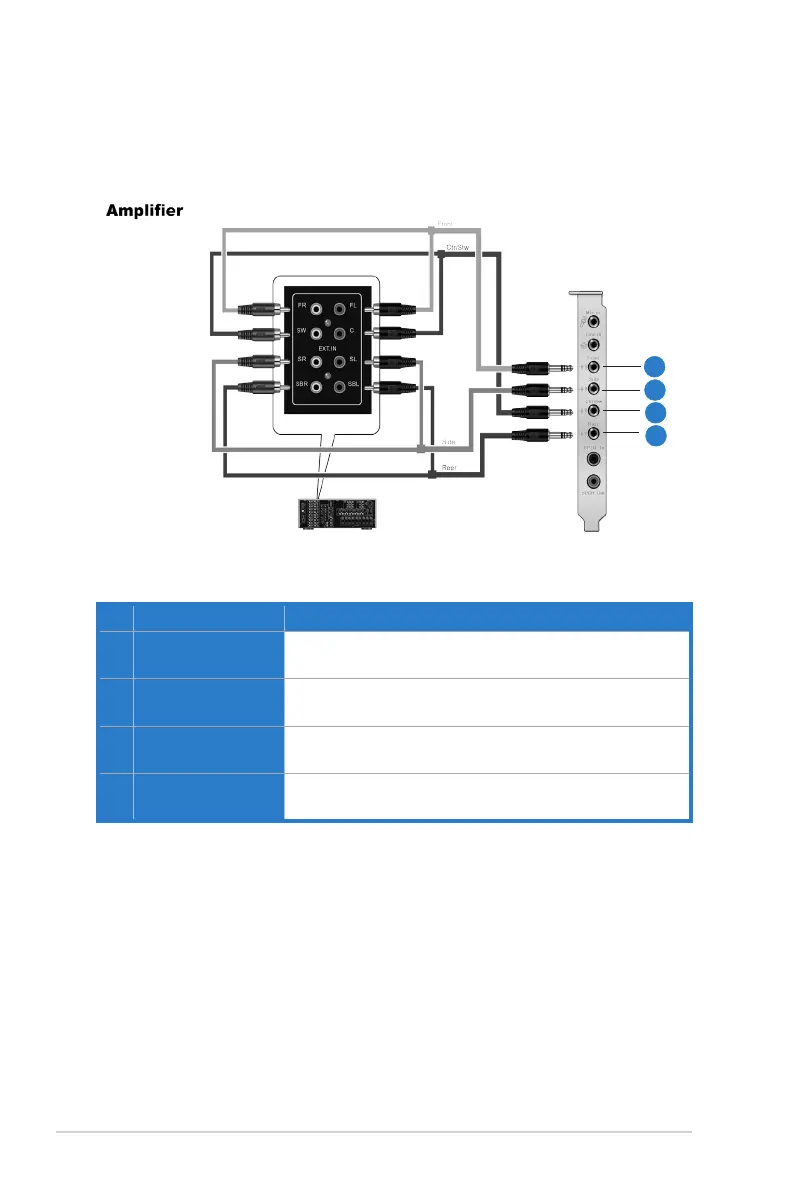
5.3 Connecting Analog Speaker Systems
5.3.1 Connecting Analog Power Amplier
1
2
3
4
No Item Description
1 Front Out
Connects to the “left front” and “right front” input ports of the
analog amplifier with the mini-jack to RCA cable.
2 Side Surround Out
Connects to the “left surround” and “right surround” input
ports of the analog amplifier with the mini-jack to RCA cable.
3 Center/Subwoofer
Connects to the “Center” and “subwoofer” input ports of the
analog amplifier with the mini-jack to RCA cable.
4 Back Surround Out
Connects to the “left back” and “right back” input ports of the
analog amplifier with the mini-jack to RCA cable.



 To Next Page