52
ASUS Xonar D2X
No Item Description
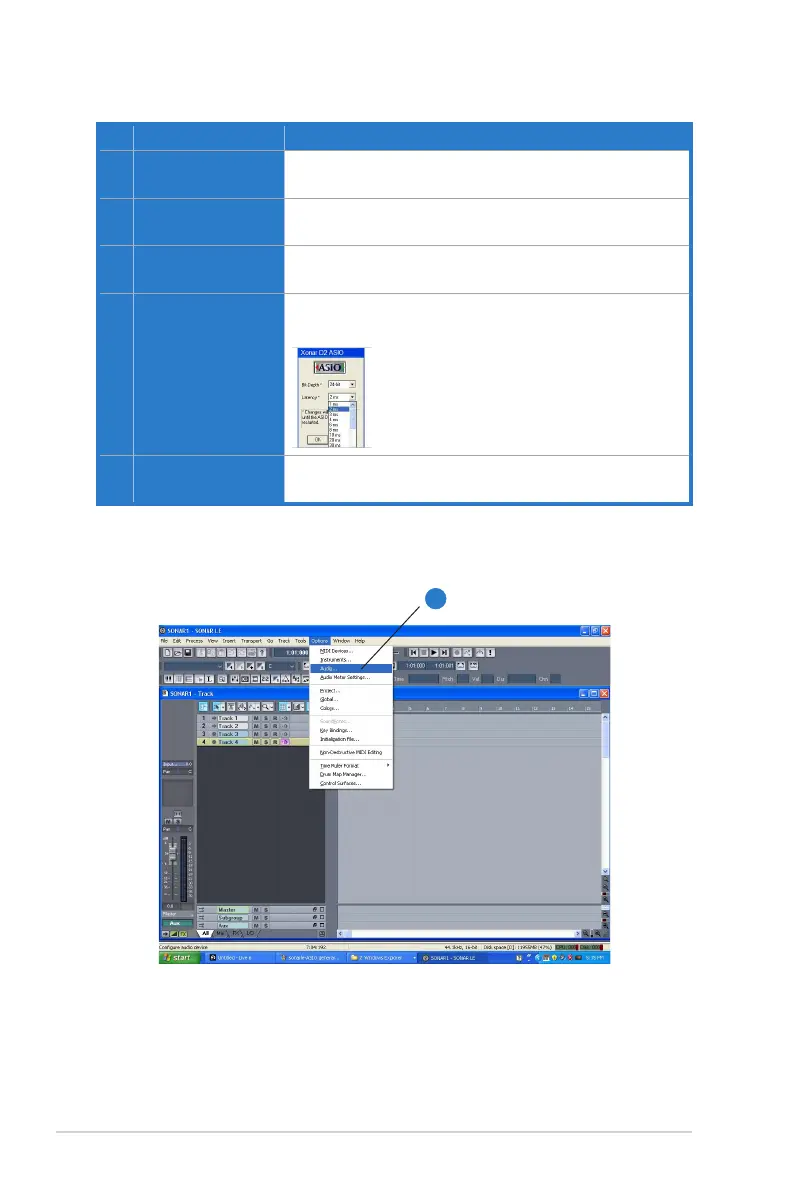
1 Preferences
Step 1 is to open the “Preferences” window from the Options
tab.
2 Driver Type
Step 2 is to select “ASIO” as the driver type. (WDM and MME
are other Windows driver types)
3 Audio Device
Step 3 is to choose “ASUS Xonar D2X ASIO” as the Audio
Device.
4 Hardware Setup
Step 4 is to click the Hardware Setup to configure the Bit-
depth (16/24bit) and latency (1ms~300ms).
5 Sample Rate
Step 5 is to select the sample rate from 44.1, 48, 96,
192KHz.
When Using Sonar LE…
1



 To Next Page