39
ASUS Xonar D2X
6.2.8 Dolby Virtual Speaker
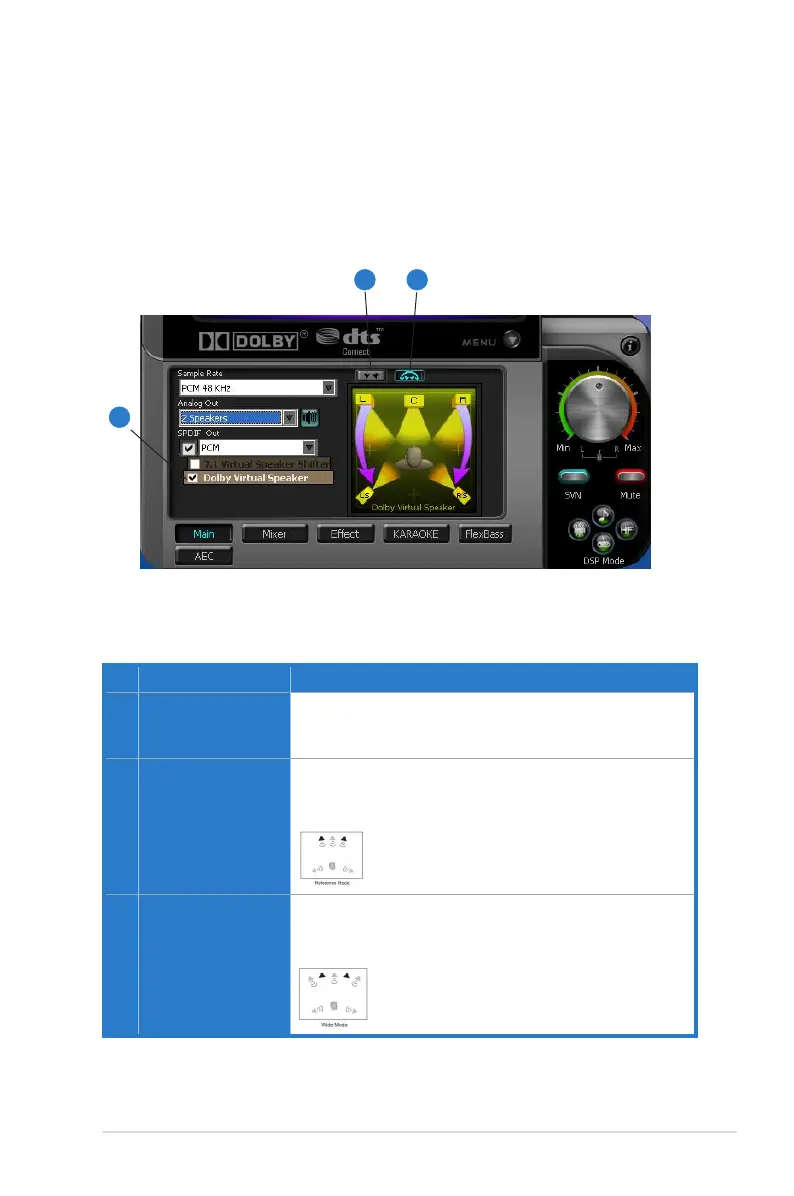
Dolby Virtual Speaker technology simulates a 5.1-speaker surround sound
listening environment from as few as two speakers. Dolby Virtual Speaker also
creates a wider two-channel environment during playback of stereo CDs and MP3
content, and when combined with Dolby Pro Logic® II processing, delivers a virtual
5.1-channel surround listening experience from any high-quality stereo source.
No Item Description
1 Dolby Virtual Speaker
enable/disable
Click this check box to enable Dolby Virtual Speaker. Clicking
the text bar will switch the right window to a Dolby Virtual
Speaker page for manual adjusting.
2 Reference Mode
Dolby Virtual Speaker provides two modes of virtualization:
The first is Reference mode, which virtualizes the missing
speakers as in the following picture.
3 Wide Mode
Wide mode virtualizes the necessary speakers and
enhances the surround experience as in the following
picture.
1
2 3



 To Next Page