6
NT2508 / NT2504 / NT1308 / NT1304 / NT4004
English
4.4 IP ADDRESS SETUP
Connecting the NT series network amplier to a computer
for remote operation requires the user to enter an IP
address for the unit� There are two controls that help
determined the IP address of the NT network ampliers.
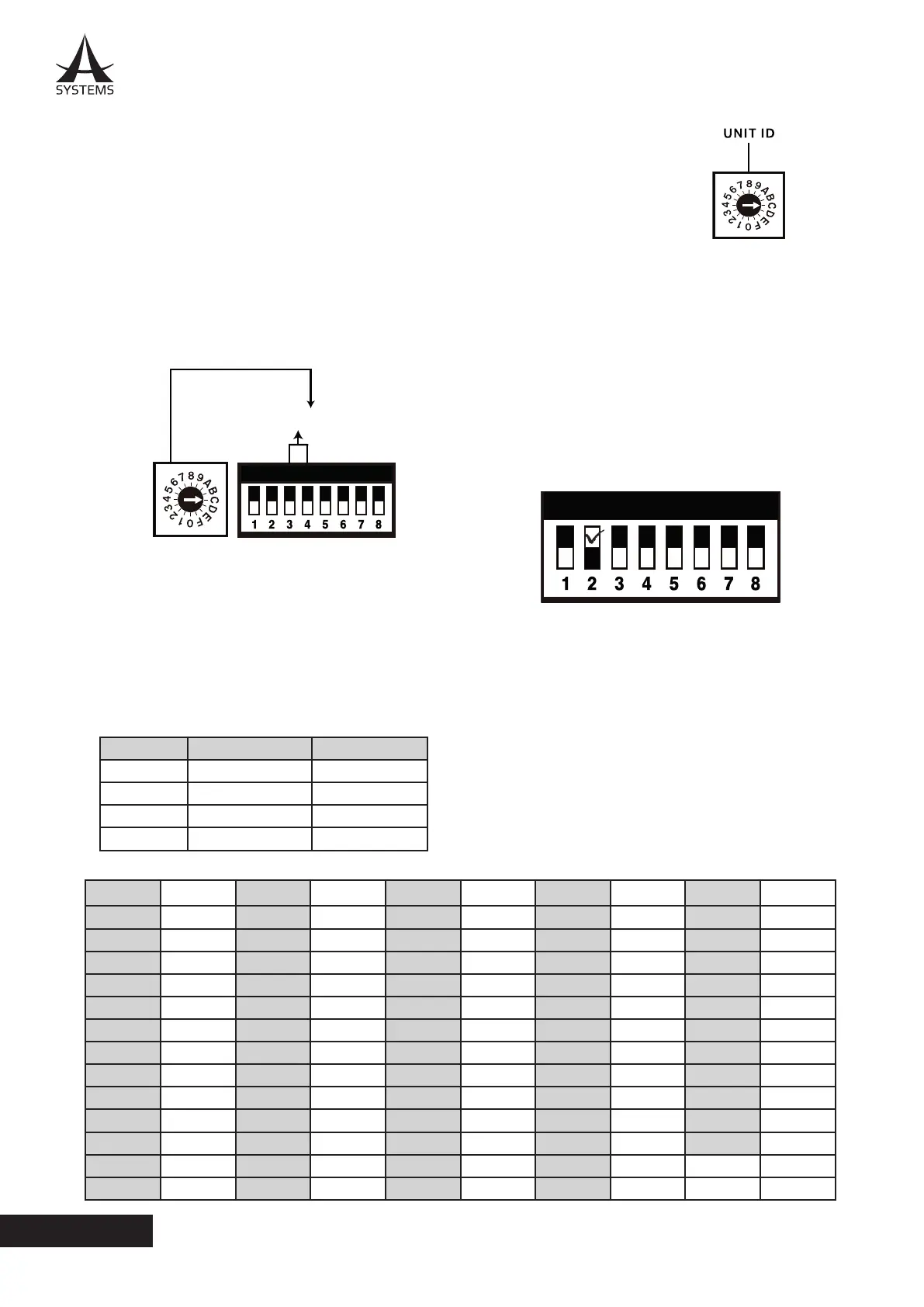
The rst is the UNIT ID rotary control, that lets you select
0 – 9 and A – F� The second is the DIP switch located
directly beside the rotary switch. The 3rd and 4th poles
of the DIP switch can be used to set a numerical value
between 0 and 3. These combine with the UNIT ID rotary
switch to form a hexadecimal value for the last value of
the IP address (as indicated below).
HEX DEC HEX DEC HEX DEC HEX DEC HEX DEC
01 1 0E 14 1B 27 28 40 35 53
02 2 0F 15 1C 28 29 41 36 54
03 3 10 16 1D 29 3A 42 37 55
04 4 11 17 1E 30 2B 43 38 56
05 5 12 18 1F 31 2C 44 39 57
06 6 13 19 20 32 2D 45 3A 58
07 7 14 20 21 33 2E 46 3B 59
08 8 15 21 22 34 2F 47 3C 60
09 9 16 22 23 35 30 48 3D 61
0A 10 17 23 24 36 31 49 3E 62
0B 11 18 24 25 37 32 50 3F 63
0C 12 19 25 26 38 33 51
0D 13 1A 26 27 39 34 52
These values can be calculated in decimal using a
programmer’s calculator, or by checking the chart provided
at the bottom of this page. The below image indicates how
the last part of the IP address is determined using these
switches
The DIP switch allows the rst digit shown below to be
selected between 0, 1, 2 and 3 with the congurations
shown below. This determines the rst digit of the IP
address (in hexadecimal).
The UNIT ID rotary control
allows a value between 0 and F
to be selected. This determines
the second digit of the IP
address (in hexadecimal).
192.168.0.Xx
Hexadecimal to Decimal Conversion
Once both digits of the hexidecimal IP address have been
selected, it still needs to be converted to decimal for the
user to have an accurate IP address� This is where the
table below comes into play. If the DIP switches are set as
“2” and Unit ID is F, this equals a hexidecimal value of 2F
which converts to a decimal value of 47 (shown below).
Therefore, in this example, the IP will be 192.168.0.47.
When setting the IP address using the UNIT ID controls,
the second pole of the DIP switch must be set to the upper
position. When in the lower position, the system will use
the IP address set through the Windows Remote software�
Value 3rd Pole 4th Pole
0 OFF OFF
1 ON OFF
2 OFF ON
3 ON ON



 To Next Page