ATC Electrical & Mechanical,
ATC House, Broomhill Drive, Tallaght, D24 EF99, Ireland
IE: 01 4678301, UK:0203 564 9164, Email sales@atc.ie
-7-
FIRST USE AND SETUP
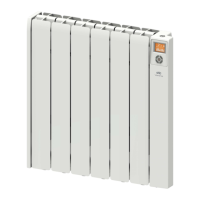
The Almeria Eco digital panel is equipped with a TFT LCD screen and 5 touch sensitive
buttons to allow easy programming.
1: Screen
2: Up Arrow
3 Enter Key
4: Down Arrow
5: Menu & Back
Key
6: Advance &
Boost key
1
2
3
4
5
6
Start Up: The first time the heater is turned on it will ask for the date, the
current time and if you want to activate the Daylight Savings function.
To input information into the heater use the ▲ and ▼ arrows to select
the correct area on the screen that you would like to change and once
the area is highlighted touch the enter key. This will allow you to change
the data, once the correct information is showing touch enter to save.
Daylight Savings (DST Mode): The daylight savings feature will
automatically adjust the time of your heater each year on the last
Sunday in March and October. The user will be asked to check if they
want this feature on or o when the heater is first turned on. It can
also be changed from the time menu. When Daylight
Savings is active there is an S ( ) shown on the
Screen beside the weekday.
Manual Mode: On first start up after the date and time
are set the heater will default into manual mode. The
screen will show the current set temperature and
manual at the bottom of the screen. The temperature
can be adjusted directly with the ▲ and ▼ keys.


 To Next Page