Operators Manual ATLAS CARTS
17
S E C T I O N
3
Operators Manual ATLAS CARTS
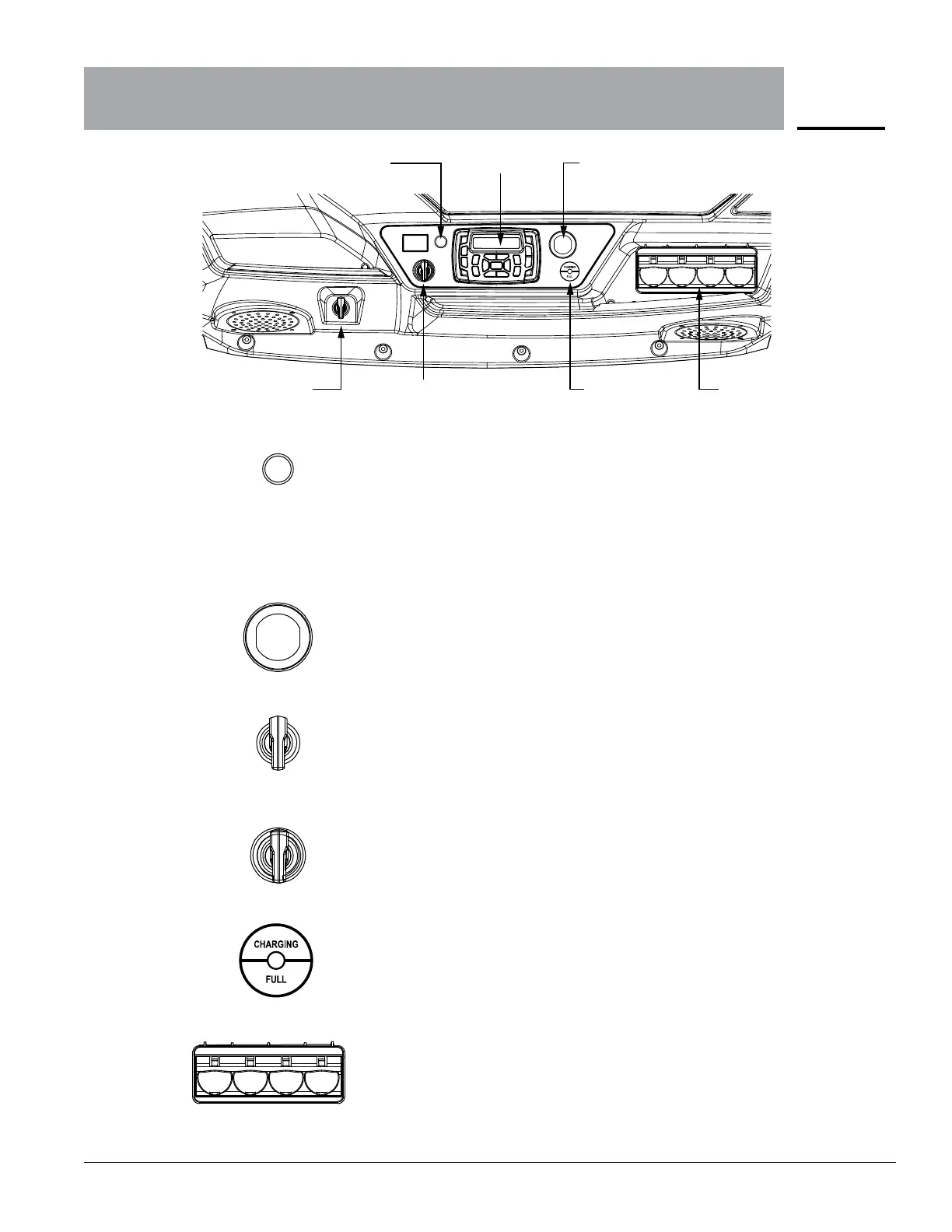
Dash Displays and Indicators
Charging
Indicator
Golf Ball
Holder
•Flashinggreenlightindicatesbatteryischarging.
•Solidgreenlightindicatesfullycharged.
•Redashinglightindicatesbatteryisnotchargingproperly
and charger connections should be checked.
Hold four golf balls and can be removed if desired.
Hazard Flasher
Button
Radio
USB Interface
Front Locking
Trunk
Key Start
Switch
Push this button to turn on the hazard warning lights (four-way flashers).
This causes all four outside turn signals and both indicators in the instrument
panel to flash. Use the hazard warning lights if you need to park in a
dangerous area near heavy trac or if your vehicle is disabled.
See page 20 for radio instructions.
With the key switch in the ON position, the 12V, 2amp USB port supplies
power to electronic devices via a USB cable.
Can be locked/unlocked with the vehicle ignition key.
Key start 2-position switch.
•OFF-vehicleisdisabled.
•ON-vehiclepoweron
Hazard warning
flasher button
Radio
USB Interface
Key start Charging
Indicator
Golf tee
Storage
Front locking
trunk


 To Next Page