Operators Manual ATLAS CARTS
18
S E C T I O N
3
Operators Manual ATLAS CARTS
Radio Controls
Bluetooth Instructions
Radio Functions
To connect bluetooth devices, ensure vehicle key is in “ON” position, press the
POWMOD button on the vehicle radio. In your device’s settings, ensure your
bluetooth is turned on. Find “ATLAS” device and choose connect.
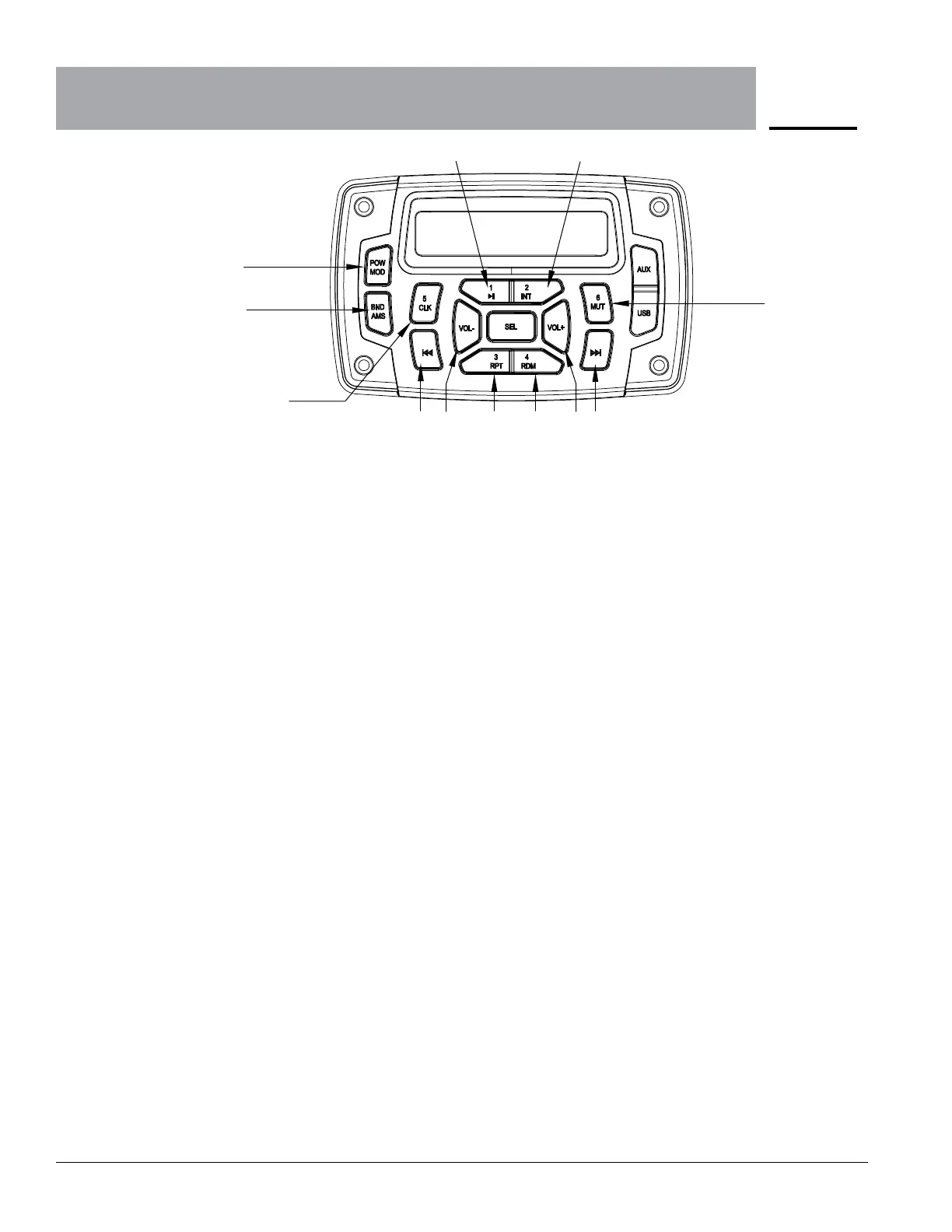
1 PWR/MOD Press this button briefly to turn system on. Press and hold for 3 seconds to power
system o. When system is on, use this button to toggle between RADIO, AUX IN,
& PHONE.
2 BND/AMS Press this button briefly to switch between the three FM and two AM sequences.
Press this button to answer incoming calls when connected to hands free calling.
4/5 VOL+/ VOL- Use VOL+ to increase stereo volume level from (0-40).
Use VOL- to reduce stereo volume level from (0-40)
6/7 TRACK/TURN BUTTONS Press left and right red arrow button to move to dierent radio frequency or play
previous or next song on bluetooth device. Hold buttons for three seconds to
initiate frequency scanning on radio mode.
8 PAU Press and hold this button on radio mode to save radio frequency in #1 position.
When pressing in BT AUDIO mode, this pause bluetooth playing.
9 INT Press and hold this button on radio mode to save radio frequency in #2 position.
The INT function is not used in this system.
10 RPT Press and hold this button on radio mode to save radio frequency in #3 position.
The RPT function is not used in this system.
11 RDM Press and hold this button on radio mode to save radio frequency in #4 position.
The RDM function is not used in this system.
12 CLK Press and hold this button on radio mode to save radio frequency in #5 position.
The CLK function is not used in this system.
13 MUTE Press and hold this button on radio mode to save radio frequency in #6 position.
Press and hold this button in the BT AUDIO mode to mute the vehicle’s
microphone.
1
2
8 9
13
106 5 11 4 7
12


 To Next Page