45
Troubleshooting
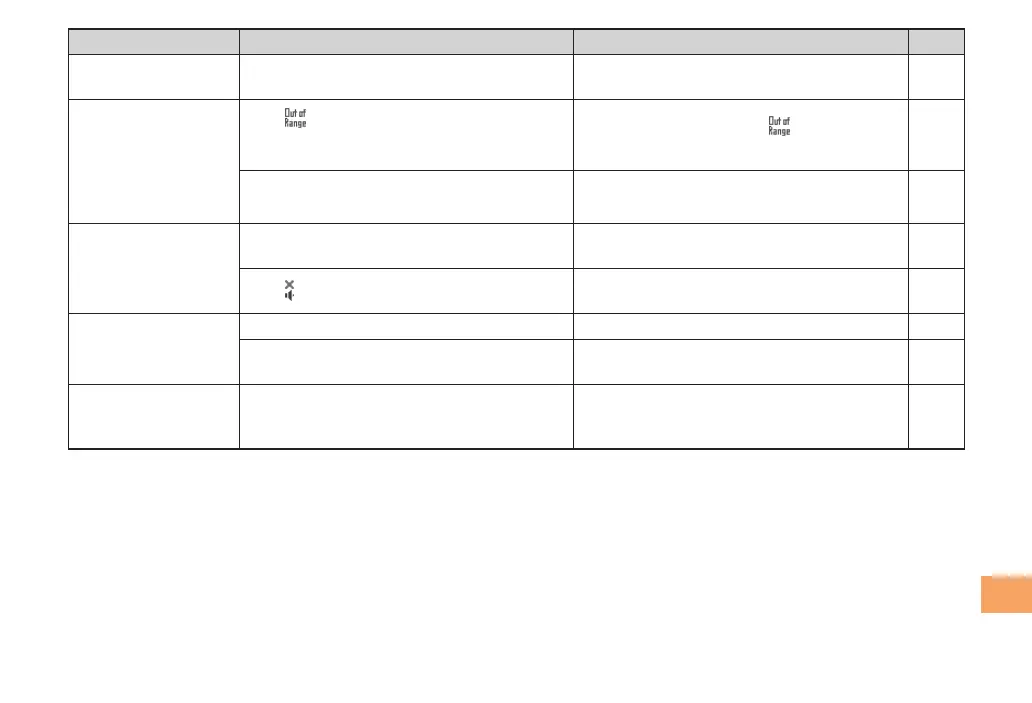
Symptom Possible Cause Remedy Page
Cannot hear the
other par
ty.
●Is the earpiece volume too low?
Pr
ess u during a call to increase the
earpiece volume.
18
When making a call,
a beeping sound
is hear
d from the
earpiece and a
connection cannot be
established.
●Is
(out of range indicator) displayed?
Or are you in a location where the signal
is too weak?
Move to a location where
(out of range
indicator) is no longer displayed.
10
●Is the wireless line busy or is the phone
you are calling on another line?
End the call and try again later. 16
The incoming
indicat
or ashes but
the ring tone does
not play.
●Is manner mode tur
ned on?
Hold down ( for at least one second to
turn off manner mode.
18
●Is
(ring tone off indicator) displayed?
Increase the volume of the incoming call
ring tone.
19
Cannot charge the
bat
tery pack.
●Is the batter
y pack installed properly?
Install the battery pack properly. 8
●Are the plug and connector of the AC
adapter inserted properly?
Insert the plug and connector firmly. 8
When the camera is
activ
ated, no subject
is displayed.
●Is a finger or other object covering the
camera (lens)?
Check the position of the camera (lens)
and r
emove the obstacle.
31
For more detailed information, visit the following au troubleshooting sites:•
- From an au cell phone: R ⇒ Top Menu/Search ⇒
auお客さまサポート
(au Customer Support) ⇒
オンラインマニュアル
(Online Manual) ⇒
故障診断Q&A
(Troubleshooting FAQ)
- From a PC: http://www.kddi.com/customer/service/au/trouble/kosho/index.html



 To Next Page