Need help?
Do you have a question about the Auber WS Series and is the answer not in the manual?
Crucial safety warnings and precautions for operating the controller.
Details the front panel and function of each item on the controller.
Explains how to connect the controller to the device and power source.
Details on PID control parameters like Proportional, Integral, and Derivative constants.
Explains system configuration parameters like Offset and Output Power Reduction.
Details alarm settings for high limit, low limit, and step finish.
Instructions on how to save the current program settings as a recipe.
Instructions on how to load a previously saved recipe into the controller.
Example of saving a multi-step program as a recipe.
Example of recalling a saved recipe into the current program.
Example of saving a single-step program as a recipe.
Example of recalling a recipe into the single-step mode.
Further examples demonstrating PrG mode effects on recipes and single-step programs.
Discusses heat generation and its impact on controller operation.
Provides methods to mitigate heat buildup in the controller during operation.
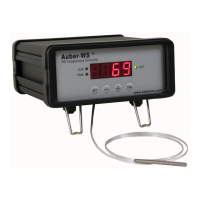
The Auber Instruments WS-1510ELPM is a precision PID temperature controller designed for various heating and cooling applications, particularly suitable for sous vide cooking. It offers advanced control features, programmability, and safety mechanisms to ensure accurate and reliable temperature management.
The WS-1510ELPM controller precisely regulates temperature using a Proportional-Integral-Derivative (PID) control algorithm. It can be programmed with up to six temperature and time steps, allowing users to create complex temperature profiles for different cooking or processing needs. The controller monitors the temperature via a Pt100 RTD sensor and adjusts the power output to the connected heating or cooling device to maintain the desired temperature. It features an LED display for current temperature, step number, and total running time, along with indicators for output status, alarm, and timer. The controller supports both heating (reversed action) and cooling (direct action) modes, and can also operate in a simpler ON/OFF mode. Safety features include high and low limit alarms, an open loop alarm, and an anti-short cycle delay for cooling applications. The device also allows for saving and recalling up to eight custom recipes, enhancing user convenience for repetitive tasks.
 General
| Brand | Auber |
|---|---|
| Model | WS Series |
| Category | Controller |
| Language | English |

 To Next Page