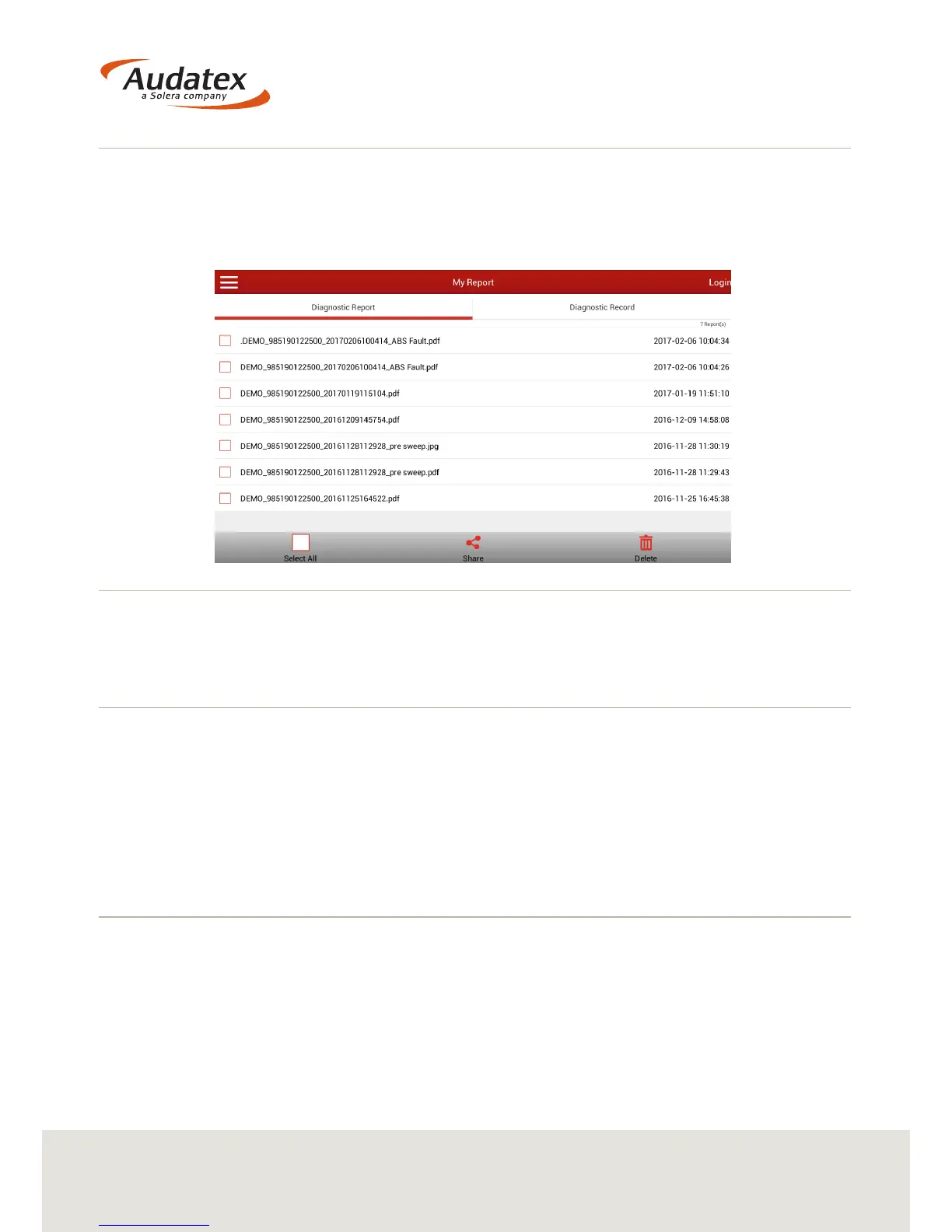
4.3 My Reports
My Reports will give you access to any Diagnostic Reports that you have saved.
From here you can share, print, read or delete a report.
Reports are also available from within the top menu bar in Diagnostics.
4.3.1 View a Report
To view a diagnostic report select the appropriate le from the list. The le name will
be what you entered when selecting to save the report.
4.3.2 Share a Report
Select the report/s that you wish to share by selecting the check box to the left of the
le name. You are able to select more than one report.
When you have selected the report/s that you wish to share, select ‘Share’ at the
bottom of the screen.
You now have the option to share the assessment.
(For information on setting up a Gmail or Dropbox account - see section 6)
4.3.2.1 Sharing a report with AudaEnterpriseGold
With the correct credentials, a user is able to share a report directly into an
AudaEnterprise Gold assessment.


 To Next Page