5.2 VHC2 Software Updates
Software Updates will be sent to the VHC2 whenever they become available
therefore they can appear at any time. These updates will include functionality
upgrades, new features and bug xes.
For access to the latest update then the VHC2 must have a minimum of 50% battery
life and be connected to the internet.
To update the VHC2 software follow the steps below, this will ensure your unit is up to
date with the latest changes.
1. To carry out an update you must enter the Help & Support option from the main
menu.
2. By selecting ‘Update SmartHub’ on the right of the screen the unit will begin the
software download. An ‘Updating...’ icon will appear for up to 10 seconds.
3. Once the icon has disappeared select the at the bottom of the screen. You will
be returned to the VHC2 home page.
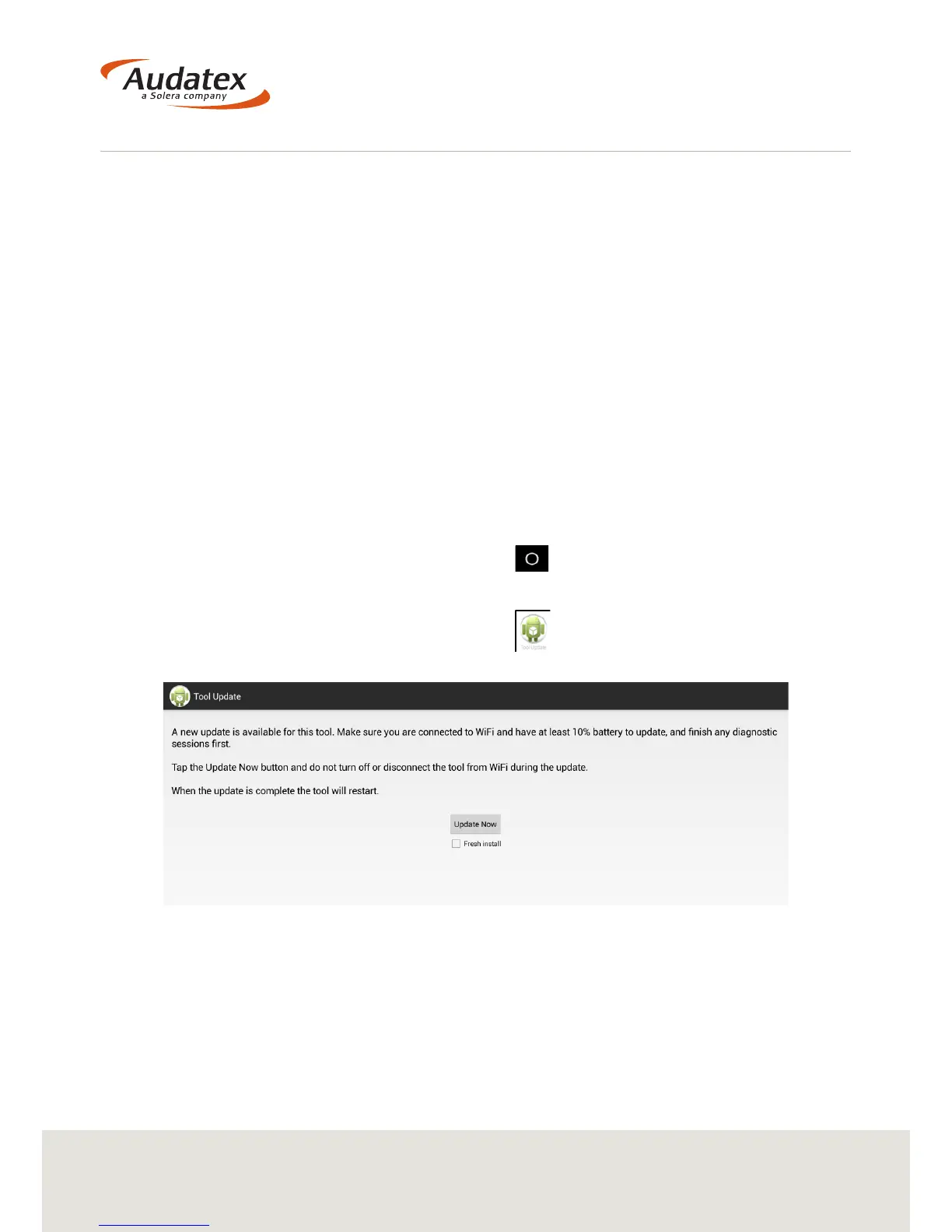
4. Within 30 seconds a new icon will appear . Selecting this icon will open the
update page.
Do not select the ‘Fresh Install’ check-box unless requested by Audatex.
5. Select ‘Update Now’. The VHC2 will start the update. On completion the VHC2 will
reboot and the update will be complete.


 To Next Page