a:,
a:,
......
N
r--.
N
.-<
0
0
::,
a:,
LED in the remote control key
The LED ¢ fig . 14 informs you of the remote con-
tro l key function .
.. If you press a button briefly, the LED blinks
on ce .
.. If the LED does not blink , the remote con t rol
key batt e ry is dead . The message
1:1 Please
change key battery
may also appear in the in-
strument cluster display . Replace the battery in
the remote contro l key.
Replacing the remote control key battery
.. Pry the cover @ off of the key CD using a coin
¢ fig. 15.
.. Remove the cover in the direction of the arrow .
.. Inse rt the new battery with the" +" facing up.
.. Press the cover back onto the key until it clicks
into place .
@ For the sake of the environment
Discharged batteries must be disposed of us-
ing methods that will not harm the env iron-
ment. Do not dispose of them in household
tras h.
@ Tips
The replacement battery must meet the same
specifications as the orig inal battery in the re-
mote contro l key.
Remote control key synchronization
If the vehicle can not be unlocked/locked by the
remo t e control, yo u can synchron ize the remo t e
con t rol key.
.. Press the remote control key button [@].
.. Inse rt the key in the driver's door lock wit hin 30
se con d s .
.. Press t he ~ but ton or ~ button .
Open ing and closing
Unlocking/locking by remote control
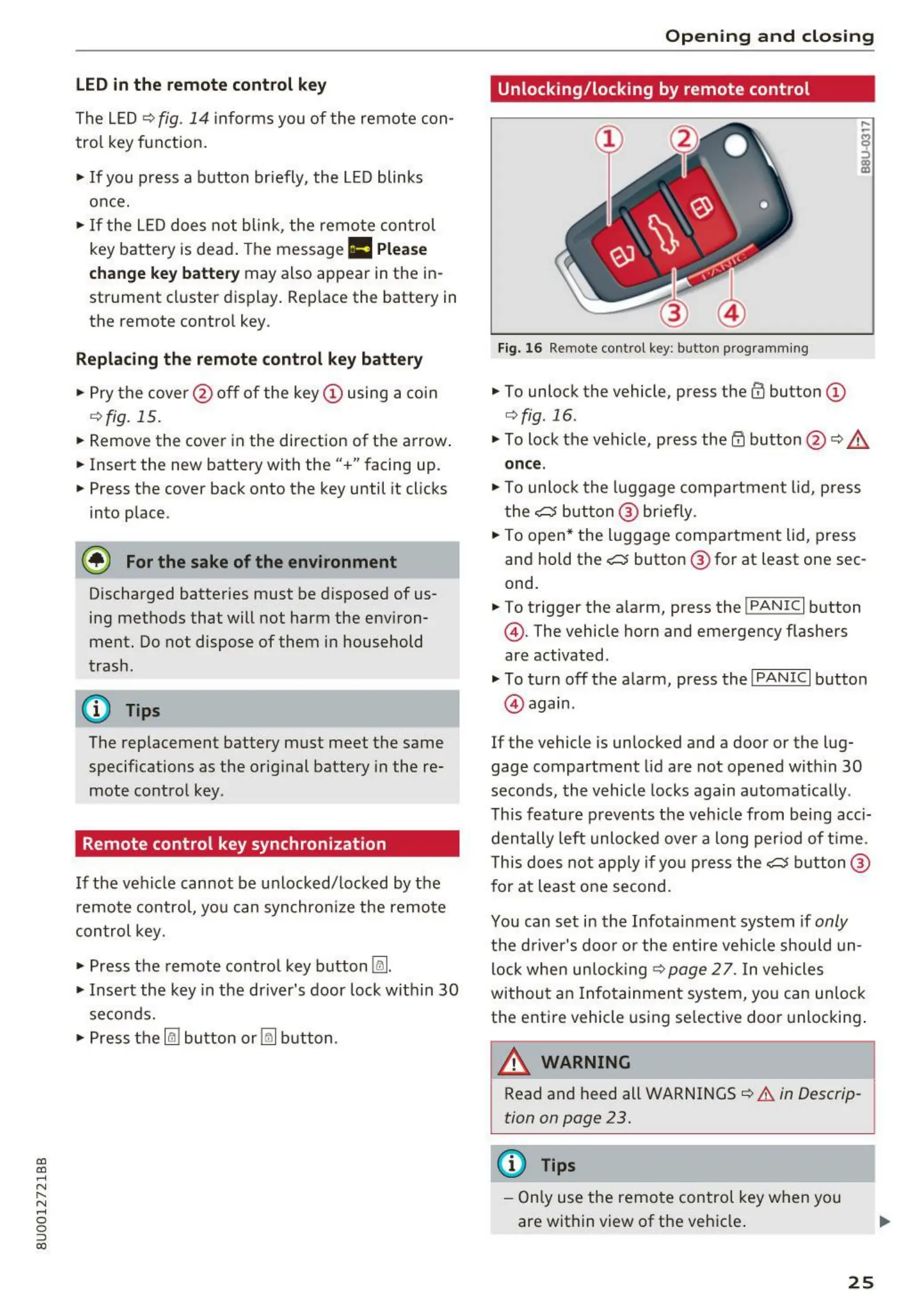
Fig. 16 Remote control key: but to n progra mming
.. To unlock the vehicle, press the ffi butto n CD
¢ fig.16 .
.,. To lock the vehicle, press the ~ button @ ¢ &
once .
.,. To unlo ck t he luggage compart ment lid, press
t he
c:5 but t on @ br iefly.
.,. To open* the luggage compar t ment lid, press
an d hold the
c:5 button @ fo r at least one sec-
ond.
.. To trigger the ala rm, press the !PANIC I button
@ . The vehicle ho rn and emergency flashers
are activated.
.,. To t urn off t he ala rm, press the
I PANIC I button
@ again .
If the vehicle is un locked and a door or the lug-
gage compartment lid are not opened wit hin 30
secon ds, t he vehicle locks again a utoma ti ca lly.
This feature prevents th e vehicle from being acci-
dentally left unlocked over a long period of t ime.
This does not app ly if you press the
c:5 button @
for at least one second .
You can set in t he Infotainment system if
only
t he dr iver's doo r or the entire vehicle should un-
lock when unlo cking <=? page 2 7 . In vehicles
withou t an Info t ainment syst em, you can unloc k
the entire vehicle using se lective door unlocking .
A WARNING
,..__
Read and heed all WARNINGS¢ &. in Descrip -
tion on page 23 .
(D Tips
- Only use the remo t e control key when yo u
are within view of t he veh icle .
25



 To Next Page