be impossible to open the doors from
the outside without the key.
(D Tips
- In the event of a crash with airbag de-
ployment a ll locked doors will be auto-
matically unlocked to g ive access to the
vehicle occupants from the outside.
- If the power locking system should ma l-
function, you can lock the driver's door
using the mechanical key
¢ page 44.
- If the power locking system should fail,
you can still open the fuel tank flap in an
emergency¢
page 231.
- You are well advised not to keep valua-
bles inside an unattended vehicle, visible
or not . Even a properly locked vehicle
cannot provide the security of a safe.
- If the LED in the upper edge of the driv-
er's door panel comes on for about
30
seconds after the vehicle is locked, there
is a malfunction in the power locking or
the anti-theft warn ing system. Have the
malfunction corrected by an author ized
Audi dealersh ip or qua lified repair fac ili-
ty.
Setting power locking
The driver can determine the functions for
power locking in the radio or in the MMI*.
In the Centra l locking menu you can decide
which doors should be unlocked when open-
ing the vehicle.
• Se lect : Funct ion button
ICARI > Central lock-
ing.
For example, if you switch the item Unlocking
single door On,
the passenger's doo r and the
rear doors are no longer included in the powe r
locking system, and will not be un locked by
press ing the un lock button on t he master key
remote control.
You can continue to unlock all the doors and
the rear lid as before. Press the open ing but-
ton on the master key twice.
Op e nin g an d cl os in g 4 1
In addition to this, the Auto locking can be
switched on and off.
When locki ng the vehicle, all doors and t he
trunk lid are locked automatically.
If you switch
Trunk lid/ tai lgate On, then the
handle on the rea r lid ¢ page 44, fig. 40 is
locked . In this case the rear lid ca n be opened
with the button
cs on the maste r key
¢ page 41, fig. 34 or with the unlocking
button in the driver 's door ¢ page 44,
fig . 39.
If the vehicle has the Convenience
key* feature, then the hand le will continue to
work
even if an valid key is near the proximity
sensor .
If you se lect
Fold mirrors* On, the automat ic
outside mirror fold function is act ivated - the
outside mirrors fold when the locking button
on the remote master key is operated
G'.I
¢ page 60.
When you select Confirmatio n tone On, a
confirmat ion tone sounds when you lock the
vehicle .
Unlocking and locking the vehicle with
the remote control
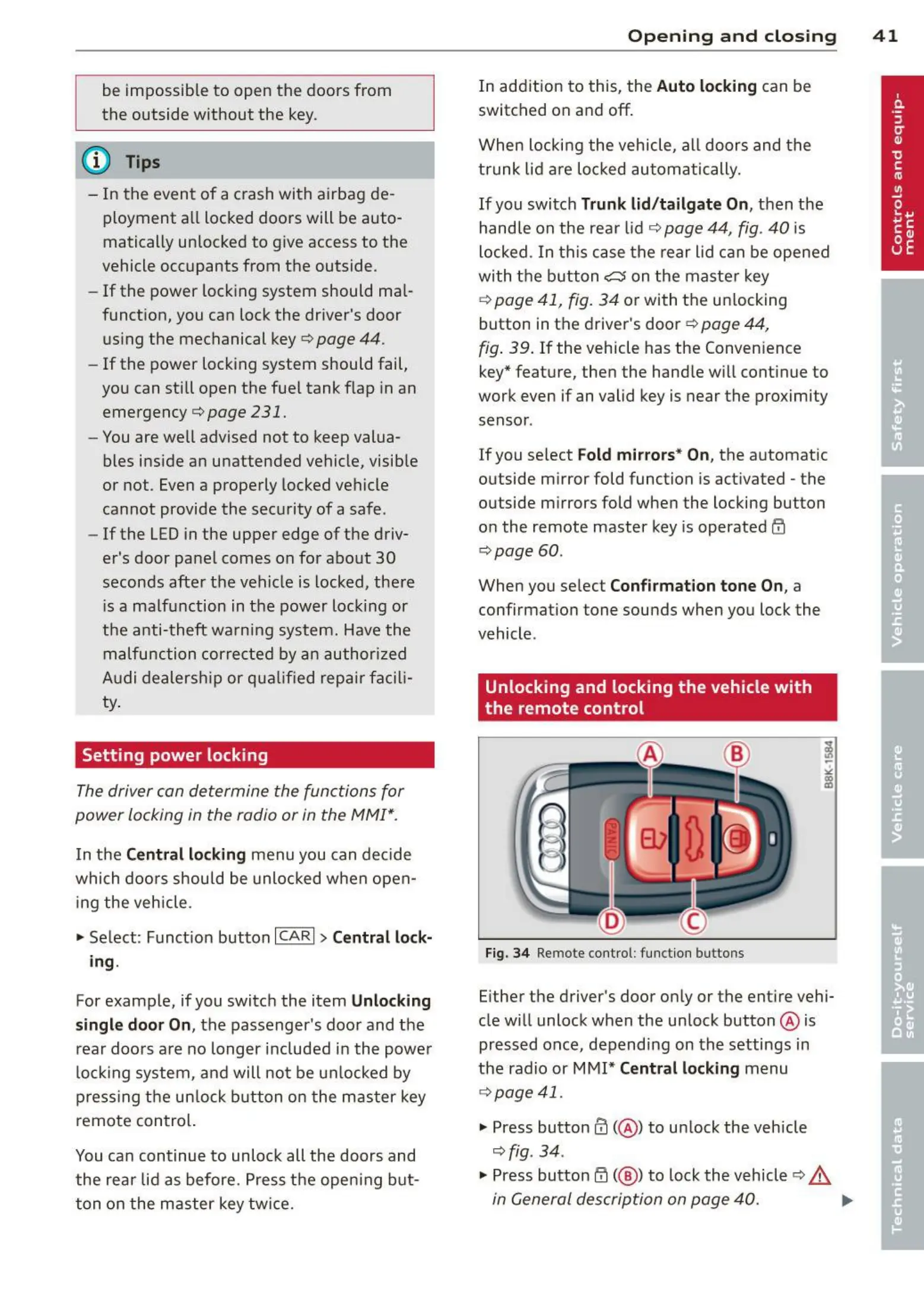
Fig. 34 Remote cont rol: funct ion buttons
Either the driver's door only or the entire vehi-
cle will unlock when the unlock button @ is
pressed once, depending on the settings in
the radio or MMI*
Central locking menu
¢ page 41.
• Press button 0 (@ ) to un lock the vehicle
¢fig. 34 .
• Press button@( @ ) to lock the vehicle ¢ ,&,
in General description on page 40. ..,,.



 To Next Page