CD
CD
....
N
"
N
....
0
0
"' 'SI"
@ Tips
- For security reasons, we recommend that
you clear the programmed buttons before
se lling the vehicle.
- For furthe r informat ion regarding Home-
Link, refer to
www.homelink.com.
- For the Declarat io n of Conformity wit h the
provisions from the FCC in t he United States
and Ind ustry Canada, refer to ¢
page 282.
Operation
Applies to: vehicles with garage door opener (Homel ink)
Fig. 3 1 Contr ol panel above the interio r rea rview mirror
Req uirement : the button in the contro l pane l
must be prog rammed ¢ page 35 and the vehi -
cle must be located within range of the system,
such as the garage door .
.,. Press the button to o pen t he ga rage door. The
green LED
(D blinks or turns on.
.,. Press t he button again to close the garage
door.
{D) Tips
When opening or closing the garage door, do
not press and hold the butto n longer ten sec-
onds or t he ga rage door opene r will switc h to
programm ing mode.
Open ing and closing
Programming the transmitter
Applies to: vehicles with garage door opener (Home link)
I
GC!OO
-- ~-- -
r.
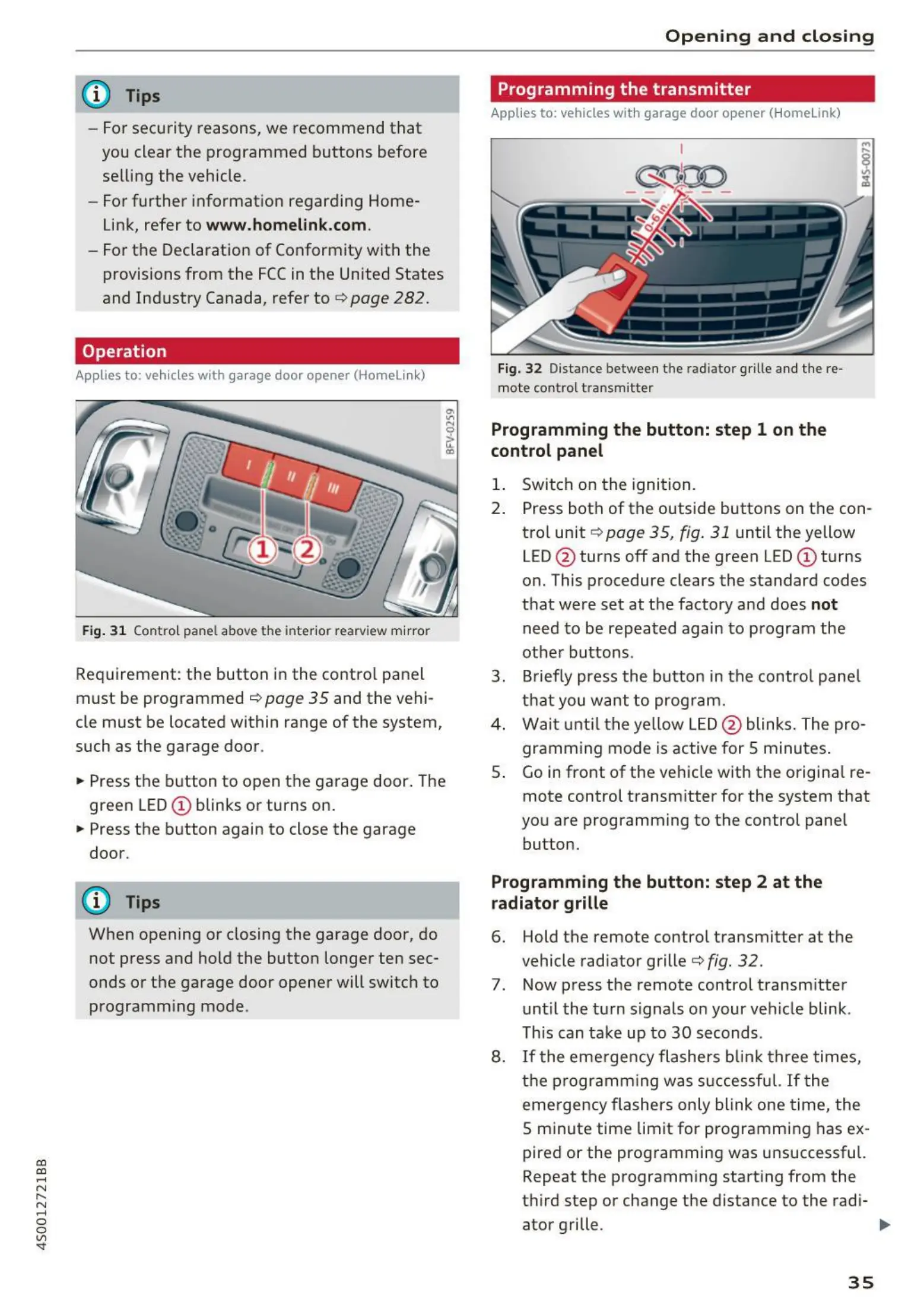
Fig. 32 Dista nce between the radiator grille and th e re -
mote contro l t ransm itter
Programming the button: step 1 on the
control panel
1. Switc h on t he ignit ion.
2. Press bot h of the outside buttons on the con-
trol unit ¢ page 35, fig . 31 until the yellow
LED @ turns off and the green LED (D turns
on. This procedure clears the standard codes
t hat were set at t he factory and does
not
need t o be repea t ed again t o program the
othe r buttons .
3 . Brief ly press t he but ton in t he contro l pa ne l
t hat you wan t to prog ram .
4. Wai t unt il th e yellow LED@ blinks . The pro-
gramm ing mode is act ive for 5 minutes .
S. Go in front of the ve hicle with the o rigina l re-
mote control transm itter for the system t hat
you are programming to t he control panel
button.
Programming the button: step 2 at the
radiator grille
6. Hold the remote contro l t ransm itter at the
vehicle radiator grille¢
fig. 32.
7 . Now press t he remote contro l transm itter
un t il the t urn signals o n your ve hicle blink .
This can ta ke up to 30 seconds .
8.
If t he eme rge ncy fl ashe rs blink t hree times,
t he progr a m ming was successfu l.
If t he
eme rge ncy flas hers on ly blink one t ime, t he
S m inute time limit for progr a mmi ng has ex-
pired or the pro gr amming was unsuccessful.
Repeat t he programm ing start ing from the
t hird step or change t he d istance to the rad i-
ator g rille . .,..
35



 To Next Page