Light s and Vision
Digital compass
Switching the compass on and off
Applies to: vehicles with digital compass
Fig. 45 Rearview mirror: digital compass is switched on
• To turn the compass on or off, press the button
@ until the compass display in the mirror turns
on or off .
The digital compass only works when the ignition
is turned on . The direct ions are indicated with ab-
breviations:
N (north), NE (northeast), E (east),
SE (southeast), S (south), SW (southwest), W
(west), NW (nort hwest).
(D Tips
To prevent inaccurate compass readings, do
not bring any remote controls, electr ica l devi-
ces or metal lic objects nea r the mirro r.
46
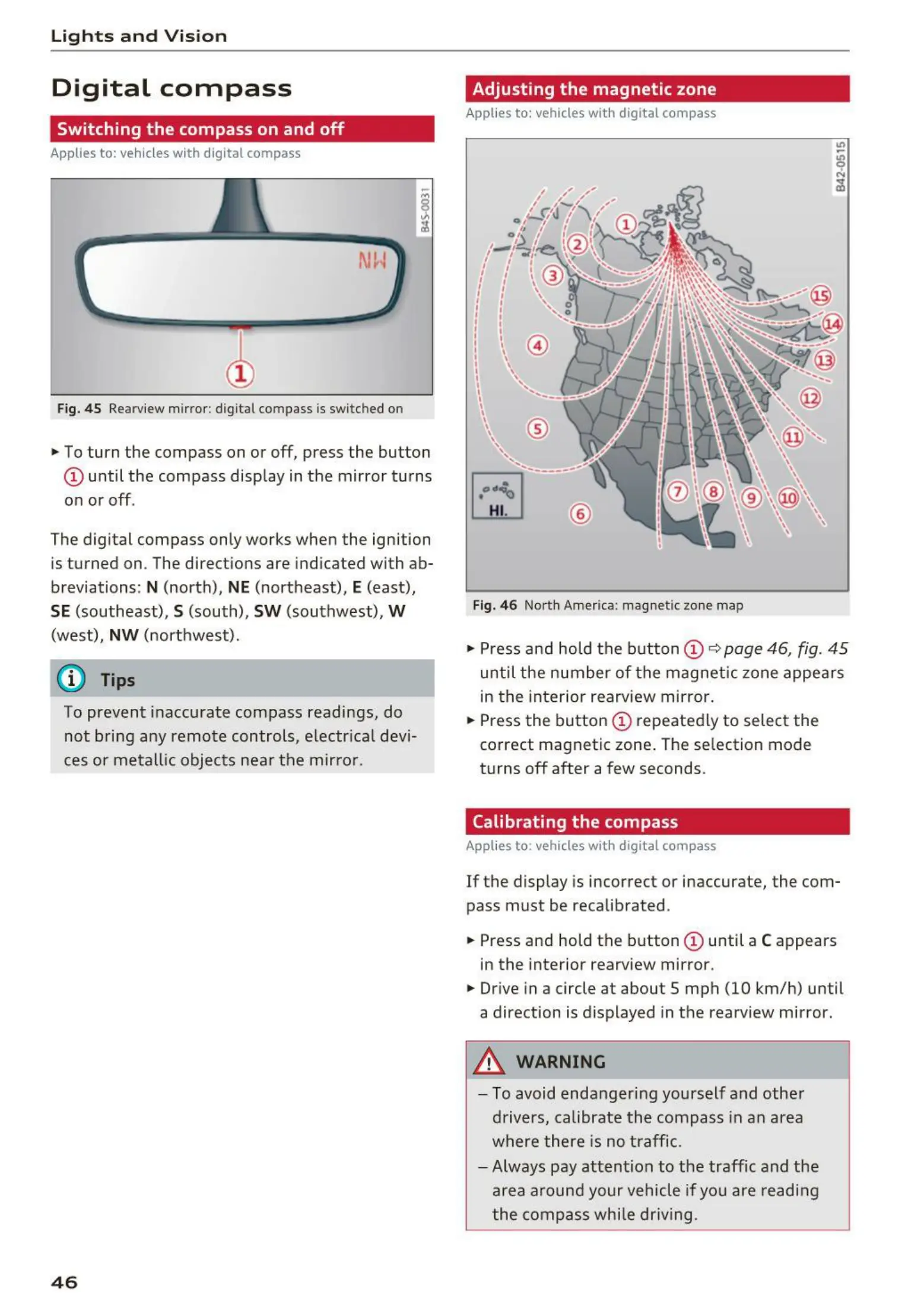
Adjusting the magnetic zone
Applies to: vehicles with digital compass
Fig. 4 6 North America : magnet ic zone map
• Press and hold the button (D c::> page 46, fig. 45
until the number of the magnetic zone appe ar s
in the interior rearview mirror .
• Press the button
(D repeated ly to select the
correct magnetic zone . The selection mode
turns off after a few seconds.
Calibrating the compass
Applies to : vehicles with digital compass
If the display is incorrect or inaccurate, the com-
pass must be recalibrated.
• Press and hold the button
(D until a C appears
in the interior rearview mirror.
• Drive in a circle at about 5 mph (10 km/h) until
a direction is d isplayed in the rearv iew mirror.
A WARNING
- To avoid endanger ing yourself and othe r
drivers, calibrate t he compass in a n area
where there is no traffic.
- Always pay attention to the traffic and the
area a round your vehicle if you are readi ng
the comp ass while dr iving.
-



 To Next Page