EasyManua.ls Logo

Audio enhancement K-STD14 - User Manual

Audio enhancement K-STD14
27 pages
Print Icon
To Next Page IconTo Next Page
Loading...
1
Rev.1.25
14241 S. Redwood Rd., Bluffdale, UT 84065 • Phone 1.800.383.9362 • AudioEnhancement.com
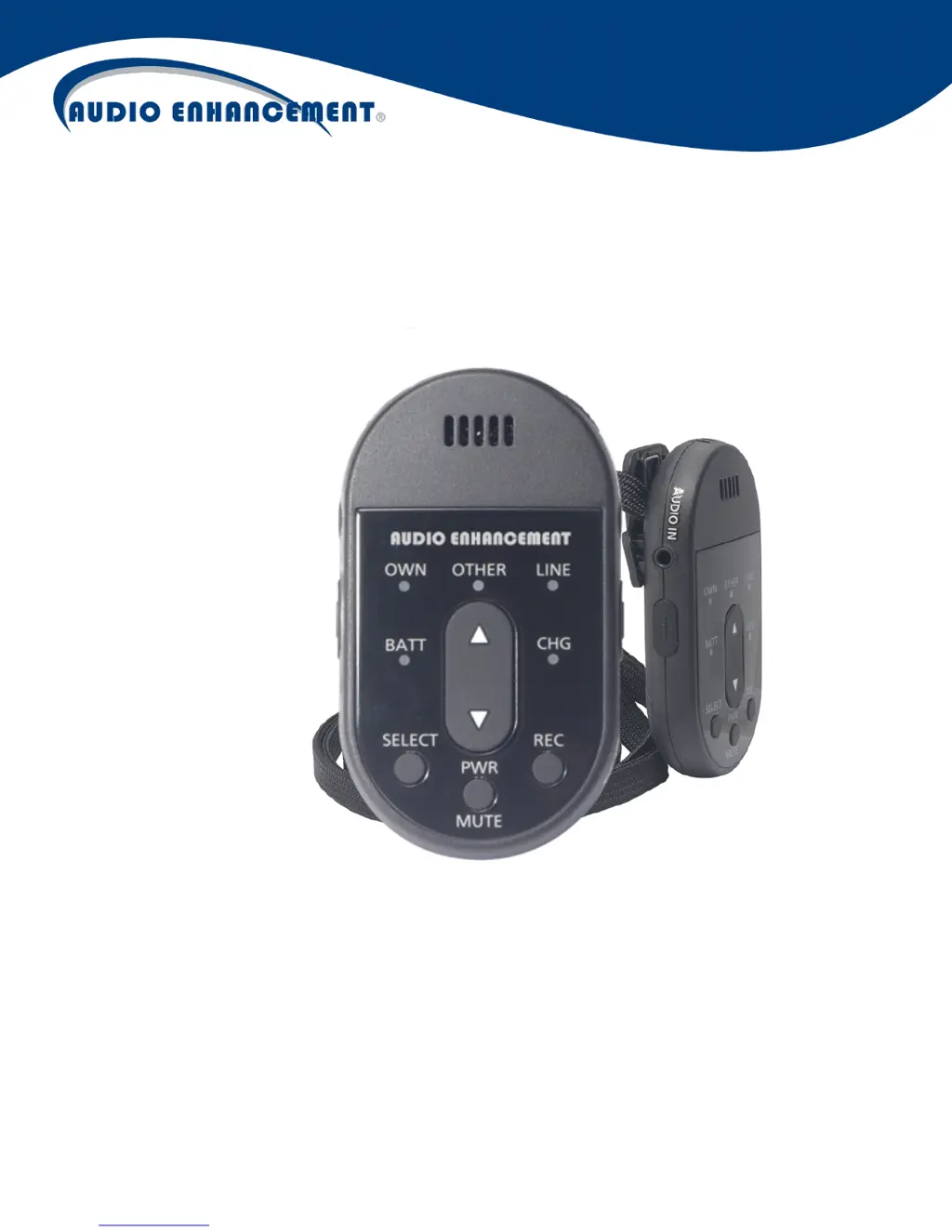
XD Pendant Microphone
K-STD14 | 1.9 GHz

Questions and Answers

  • S
    Sarah LeeAug 15, 2025
    Why is the volume too low on my Audio enhancement K-STD14 Microphone?
    • M
      Michelle SimonAug 15, 2025
      If the volume of your Audio enhancement Microphone is too low or there is no sound, and the [OWN] selection indicator is lit, press the volume button to increase the volume. Also, ensure that the receiver is set up correctly by checking the settings.
  • T
    Timothy PughAug 18, 2025
    Why is my Audio enhancement K-STD14 Microphone not charging?
    • P
      Patricia HerreraAug 18, 2025
      If your Audio enhancement Microphone is not charging and the charge indicator is off, ensure that a battery is installed and that the micro-USB plug of the charger is fully inserted into the DC input terminal. Confirm the connection to resolve the issue.
  • C
    Crystal MosleyAug 22, 2025
    What to do if Audio enhancement Microphone battery indicator blinks yellow?
    • D
      Derrick SotoAug 22, 2025
      If the battery indicator on your Audio enhancement Microphone blinks yellow, it could be due to several reasons: * Pairing registration with a receiver has not been performed. To resolve this, press a receiver's [LINK] button to put it into registration mode, then simultaneously press the [PWR/MUTE] and [REC] buttons on the microphone to register it. * The microphone might be out of range. Ensure you are using it within the specified range and press the PWR/MUTE button to resume. * The receiver's power supply might be off. Please check the receiver's power supply.
  • M
    Mary SmithAug 25, 2025
    Why does Audio enhancement K-STD14 take so long to charge?
    • J
      Jessica RobbinsAug 26, 2025
      If your Audio enhancement Microphone takes a long time to charge, avoid charging it from a computer. Instead, use a charger connected to a power outlet. Also, ensure you are using a charge-only Micro-USB cable, as a Micro-USB communication cable may prevent the battery from fully charging.
  • M
    martinezmarioAug 28, 2025
    What does it mean when Audio enhancement Microphone battery indicator blinks red?
    • A
      Andrew ThompsonAug 28, 2025
      If your Audio enhancement Microphone's battery indicator blinks red, it indicates a pairing registration error with the receiver. To resolve this: * Press the [LINK] button on the receiver to put it into registration mode (the LINK LED will blink yellow for 20 seconds). * During this time, register the microphone by pressing the [PWR/MUTE] and [REC] buttons together for one second or more.
  • B
    Brianna JacobsSep 1, 2025
    Why does Audio enhancement Microphone charge indicator blink and then go solid?
    • K
      kylieharrisSep 1, 2025
      If the charge indicator on your Audio enhancement Microphone is blinking but goes solid after a few minutes, it's likely because the battery is already fully charged. Remove the charger from the microphone and use it with the battery.
  • K
    kristenleeSep 4, 2025
    Why is my Audio enhancement K-STD14 making loud noise?
    • G
      gwarrenSep 4, 2025
      If you are experiencing loud noise with your Audio enhancement Microphone, and an external device (like a portable CD player) is connected to the microphone input terminal, connect the external device to the external input terminal instead.
  • E
    Erica RobertsSep 7, 2025
    Why is external microphone not working with Audio enhancement K-STD14?
    • R
      Ralph DavisSep 7, 2025
      If there is no sound from an external microphone connected to your Audio enhancement Microphone, ensure that the external microphone is connected to the microphone input terminal, not the external input terminal.
  • A
    Amanda BrooksSep 12, 2025
    How to fix a deteriorated Audio enhancement K-STD14 battery?
    • M
      Manuel GibsonSep 12, 2025
      Replace the deteriorated battery of your Audio enhancement Microphone with a new rechargeable one.

Audio enhancement K-STD14 Specifications

Frequency and Coverage IconFrequency and Coverage
frequency range1, 920.0 ~ 1, 930.0 MHz
coverage normal20 m
coverage high power30 m
Audio Specifications IconAudio Specifications
audio frequency response100Hz to 7 kHz
external input level–55 dBV ø3.5 mini jack
external input–14 dBV ø3.5 stereo mini jack
Battery IconBattery
battery typeLithium Ion Battery
battery lifeabout 2 years
talk timeAround 8 hours
charge timeAround 4 hours (5 V / 500 mA)
Operating Environment IconOperating Environment
temperature range5 °C ~ +35 °C
humidity range~90%
installation conditionIndoor use
Weight and Dimensions IconWeight and Dimensions
dimensions3.31" (H) x 1.89" (W) x 0.63" (D)
dimensions metric84 W x 48 H x 16 D [mm]
weight0.11 lbs. (50 g)

Related product manuals