13
Rev.1.25
Fitting the microphone
When fitting, removing, or adjusting the position of the microphone, turn off the power and make sure
that the microphone is not connected to the charger.
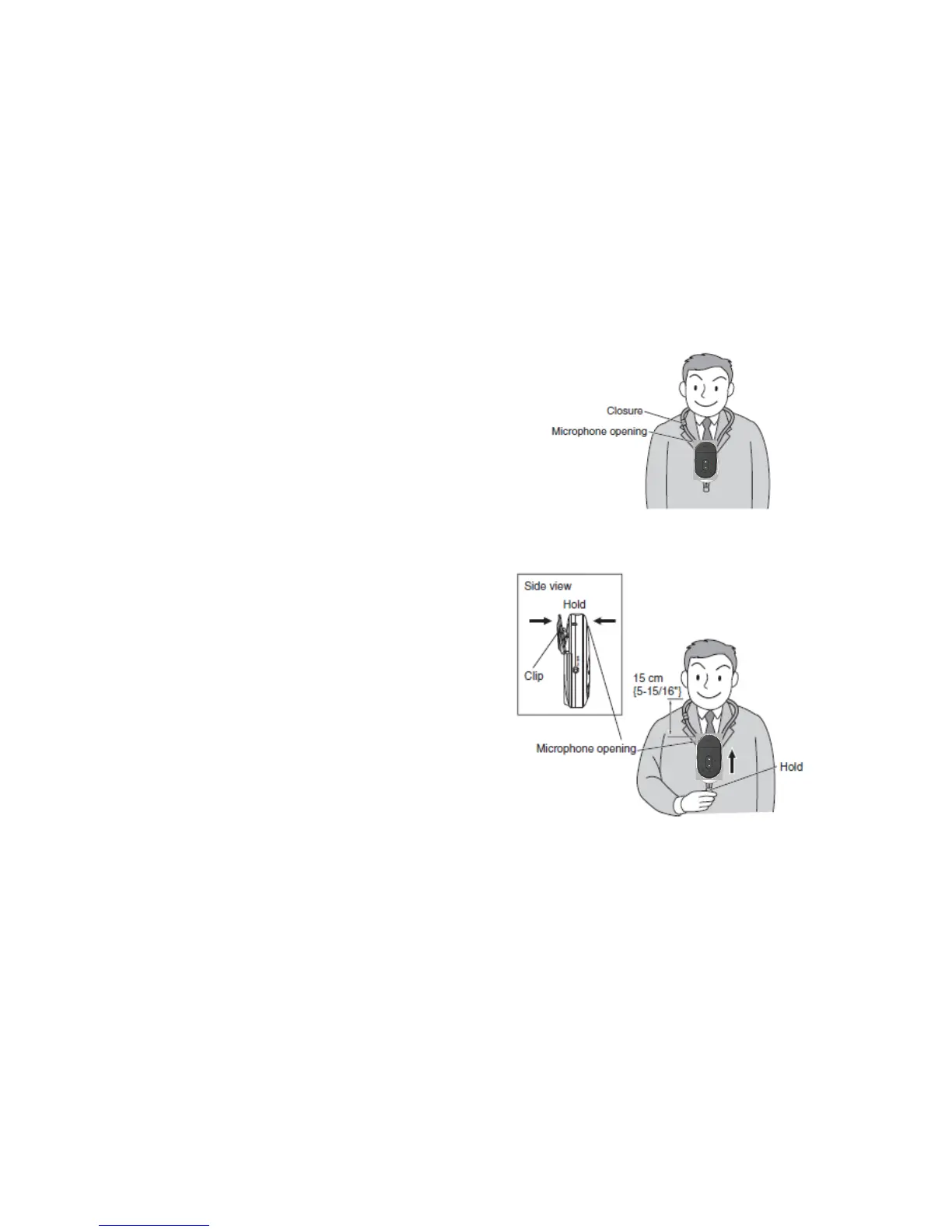
1) Place the microphone around the neck of the person speaking.
Widen the looped part of the strap above
the microphone and place it around the
speaker’s neck, with the front of the
microphone facing outward as shown in
the illustration on the right.
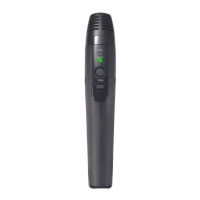
2) Adjust the position of the microphone.
While holding the lower end of the neck
strap with one hand and opening the clip
at the rear of the microphone with the
other, pull up the microphone to the level
of the speaker’s chest.
Adjust so that the distance between the
speaker’s mouth and the microphone
opening is approx. 15 cm {~6"} as
shown in the illustration at right.
Let go of the clip in the desired position.
If bothered by the sound of the microphone rubbing against your clothes, fix the clip at the rear of the
microphone to your shirt pocket or placket.
Note:
• The neck strap is provided with a safety closure to prevent strangling. It is not meant to fit the
microphone.
• To remove, reverse the above procedure.


 To Next Page