12
Rev.1.25
Inserting a battery
• To insert a battery, turn off the power of the microphone, and make sure that the microphone is not
connected to the charger.
• To replace a battery, refer to the "Replacing a Battery" section on page 21.
Note:
• Do not touch the battery poles with hands. Otherwise poor contact or noise may result. If dirty, wipe
off with a dry soft cloth.
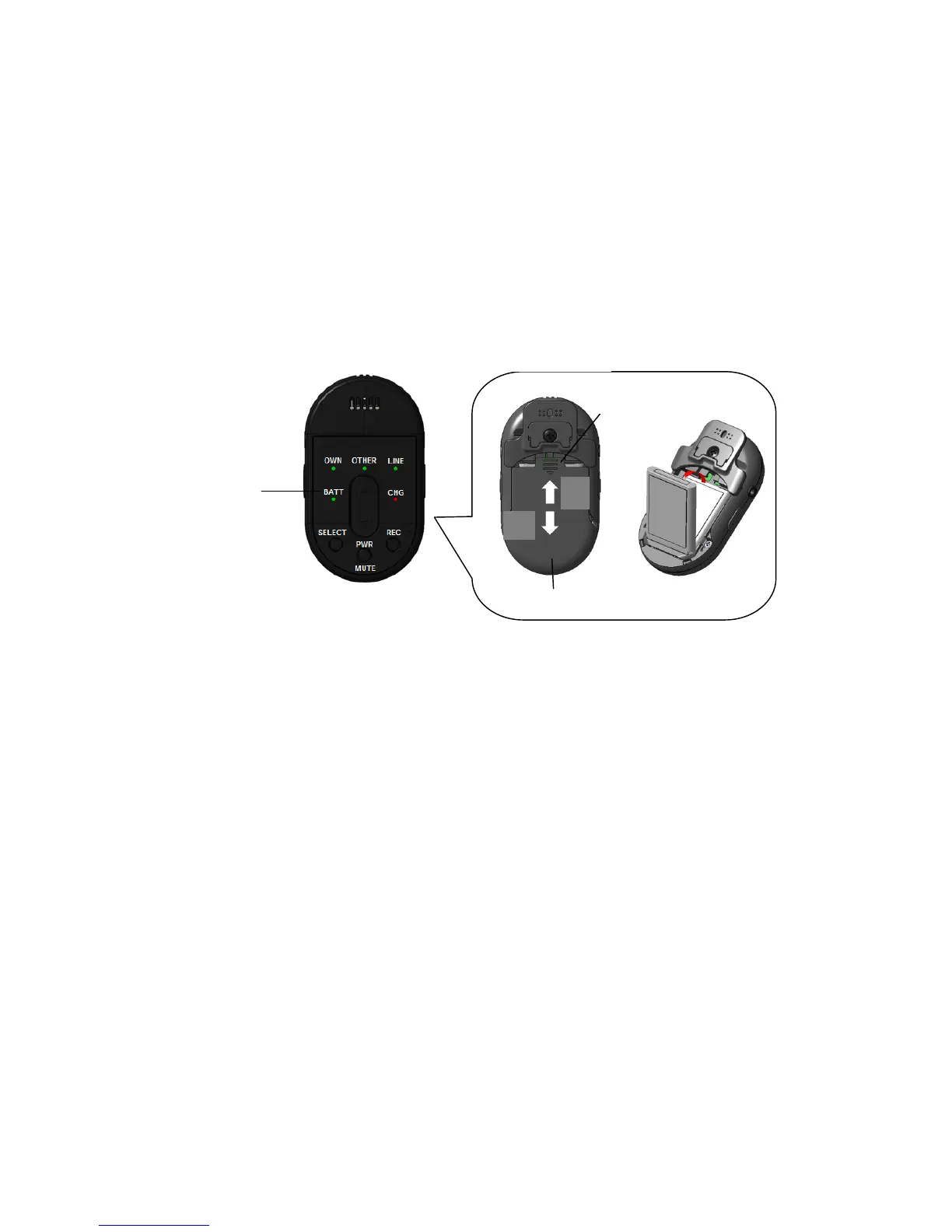
1) Confirm that the battery indicator is off.
If it is not, press and hold the PWR/MUTE button for 2 seconds until the battery indicator turns off.
2) Remove the battery cover.
Pull the battery cover in the arrow direction depicted above while pressing the A position with both
right and left thumb.
3) Install a battery.
Insert the battery, making sure that its orientation is correct.
About batteries that you can use with this unit
The 1U583136R-B006A (Lithium Ion Battery) is the only battery that can be used in this microphone.
4) Attach the battery cover.
Push up the battery cover in the direction of the arrow depicted in the figure above, and fit it back in
its original position.


 To Next Page