9
Rev.1.25
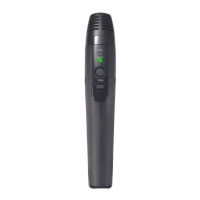
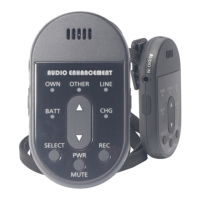
[1] Microphone opening
This opening picks up the speaker’s voice.
[2] [OWN] Microphone selection indicator (green)
Lights when [OWN] (audio from [1], [6], or [13]) is selected for adjusting the volume.
Blinking indicates that the microphone is muted.
[3] [OTHER] Microphone selection indicator (green)
[OTHER] microphone refers to another microphone receiving audio at the same receiver. LED lights
when the [OTHER] microphone is selected for volume adjustment.
[4] [LINE] Line selection indicator (green)
[LINE] refers to external devices connected to the line input terminal on the receiver. Lights when
[LINE] is selected for adjusting the volume.
[5] Volume control buttons
Adjust the volume of [OWN], [OTHER] and [LINE]. (Adjustment step range: refer to the XD Receiver
[K-SRC14] manual) Adjust when any one of the indicators in [2] to [4] is on.
Pressing the button will increase the volume.
Pressing the button will decrease the volume.
Keeping the buttons pressed will continuous increase / decrease the volume.
[6] [MIC IN] Microphone input terminal (side)
Transmits the audio from a connected external microphone to the receiver.
When an external microphone is connected to this terminal, the audio from the [1] Microphone
opening is muted.
[7] [CHG] Charge indicator (red)
Indicates the charging status or alert activation
Blinking (2 seconds interval lights): Charging.
* In the case of a complete discharge state, the LED lights red for the first minute.
ON: [During charging] Charging completed
[During E2 state or after both E2 [14] button have been pressed] E2 state
[During microphone operation] Battery is empty


 To Next Page