EasyManua.ls Logo

Audio Note DAC Kit 3.1 - Connecting the USB Input

Default Icon
79 pages
Print Icon
To Next Page IconTo Next Page
To Previous Page IconTo Previous Page
Loading...
Copyright © 2006-2011 AudioNote Kits
www.AudioNoteKits.com
audionotekits@rogers.com
Page 72
Connecting the USB Input
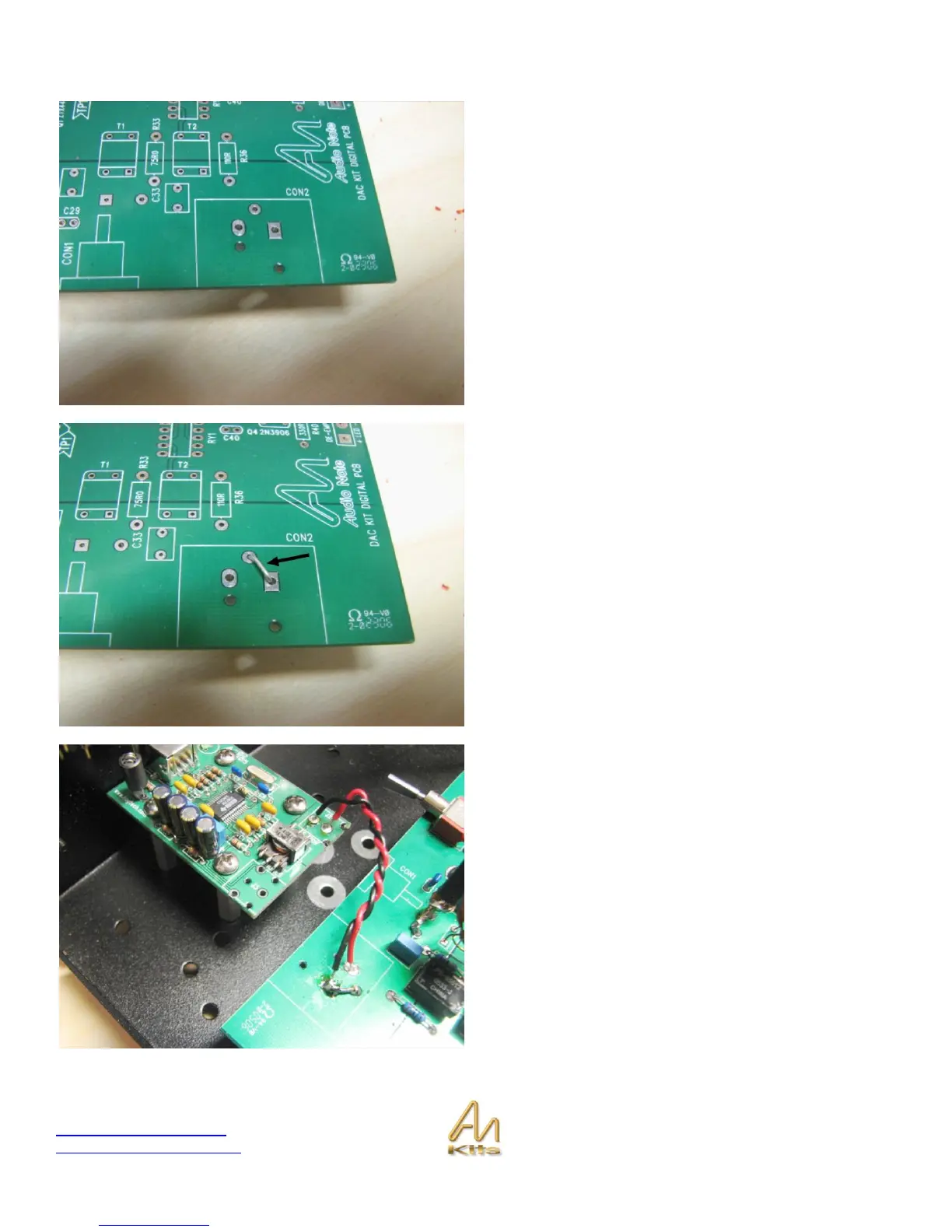
If using the USB input then you will want to examine the
three holes in the “XLR” footprint on the Digital Board.
You will notice that there are three holes that the XLR
would normally fit into this is where we are going to hook
up the USB inputs.
To prepare for USB connection you will need to put a
jumper from the circular pad in the center to the rectangular
pad on the right.
This is the GROUND connection and the signal from the
USB goes to the loan OVAL pad.
This picture shows the connection of the USB (signal red)
to the Digital Board input.

Table of Contents

Related product manuals