EasyManua.ls Logo

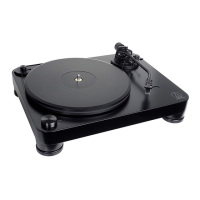
Audio Technica AT-LP7 - User Manual

Audio Technica AT-LP7
18 pages
Print Icon
To Next Page IconTo Next Page
Loading...
AT-LP
7
User Manual
Belt-Drive Turntable
EN
IMPORTANT:
Turntable belt needs to be attached or turntable will not
operate. See page 5 for instructions.
For assistance, contact our Audio Solutions Department at
330-686-2600 x5000 or audio-solutions@atus.com.

Questions and Answers

  • T
    Tanner MillerAug 13, 2025
    What to do if my Audio Technica Turntable has sound but volume is low?
    • M
      Maria BatesAug 13, 2025
      If your Audio Technica Turntable platter spins but you're not getting any sound or the volume is too low, there are several things to check: * Ensure the settings for all connected equipment are correct. * Inspect the stylus and replace it if needed. * Check and adjust the cartridge if necessary. * Verify that your pre-amplifier settings are correct. Specifically, if there's no sound or low volume, confirm the product is set to “PHONO” and connected to the amplifier’s AUX/LINE input. If the volume is too loud or distorted, check if it’s set to “LINE” and connected to the amplifier's PHONO input. * Adjust the tracking force. Also, a damaged belt can cause sound issues; replace it with a new one if needed.
  • B
    Brandy MacdonaldAug 17, 2025
    How to fix an Audio Technica Turntable when the platter does not spin?
    • L
      Larry WilsonAug 17, 2025
      If your Audio Technica Turntable platter isn't spinning, try the following: * Ensure the AC adapter is connected to the outlet. * Verify the plug is properly attached to the AC adapter. * Make sure the belt is correctly placed on the platter. * Check that the belt is properly positioned on the motor pulley.
  • N
    nicholas46Aug 21, 2025
    What to do if Audio Technica AT-LP7 stylus skips?
    • G
      Gary GreenAug 21, 2025
      If the stylus on your Audio Technica Turntable is skipping, try these solutions: * Adjust the tracking force. * Ensure the anti-skate setting matches the cartridge tracking force. * Check the condition of the record.
  • D
    davidwatkinsAug 25, 2025
    What to do if Audio Technica Turntable speed slows down?
    • M
      Megan HernandezAug 25, 2025
      If the playing speed of your Audio Technica Turntable slows down or the rotation is irregular, the belt might be stretched out. Replace it with a new belt.
  • J
    Jennifer ReidAug 28, 2025
    Why is my Audio Technica Turntable humming?
    • A
      archersheriAug 28, 2025
      If you're hearing humming during playback on your Audio Technica Turntable, ensure the ground line is properly connected. Also, check that the headshell is firmly attached to the tonearm and that the locking ring is tight.
  • A
    Angel AlexanderSep 1, 2025
    Why is my Audio Technica Turntable playing too fast?
    • E
      Erica BrownSep 1, 2025
      If the sound is either too fast or too slow when playing a record on your Audio Technica Turntable, use the control knob to select the correct speed for the type of record being played.
  • M
    Michael HenrySep 5, 2025
    How to stop Audio Technica AT-LP7 Turntable from howling?
    • J
      james28Sep 5, 2025
      If you are experiencing howling with your Audio Technica Turntable, it might be due to excessive vibrations. Try to decrease the vibrations or mount the turntable on a surface that is not subject to the effects of vibrations. Also, check whether the surface on which the product is mounted is suitable.
  • J
    John MorenoSep 8, 2025
    How to remove noise when record is playing on Audio Technica Turntable?
    • W
      Wesley ThompsonSep 9, 2025
      If you notice noise when playing a record on your Audio Technica Turntable, check the cartridge’s stylus tip for dust. If dust is stuck to the stylus tip, clean it with a commercially sold brush.

Summary

Important Turntable Information

Belt Attachment Requirement

Critical notice stating the turntable belt must be attached for operation.

Safety Precautions and Usage Notes

General Safety Guidelines

Details safety warnings and precautions for fire, shock, heat, and impact.

Component Identification

Initial Setup and Assembly

Platter and Belt Installation

Instructions on placing the platter and attaching the drive belt.

Advanced Setup Procedures

Tonearm Balance Adjustment

Instructions for balancing the tonearm to ensure it is level.

Tracking Force Setting

Detailed steps for setting the correct tracking force for the cartridge.

Playing Records

Placing and Starting a Record

Steps to place the record, select speed, and start playback.

Stylus and Cartridge Replacement

Replacing the Cartridge Assembly

Detailed steps for removing and replacing the cartridge and headshell.

Belt Replacement and Tonearm Height

Adjusting Tonearm Height

Process of adjusting the tonearm height for optimal performance.

Overhang Adjustment and Transport Prep

Adjusting Cartridge Overhang

Instructions for accurately positioning the cartridge (overhang).

Troubleshooting Guide

Platter Spin and Sound Issues

Solutions for platter not spinning or no/low volume.

Playback and Noise Resolution

Troubleshooting for stylus skips, howling, noise, and speed variations.

Audio Technica AT-LP7 Specifications

General IconGeneral
BrandAudio Technica
ModelAT-LP7
CategoryTurntable
LanguageEnglish

Related product manuals