EasyManua.ls Logo

Audio Technica AT-LPW30TK - User Manual

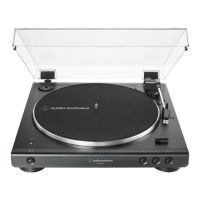
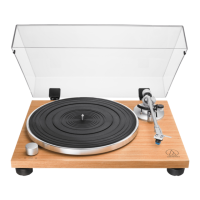
Audio Technica AT-LPW30TK
15 pages
Print Icon
To Next Page IconTo Next Page
Loading...
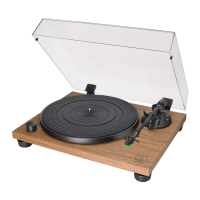
AT-LPW40WN/AT-LPW30TK
User Manual
Belt-Drive Turntable

Questions and Answers

  • W
    william35Jul 28, 2025
    How to fix stylus skipping on Audio Technica AT-LPW30TK Turntable?
    • B
      Brian MclaughlinJul 28, 2025
      If the stylus on your Audio Technica Turntable is skipping, adjust the tracking force and verify the anti-skate setting matches the cartridge tracking force. Also, check the record and ensure there isn't excessive buildup around the stylus tip.
  • T
    Toni JonesAug 1, 2025
    What to do if my Audio Technica AT-LPW30TK has no sound or low volume?
    • A
      Adam MunozAug 2, 2025
      If your Audio Technica Turntable's platter is spinning but there is no sound or the volume is too low, verify that the settings for the connected equipment are correct. Also, check the stylus and replace it if needed. Inspect the cartridge and adjust it if necessary. Make sure the output settings are correct. Adjust the tracking force if needed. If there is no sound, or if the volume is not loud enough, the product is set to the 'PHONO' position and connected to the amplifier’s AUX/LINE input. If the volume is too loud or is distorted, the product is set to the 'LINE' position and connected to the amplifier's PHONO input.
  • C
    Christina DouglasAug 5, 2025
    How to troubleshoot Audio Technica AT-LPW30TK Turntable platter not spinning?
    • C
      Christian LambertAug 5, 2025
      If your Audio Technica Turntable platter does not spin, connect the AC adapter to the outlet and make sure the plug is properly attached to the AC adapter. Ensure the belt is correctly placed on the platter and on the motor pulley. If the belt is damaged, replace it with a new one.
  • G
    gchristianAug 10, 2025
    Why does my Audio Technica AT-LPW30TK Turntable playing speed slow down?
    • M
      Mr. John HopkinsAug 10, 2025
      If the playing speed of your Audio Technica Turntable slows down or the rotation is irregular, replace the belt with a new one.
  • C
    Charles JacksonAug 14, 2025
    Why is my Audio Technica Turntable playing too fast or slow?
    • C
      Casey BurkeAug 15, 2025
      If the sound when the record is playing on your Audio Technica Turntable is either too fast or too slow, use the control knob to select the correct speed for the type of record being played.
  • M
    Madeline JamesAug 19, 2025
    Why is my Audio Technica Turntable humming during playback?
    • J
      Jackson HernandezAug 19, 2025
      If you are experiencing humming during playback with your Audio Technica Turntable, ensure that the ground line is properly connected and that the locking ring is tight.
  • J
    jillianrussellAug 22, 2025
    How to stop howling sound on Audio Technica AT-LPW30TK Turntable?
    • J
      jason64Aug 23, 2025
      To address howling with your Audio Technica Turntable, decrease the vibrations or mount the product on a surface that is not subject to the effects of vibrations. Check whether the surface on which the product is mounted is suitable.

Summary

Introduction and Package Contents

Product Introduction

Welcome message and advice to read the manual for correct usage.

Package Contents Overview

Lists all items included in the product package for user verification.

Safety Precautions and Usage Notes

Important Safety Information

Essential warnings and cautions for safe operation and handling of the apparatus.

Usage Notes and Recommendations

Guidance on placement, environment, and handling for optimal turntable use.

Part Identification and Functionality

Overall Diagram and Turntable Components

Identifies and describes the main turntable components and their layout.

Tonearm Assembly and Cartridge Details

Details the tonearm, headshell, cartridge, and their adjustment controls.

Turntable Connections and Controls

Explains terminals, switches, and knobs for operation and audio output.

Preparation for Use

Platter and Turntable Setup

Instructions on placing the platter, leveling the unit, and initial setup.

Tonearm Assembly and Balance Adjustment

Guide to assembling the tonearm, setting balance, and anti-skate.

Connecting Equipment and Power

Steps for installing dust cover, setting output, connecting to audio devices, and AC adapter.

Playing and Stopping Records

Record Playback Procedure

Steps for preparing, playing, and pausing a record.

Stopping Record Playback

Instructions for safely stopping the turntable and removing the record.

Care and Maintenance

Turntable Body and Stylus Care

Guidance on cleaning the turntable body and stylus tip.

Replacing the Stylus and Cartridge

Procedures for removing and installing a new stylus and cartridge.

Replacing the Drive Belt

Instructions on how to replace the turntable's drive belt.

Advanced Adjustments and Moving

Adjusting Cartridge Overhang

Procedure for accurately determining cartridge position when mounting.

Preparing the Turntable for Moving

Measures to take when moving the turntable to prevent damage.

Troubleshooting and Specifications

Troubleshooting Common Problems

Solutions for issues like no sound, skipping stylus, or speed problems.

Product Specifications

Detailed technical specifications of the turntable and its components.

Audio Technica AT-LPW30TK Specifications

General IconGeneral
Drive MethodBelt-drive
TypeManual
MotorDC servo motor
Speeds33-1/3 RPM, 45 RPM
Phono Pre-AmpYes
USB OutputNo
BluetoothNo
PlatterDie-cast aluminum
TonearmStraight
CartridgeAT-VM95C
Output Level4.0 mV (at 1 kHz, 5 cm/sec)
OutputsRCA
Dimensions420.0 mm x 340.0 mm x 116.9 mm
Weight5.0 kg

Related product manuals