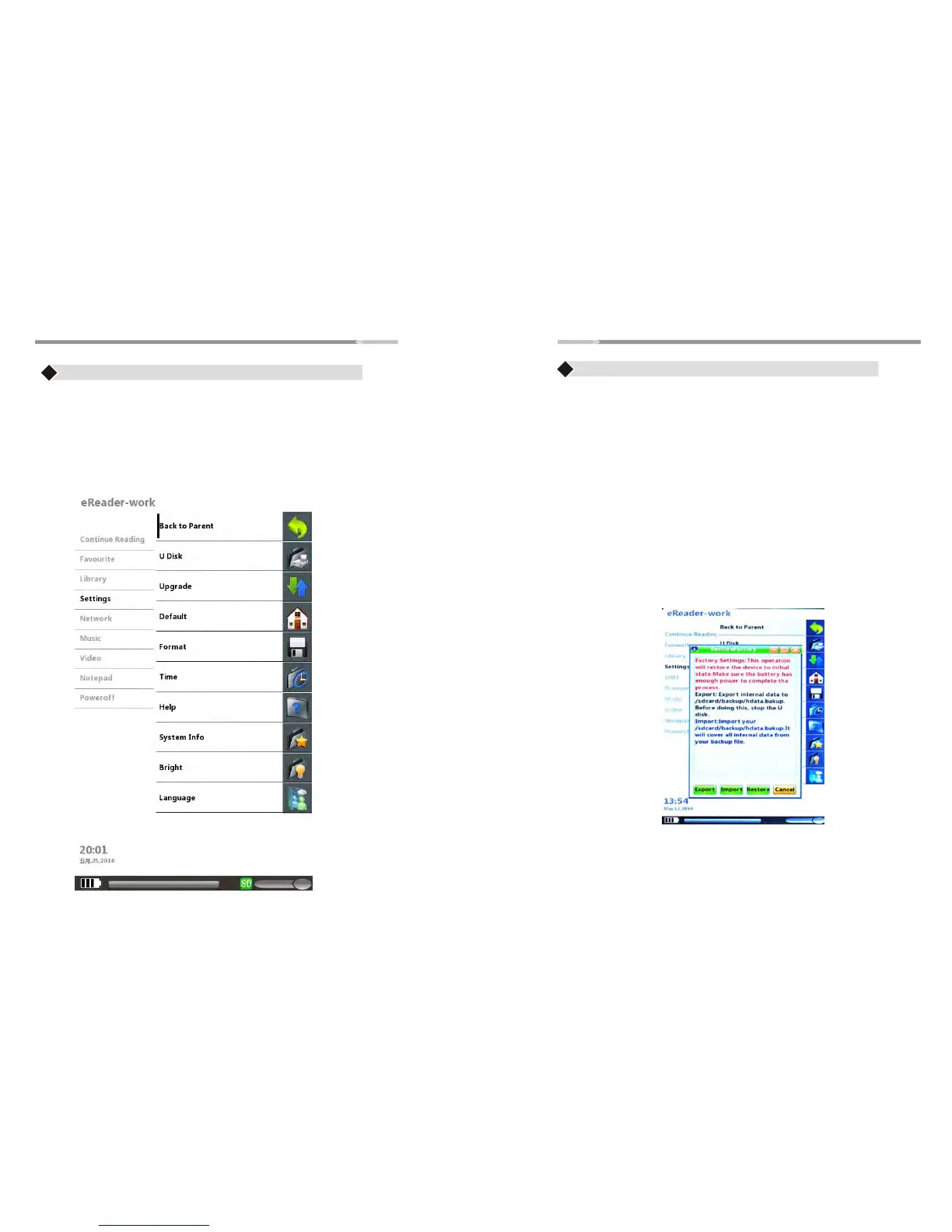
Settings
>13<
Back to Parent
♦ Select “Back to Parent” to go back to the HOME menu
Use the “Joystick” button to highlight on the following options:
U Disk
♦
Use the U Disk Option if your computer did not recognize your
eReader automatically
♦ While the eReader is connected to USB. On the Settings Menu,
use the “Joystick” button to highlight the U Disk option and press
“Enter” button. The display will appear as shown in page 22.
Upgrade
♦ For Upgrade options: NOT available on this model
Default
♦
Use to restore the settings of the eReader to factory Default
Settings
♦ Use the “Joystick” button to highlight the buttons. Highlight
restore button and press “enter” button to restore back to default
or highlight Cancel button to abort the operation
Settings
>12<
♦ Use the “Joystick” button to highlight the “Settings” menu
♦ Press the “Enter” button to open “Settings” menu,
Settings Submenu contains:
Back to Parent, U Disk, Upgrade, Default, Format, Time,
Help, System Info, Backlight, Language.


 To Next Page